Fallout Mod Manager - FOMM
⚪ Last updated 2010⚠️ Install Order · 5 steps
Install in this order, then this mod last — most mods fail to load without their framework and dependencies in place.
Preview
🔍 Analysis
- 👍 3.1% endorsement rate — high engagement, a strong quality signal
- 🏆 #3 of 57 Utilities mods in this game by downloads
📋 About This Mod
An updated version of this mod is available at https://www.nexusmods.com/newvegas/mods/54991/?
I'm sure many have realized that I have not been in the forums of late. I apologize for the falling off of support. I wanted to let everyone know that I won't be supporting this version of FOMM for the next while; however, I am actively working on a replacement that I hope everyone will find far superior. Rest assured that I haven't abandoned everyone, but that I am indeed working to create the best FOMM yet.
I have taken FOMM out of alpha. I'm sure it's not perfect, but I believe it to be sufficiently stable for general use.
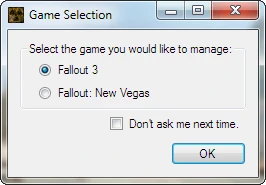
This version of FOMM is the first step in expanding the scope of the mod manager. Instead of having two different managers, one for Fallout 3 and another for Fallout: New Vegas, FOMM is able to manage mods for both games from a single install. This ensures that all new features that are added to FOMM will be available for both games. Further, the folders that FOMM uses to store install info and FOMods are now configurable, allowing you to place them wherever you have disk space, rather than wherever FOMM is insalled.
Main Features:
For the mod user:
- []Fail-Safe Mod Installs
Don't worry if a mod install fails; FOMM cleans up after itself, preventing half-installed mods.[
]Mod Info RetrievalWhen adding new mods, FOMM can retrieve missing information about the mod (such as author and the screenshot) from the web. You are prompted to enable this option, and it can be changed in the settings window.[]Mod Versioning
FOMM is able to upgrade mods without have to re-activate them, and without changing which mods overwrite which.[]Mod Reactivation
You can change the installation options of mods without have to reinstall them.
For the mod author and tinkerers:
- []Configurable Scripts
Control how your mod can be installed, and give your users choices. You can write powerful install scripts using the flexible XML Configuration scripts, the more powerful C# Scripts, or event the traditional OBMM/OMOD script language.[
]Low-Level Editing ToolsFOMM still includes: TESsnip, BSA Creator/Unpacker, Shader Editor.
Note to Mod Authors:
FOMod scripts for FO:NV mods should derive from FalloutNewVegasBaseScript, instead of BaseScript. The functions in the scripting language have changed to reflect the differences between FO3 and FO:NV (for example, NVSE instead of FOSE). If your scripts don't derive from FalloutNewVegasBaseScript they will still work, but you won't have access to the new functions, and calling FOSE-related functions will cause your script to fail.
Installation
If you are installi
Fallout Mod Manager (FOMM) is a classic utility suite for creating and using mods in Fallout games. With over 157,000 endorsements and 5 million downloads, it remains a staple tool for modding, though it hasn't been updated since 2010.
✨ Key Features
📊 Pros & Cons
✅ Pros
- Massive community trust with 157k endorsements and 5M downloads — this is the gold standard for Fallout mod managers.
- All-in-one toolkit for modders and players, covering both creation and usage.
- Proven stability over years of use, even if it's old.
⚠️ Cons
- No updates since 2010 — likely incompatible with modern Fallout versions and Windows systems.
- Outdated interface and features compared to newer mod managers like Mod Organizer 2.
- May require manual configuration or workarounds on current OSes.
For veteran Fallout modders who remember the early days and need a reliable tool for classic games like Fallout 3 and New Vegas. If you're modding modern Fallout titles or want active development, skip this and use a current manager.
💡 Beginner Tips
- If you're modding Fallout 3 or New Vegas, FOMM can handle FOMOD installers, but check for compatibility patches with your game version.
- Use FOMM's built-in archive invalidation toggle to ensure custom textures show up correctly.
- For newer Fallout games, consider using Mod Organizer 2 instead, as FOMM is outdated.
📊 Mod Details
- Game
- New Vegas Mods
- Author
- Q and Timeslip
- Version
- 0.13.21
- Downloads
- 5,021,934
- Endorsements
- 157,562
- Category
- Utilities
- Created
- 11/8/2010
- Updated
- 11/25/2010
🔧 How to Install New Vegas Mods
Download from Nexus.
📖 Full step-by-step install guide for New Vegas →
Visit the official mod page for specific installation instructions for this mod.
🎮 Need cheat codes or console commands? Check ur gaming wiki for New Vegas commands, item IDs, and more.
Keep browsing — more New Vegas mods await