Loot Menu for FNV
⚪ Last updated 2022⚠️ Install Order · 5 steps
Install in this order, then this mod last — most mods fail to load without their framework and dependencies in place.
Preview
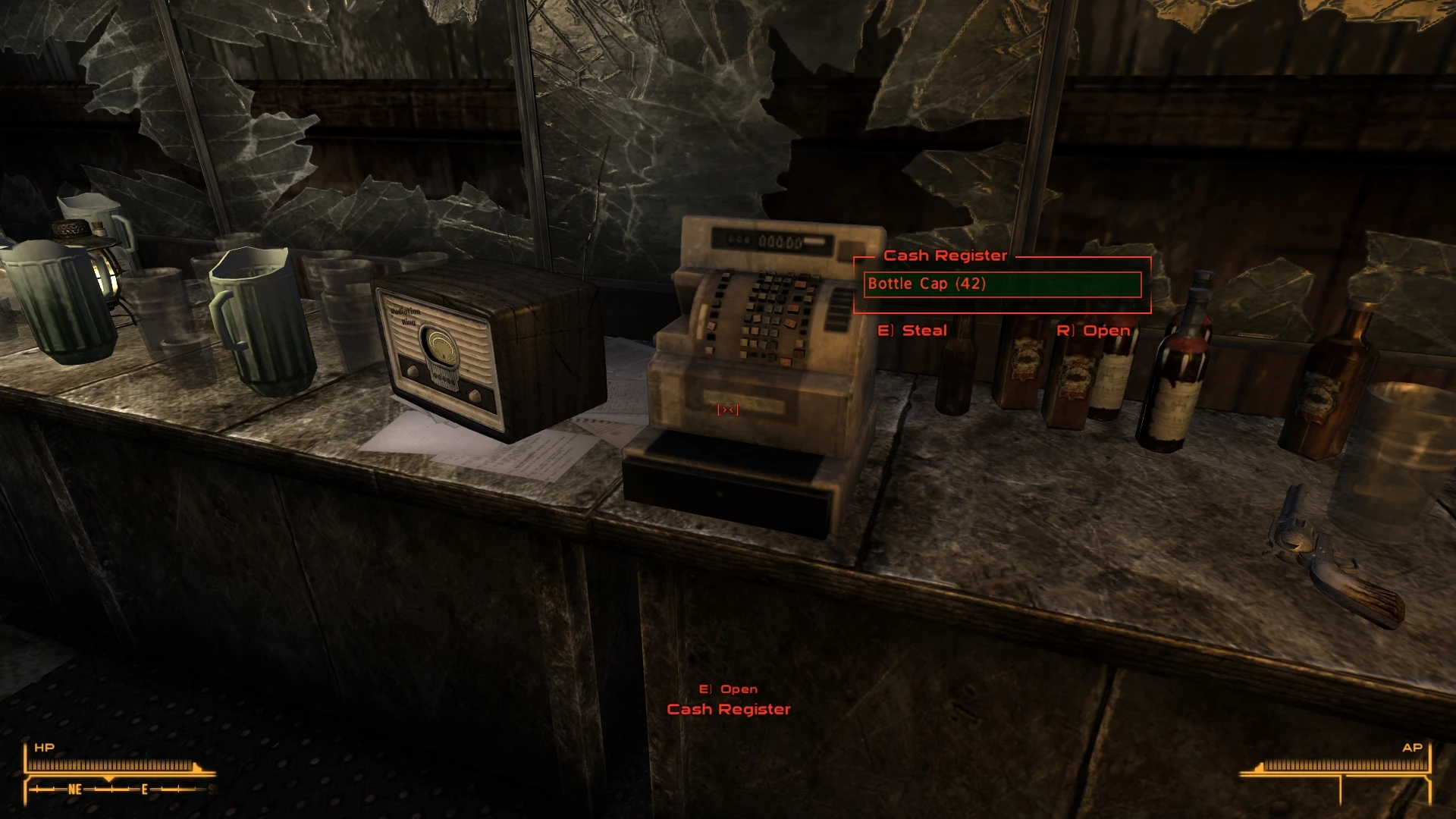
🔍 Analysis
- 👍 2.6% endorsement rate — high engagement, a strong quality signal
- 🏆 #39 of 173 User Interfaces mods in this game by downloads
📋 About This Mod
This mod needs the most recent version of NVSE, JIP LN, and UIO
This mod now exists for Oblivion thanks to Ersh - Loot Menu
Fully dynamic and configurable:
-
[]Full word wrapping, never miss out on part of a name
[
]Sorted, similar to Fallout 4[]Controller support
[]Change the keys used (even with controller)
[]Put it where you want
[]Choose how many items show (from 1-8)
[]Change location with offsets
[]Change the width (this is useful if you use alternate fonts)
- UI uses all game strings, no translation needed (MCM not included)
The loot menu works on all containers and creatures, mod added or otherwise. It's able to detect ash and goo piles correctly. It will NOT show up for any scripted containers, as scripted containers often have special controls on access (think Mojave Dropboxes). This can be overridden in the MCM.
By default if an item is weightless then all of the item will be taken, no matter how large the stack. This emulates vanilla behavior, and can be turned off. There is also a configuration option for how many items must be in a stack before take all will activate. By default this is 5, same as vanilla, though it can be set up to a reasonably large number. The larger the number the more items must be in the stack before Take All activates on that stack.
The sort order for items is:
Quest Items, Money, Lockpicks, Super Stimpaks, Stimpaks, Doctor Bags, RadAway, RadX, Keys, Notes, Books, Caravan Cards, Casino Chips, Ammo, Weapons, Weapon Mods, Armor, Food, and Miscellaneous
KNOWN ISSUES:
The vanilla container prompt will appear on all containers. Hiding it results in a number of issues that go beyond the scope of what I want to mess with.
Loot Menu for FNV is a UI overhaul that replaces the classic container menu with a Fallout 4-style loot interface, designed to match New Vegas's aesthetic. It supports both keyboard and controller input, allowing for real-time looting. With over 14,000 endorsements and 555,000 downloads, it's a popular choice for players seeking a more modern looting experience.
✨ Key Features
📊 Pros & Cons
✅ Pros
- Huge community trust: 14,507 endorsements and 555,073 downloads show it's a go-to mod for UI overhauls.
- Real-time looting is a game-changer for immersion—no more pausing to sort through containers.
- Controller support is a big win for players who prefer gamepads, making looting smooth and intuitive.
⚠️ Cons
- Last updated in January 2022—might have compatibility issues with newer game patches or mods.
- The Fallout 4-style menu might not appeal to purists who prefer the classic New Vegas interface.
For Fallout: New Vegas players who want a more modern, streamlined looting experience without breaking the game's vibe. If you're tired of the clunky default container menu and want something that feels like Fallout 4 but fits New Vegas, this is for you. Skip if you're a purist who loves the original UI or if you prefer gameplay mods over cosmetic UI changes.
💡 Beginner Tips
- Use a mod manager like Vortex or Mod Organizer 2 to install—it's a simple drag-and-drop, but a manager keeps your load order clean.
- Check if you have any other UI mods installed that might conflict; this mod changes the container menu, so disable similar overhauls.
- If you're using a controller, make sure your game is set to gamepad mode in the options for the best experience.
📊 Mod Details
- Game
- New Vegas Mods
- Author
- Gribbleshnibit8
- Version
- 1.16
- Downloads
- 555,073
- Endorsements
- 14,507
- Category
- User Interfaces
- Created
- 5/16/2016
- Updated
- 1/7/2022
🧩 Commonly Used Together
Users add these mods to the same collections — a real compatibility signal, not an AI guess.
🔧 How to Install New Vegas Mods
Download from Nexus.
📖 Full step-by-step install guide for New Vegas →
Visit the official mod page for specific installation instructions for this mod.
🎮 Need cheat codes or console commands? Check ur gaming wiki for New Vegas commands, item IDs, and more.
Keep browsing — more New Vegas mods await