UI Expansion
🟠 Updated over a year ago⚠️ Install Order · 2 steps
Install in this order, then this mod last — most mods fail to load without their framework and dependencies in place.
Preview
🔍 Analysis
- 👍 2.3% endorsement rate — high engagement, a strong quality signal
- 🏆 #3 of 102 User Interface mods in this game by downloads
📋 About This Mod
UI Expansion
MWSE-Lua mod
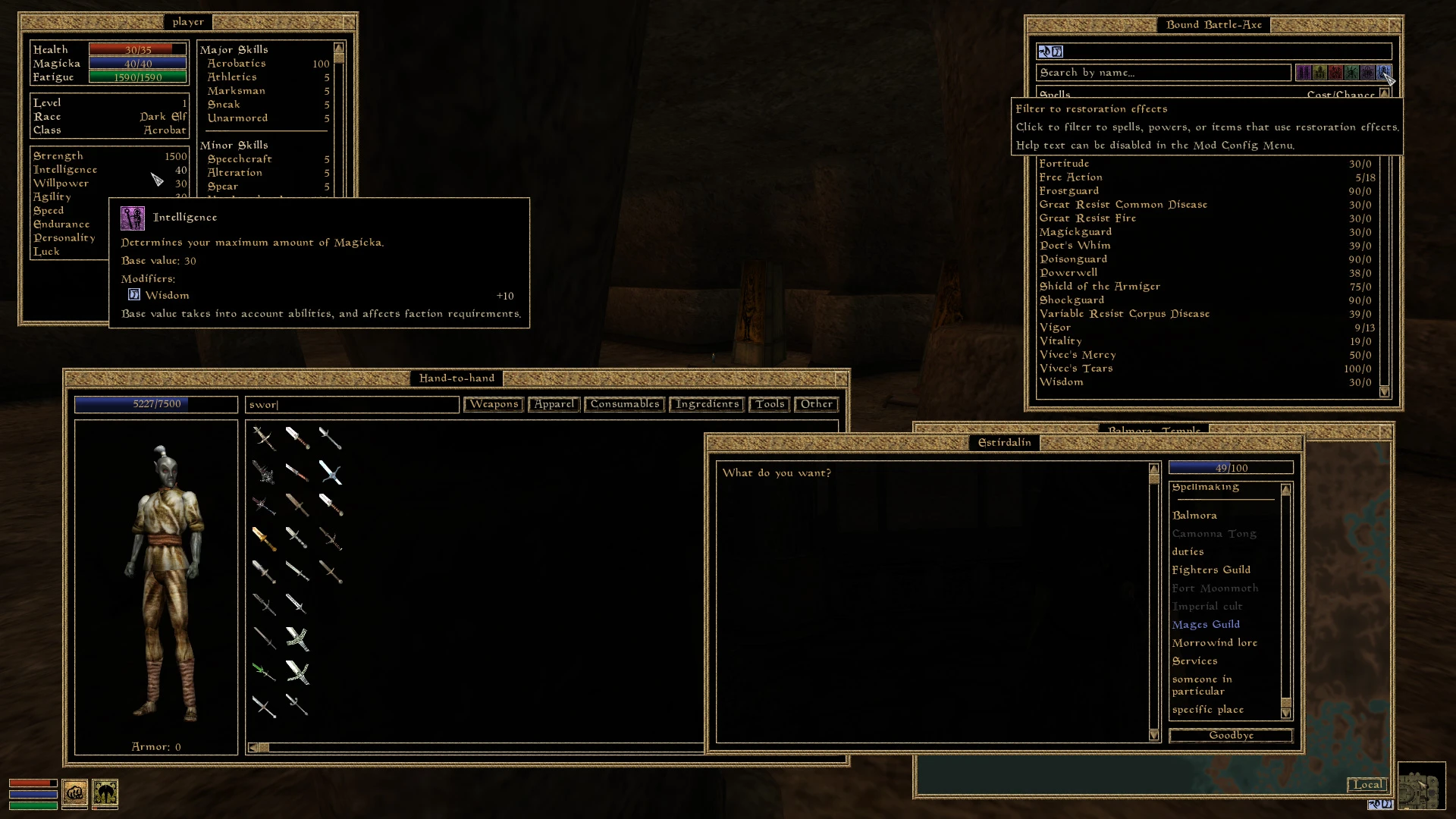
UI Extensions provides many additional UI elements, designed to provide a more functional user experience.
Additional features can be found on the beta version, over on the GitHub mirror.
Requirements & Installation:
This mod uses the alpha and thus experimental and not necessarily stable 2. 1-branch of MWSE, currently in development. By using this mod, you're basically asking to be a tester! If you encounter any issues please post a report, ideally on the MWSE bug tracker. You can download the latest nightly build from the link below.
This mod requires Morrowind Graphic Extender (MGE-XE) version 0. 10. 1. Older versions will not work with MWSE 2. 0+! Additionally, it will require the latest nightly build of MWSE 2. 1.
To install the mod, extract the archive into your Data Files folder. There is no ESP to activate.
[]Searchable and filterable UI panels. This includes the inventory, spell list, containers, merchants, and item select panes (e.g. ingredient selection). The spells list can be filtered by spell school.
[]Entering the menus can auto-select either the inventory or magic search bars. This can be changed, or disabled, in the Mod Config Menu.
[]New inventory, container, and barter tab options for a better organized inventory. Ingredients are segregated out, and consumables and tools have their own tabs.
[]When searching a container, any active filter is applied when taking items. For example, searching for "sword" and using the take all button will take all swords, not all items in the container. This feature can be disabled in the Mod Config Menu.
[]Hovering over an attribute or skill will display what magic sources contribute to the modified value.
[
]Dialogue topics are highlighted based on what the player has seen before. Previously viewed entries will be grayed out, whileUI Expansion by NullCascade enhances the game interface with searching, filtering, and improved visual feedback. With 3,706 endorsements and 158,080 downloads, it's a popular UI mod for players who want more control and clarity in their menus. Last updated October 2024.
✨ Key Features
📊 Pros & Cons
✅ Pros
- Huge community trust (3,706 endorsements) — this mod is proven
- Massive download count (158,080) shows it's widely used
- Actively maintained (updated October 2024)
⚠️ Cons
- No specific details on what exactly is searchable or filterable
- Compatibility with other UI mods is unknown — may conflict
For players who feel the default UI is clunky and want to quickly find items or filter lists. If you're tired of scrolling through menus, this mod could be a game-changer. Skip if you're happy with the vanilla interface or prefer minimal UI changes.
💡 Beginner Tips
- Check if the mod requires a mod manager like Vortex or MO2 — if not, just drop the files into your game's Data folder.
- If you use other UI mods, test this one first to see if they conflict — load order might matter.
- Look for a settings menu in-game to customize the search and filter options to your liking.
📊 Mod Details
- Game
- Morrowind Mods
- Author
- NullCascade
- Version
- 1.7.3
- Downloads
- 158,080
- Endorsements
- 3,706
- Category
- User Interface
- Created
- 10/1/2018
- Updated
- 10/21/2024
🔗 Required By 3 Mods
These mods list this mod as a dependency.
🧩 Commonly Used Together
Users add these mods to the same collections — a real compatibility signal, not an AI guess.
🔧 How to Install Morrowind Mods
Download from Nexus.
📖 Full step-by-step install guide for Morrowind →
Visit the official mod page for specific installation instructions for this mod.
🎮 Need cheat codes or console commands? Check ur gaming wiki for Morrowind commands, item IDs, and more.
Keep browsing — more Morrowind mods await