Morrowind UI Revamped
⚪ Last updated 2020⚠️ Install Order · 2 steps
Install in this order, then this mod last — most mods fail to load without their framework and dependencies in place.
Preview
🔍 Analysis
- 👍 2.8% endorsement rate — high engagement, a strong quality signal
- 🏆 #12 of 102 User Interface mods in this game by downloads
📋 About This Mod
HD New look and overhaul to Morrowind's UI with keeping to the base design scheme.
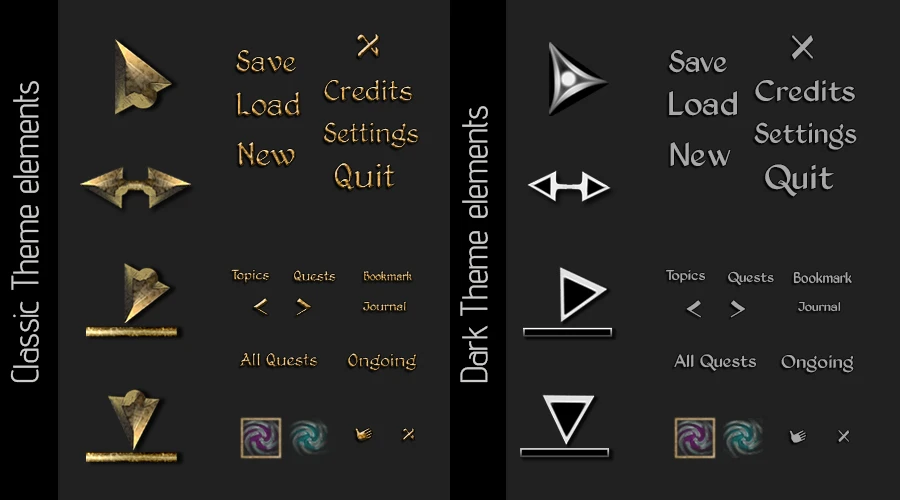
2 Main Theme choices to choose from; Classical (Morrowind-like) and Dark (Monochrome/Skyrim-like).
Classic: classictheme_mainmenu | classictheme_ui1 | classictheme_ui2 | classictheme_journal | classictheme_journalbookmark | classictheme_scroll Dark: darktheme_mainmenu | darktheme_ui1 | darktheme_ui2 | darktheme_journal | darktheme_journalbookmark | darktheme_scroll
Exponentially significant fidelity increase of the new UI compared to the original asset make-up and that to other UI mods ie cursor sizes, menu scaling etc..
Some new UI features that either expand or integrate seamlessly with the vanilla UI.
HD quality and fidelity of the assets allow for better resolution scaling for when using the MGE/MGE XE "Menu UI Scaling"
Customizability through initial mod set-up/install.
Requirements: Morrowind v1. 6. 1820+
Mod Archive/Package: NMM - Mash Package preconfigured installer. Install in order of numbered/hierarchy format when using Wrye Mash to install the mod.
Manual Install: Extract the contents of:
Choose any one of the following: 00 JMUIR 00 JMUIR
Choose any one of the following: 01 JMUIR - Crosshair (dot) 01 JMUIR - Crosshair (star) 01 JMUIR - Crosshair (dot) 01 JMUIR - Crosshair (star)
Choose only one of the following: 02 JMUIR - 25% Smaller 02 JMUIR - 50% Smaller
Choose only one of the following: 03 JMUIR - 25% Smaller 03 JMUIR - 50% Smaller
Choose any of the following: 05 JMUIR Patch - abot Scroll Daedric Alphabet 05 JMUIR Patch - yacoby Ownership Indicator
from the archive to your Morrowind\Data Files directory. Overwrite any other files when prompted.
. INI Install: If using Wrye Mash/MorrowINI copy the .mit files
Morrowind UI Revamped is a user interface overhaul that gives Morrowind's UI a high-definition new look while preserving the original design scheme. It has 2,289 endorsements and 80,880 downloads, last updated in May 2020. Ideal for players who want a cleaner, sharper UI without changing the classic aesthetic.
✨ Key Features
📊 Pros & Cons
✅ Pros
- Community favorite with 2,289 endorsements and over 80k downloads
- Preserves the classic Morrowind UI feel while making it crisper
- Simple concept—no gameplay changes, just a visual upgrade
⚠️ Cons
- Last updated in 2020—may not be compatible with the latest Morrowind patches or mods
- UI overhauls can conflict with other UI mods—check compatibility before installing
For Morrowind players who want a sharper, HD UI without straying from the original look. Perfect for vanilla-plus enthusiasts and modders who prefer subtle enhancements. Skip if you're looking for a complete UI redesign or gameplay changes.
💡 Beginner Tips
- Make sure to install the mod after any other UI mods to avoid overwriting conflicts.
- If you use a mod manager like Wrye Mash or Mod Organizer 2, let it handle the file placement to keep your Data Files folder clean.
- Test the UI in the main menu and inventory screen first to ensure everything looks right before starting a new game.
📊 Mod Details
- Game
- Morrowind Mods
- Author
- jiffyadvent
- Version
- 1.06
- Downloads
- 80,880
- Endorsements
- 2,289
- Category
- User Interface
- Created
- 11/12/2015
- Updated
- 5/24/2020
🔧 How to Install Morrowind Mods
Download from Nexus.
📖 Full step-by-step install guide for Morrowind →
Visit the official mod page for specific installation instructions for this mod.
🎮 Need cheat codes or console commands? Check ur gaming wiki for Morrowind commands, item IDs, and more.
Keep browsing — more Morrowind mods await