Skyrim Style Quest Notifications
🟠 Updated over a year ago⚠️ Install Order · 3 steps
Install in this order, then this mod last — most mods fail to load without their framework and dependencies in place.
Preview
🔍 Analysis
- 👍 2.9% endorsement rate — high engagement, a strong quality signal
- 🏆 #63 of 102 User Interface mods in this game by downloads
📋 About This Mod
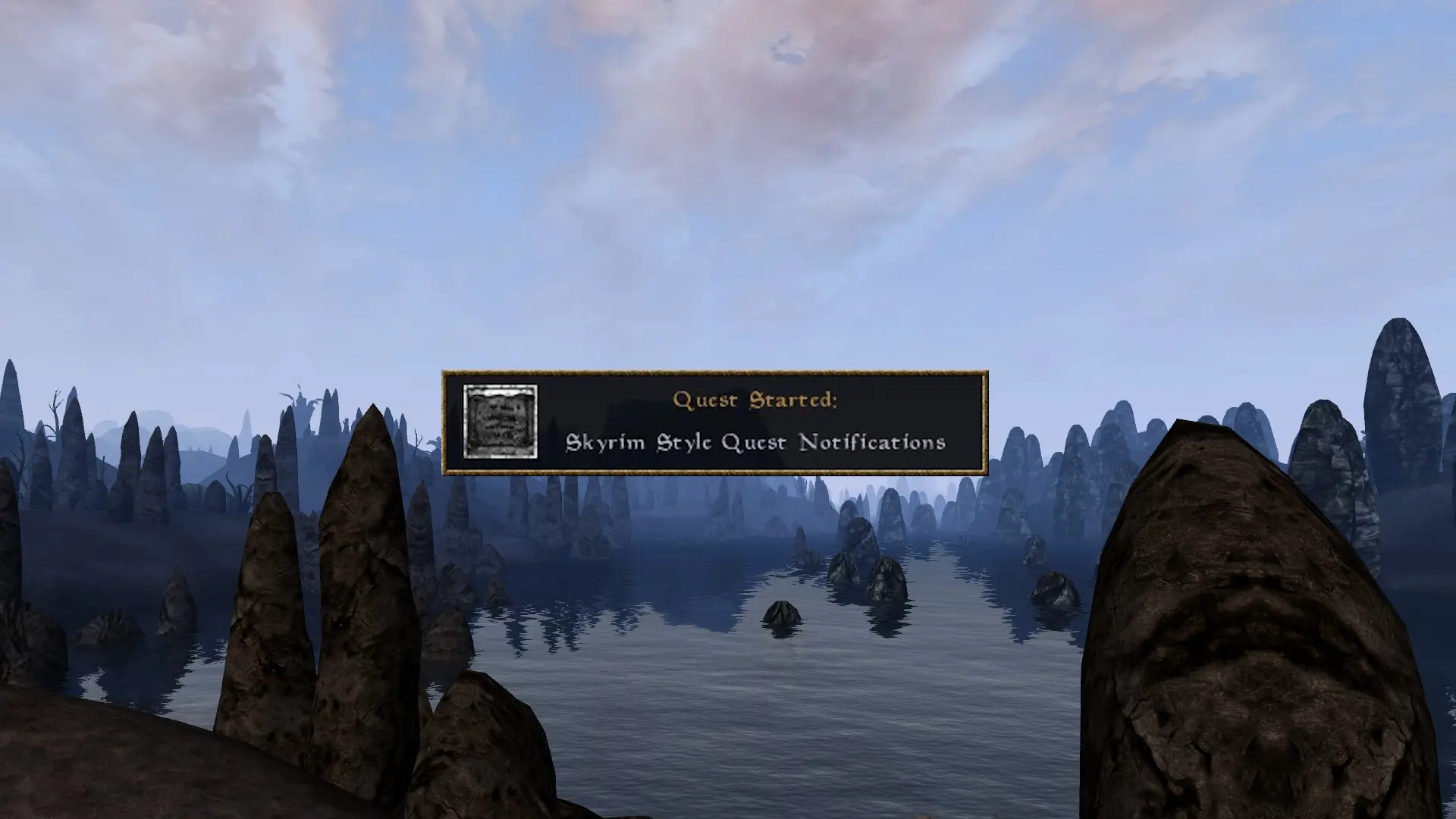
Never quite sure when one quest started or another quest ends? Wonder no more, Skyrim Style Quest Notifications informs you when you start or finish a quest with a brief popup notification that you can place anywhere on the screen. This mod is plugin-less and does require MWSE, please make sure you have that installed. Default look and feel of the notification is styled after the Skyrim quest notifications, hence the name. Additional info can be found in the readme.
Version 1. 5 the "Icon" Update
Now includes Danae's SSQN Addon bundled in (formerly a Discord exclusive). This addon adds unique icons for Galen's Quest for Truth, The Rishajiit, Friends and Frens, Mysterious Affair of Sara Shenk, Sails and Sales, Imperial Factions, Divine Providence, Suran Underworld, Pimp my Shrine, Hircine's Quest, The Sable Dragon, Surfracer, Failed Incarnate Pilgrimage, Olyn Hleran, and Ebonheart Underworks. These mods are not required. But if you do have them you will now see unique icons for them displayed.
Also now includes unique icons for the Morrowind, Tribunal, and Bloodmoon mainquests. As well as unique icons for the East Empire Company, Vampire, and Daedric quests. If you are tired of seeing the default icon everywhere pick up the new version today!
Skyrim Style Quest Notifications - Legendary Edition by Aksenty replaces and adds new icons for a large variety of quests. If you don't like the default icons or want some more variety check it out (SSQN - LE requires SSQN)
OpenWM Skyrim Style Quest Notification by Taitechnic for a port compatible with OpenMW
Notification with Icon and sound effect when a new quest is added to your journal or a quest is marked finished in your journal
Unique Icons for major factions (Mages Guild, Fighters Guild, Thieves Guild, Morag Tong, Temple, Imperial Legion, NEW Imperial Cult, and all three Great Houses)
NEW You can now choose between six sounds to play when the notification appears
Most UI elements are customizable.
Works "out of the box" with quest mods, and adds the ability for mod authors to add custom icons for their quest mods
Notification customization available through MCM:
Toggle Start and Finish notifications on/off separately
Place location of Notification box anywhere on the screen
Toggle notification icon on/off
NEW Choose between six notification sounds (Skyrim Quest, Oblivion Quest, Morrowind Skill Up, 6th House Bell, Mysticism, and Cliff Racer Scream ) or turn the sound off completely
Mod authors:
Included is interop capabilities allowing your quests to display a custom icon in the notification.
NEWER Added new interop function to block a specific quest ID from displaying notifications. Handy for tracking quests you don't wan the player to see.
Pluginless MWSE mod for Morrowind that adds Skyrim-style popup notifications when starting or finishing quests. Highly customizable, works with vanilla and mod quests. 296 endorsements, last updated May 2025.
✨ Key Features
📊 Pros & Cons
✅ Pros
- Community-approved with 296 endorsements and over 10k downloads.
- Pluginless design means no plugin conflicts, a big plus for modded setups.
- Works with mod quests, so it's useful for quest mod enthusiasts.
⚠️ Cons
- Requires MWSE, so it won't work without the Morrowind Script Extender.
- No screenshots or detailed feature list provided, so you're flying blind on customization options.
- Last updated May 2025 — likely compatible with current MWSE, but no explicit version info.
For Morrowind players who want that Skyrim-style quest popup feedback. If you're into UI overhauls and use MWSE, this is a no-brainer. Skip if you don't use MWSE or prefer minimal UI changes.
💡 Beginner Tips
- Make sure you have the latest MWSE installed, as this mod relies on it.
- Use a mod manager like MO2 to keep track of the mod and its files.
- Check the in-game mod options to tweak notification style to your liking.
📊 Mod Details
- Game
- Morrowind Mods
- Author
- Nazz
- Version
- 1.12
- Downloads
- 10,038
- Endorsements
- 296
- Category
- User Interface
- Created
- 7/14/2023
- Updated
- 5/17/2025
🔧 How to Install Morrowind Mods
Download from Nexus.
📖 Full step-by-step install guide for Morrowind →
Visit the official mod page for specific installation instructions for this mod.
🎮 Need cheat codes or console commands? Check ur gaming wiki for Morrowind commands, item IDs, and more.
Keep browsing — more Morrowind mods await