Quick Loot
⚪ Last updated 2017⚠️ Install Order · 2 steps
Install in this order, then this mod last — most mods fail to load without their framework and dependencies in place.
Preview
🔍 Analysis
- 👍 3.1% endorsement rate — high engagement, a strong quality signal
- 🏆 #101 of 102 User Interface mods in this game by downloads
📋 About This Mod
Requires: Morrowind Goty, MGE-XE (beta, last version! here)
When updating from a previous version, a clean save is recommended.
_________________________________________________________________________________________________________
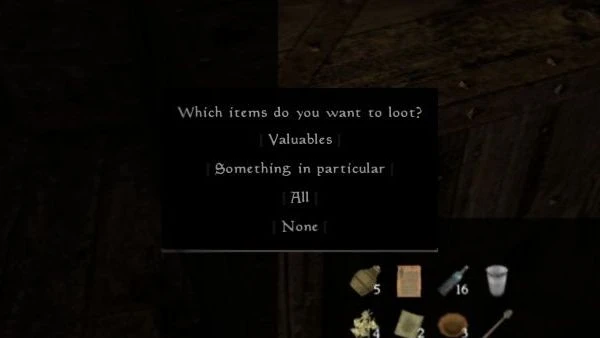
It's a small mod that you could find useful. See pictures for reference. Look at a container (or corpse), then press:
Ctrl+Z: brings up the loot menu
Ctrl+X: automatically loots valuable items from the container. To define what items are 'valuable' for you, press Alt+Q+L in menu mode (inventory), you'll be able to select a custom value/item weight ratio. Default is 3.
Ctrl+Shift+X: automatically loots all items from the container.
Ctrl+Shift+Z: it works the other way around, you can put away stuff in a container (only if it has no owner), with a menu. It won't put away equipped items.
It also works on dead NPCs and creatures (but you can't put suff inside them). It works with leveled chests. It doesn't work on locked items, nor for owned containers (by default).
Optional 'thieving' mode (off by default, activate in configuration):
You get a warning if the container is owned. If you loot it anyway and are detected, you'll be attacked and your crime level increases. Even if you aren't detected immediately, after some time your actions can be discovered and the suspects will fall on you (see picture). This is random, the formula is
( Random 96 + ( Containers looted * 5 ) ) - Sneak skill (at the moment of the looting)
So with skill >= 100 and 1 owned container looted, there's automatic success. If the check is failed, you won't be attacked, but your crime level will be increased. I introduced this mechanic to offset the fact that things you loot lose their ownership, so they will not removed from your inventory when paying fines. This only concerns owned containers, not all containers. The more containers you loot this way, the higher the fine you'll have to pay.
________________________________________________________________________________________________________________________________
Version 1. 3 notes: Updated to work with MGE-XE, dropped support for MGE.
________________________________________________________________________________________________________________________________
Version 2. 0 notes: Using xIsScripted function from MGE-XE, now compati
Quick Loot is a user interface mod that speeds up looting and helps organize loot. With 133 endorsements and 4,288 downloads, it's a niche utility for players who want a more efficient inventory management experience. Last updated in 2017, it may be outdated for current game versions.
✨ Key Features
📊 Pros & Cons
✅ Pros
- Community-tested with 133 endorsements
- 4,288 downloads show it's been used by a decent number of players
- Simple concept that directly addresses a common annoyance
⚠️ Cons
- Last updated in 2017 — likely incompatible with current game versions
- Small mod with limited scope; may not offer significant improvements over vanilla
For players who are tired of slow looting and want a bit of organization help. If you're on an older game version, this might be a handy QoL tweak. Skip if you're on the latest version or expect a comprehensive overhaul.
💡 Beginner Tips
- Check if the mod is compatible with your game version before installing, as it's from 2017.
- If you use a mod manager, install it through that for easier removal.
- Test looting in a low-stakes area first to see if the changes suit your playstyle.
📊 Mod Details
- Game
- Morrowind Mods
- Author
- mg979
- Version
- 2.1
- Downloads
- 4,288
- Endorsements
- 133
- Category
- User Interface
- Created
- 4/26/2016
- Updated
- 11/23/2017
🔧 How to Install Morrowind Mods
Download from Nexus.
📖 Full step-by-step install guide for Morrowind →
Visit the official mod page for specific installation instructions for this mod.
🎮 Need cheat codes or console commands? Check ur gaming wiki for Morrowind commands, item IDs, and more.
Keep browsing — more Morrowind mods await