Modernized HUD for OpenMW
🟠 Updated over a year ago⚠️ Install Order · 2 steps
Install in this order, then this mod last — most mods fail to load without their framework and dependencies in place.
Preview
🔍 Analysis
- 👍 2.8% endorsement rate — high engagement, a strong quality signal
- 🏆 #90 of 102 User Interface mods in this game by downloads
📋 About This Mod
Modernized UI for OpenMW 0. 49
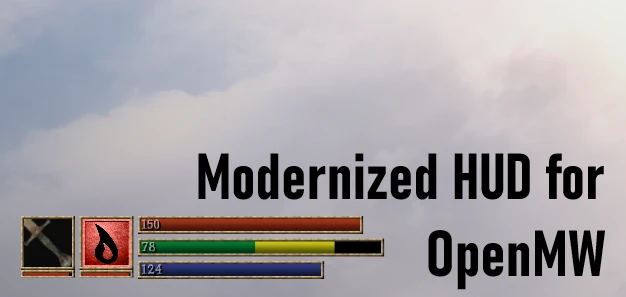
This standalone mod reworks the energy gauges, while keeping the vanilla feel intact.
Features - all shown in the images tab
-
[]The Health, Fatigue and Magicka gauges now scale, according to your stats.
[
]Damage and depletion of stats are indicated by a yellow remainder.[]Reworked enemy healthbar. Now displays the name, and optionally the level and class.
[]Optional number values can be activated, which are layered on top of the gauges.
[]Customizable - you may toggle features on and off.
[]Scales perfectly to all resolutions and HUD-scales.
[]Smooth animations, while still being responsive.
Compatibility
-
[]Requires OpenMW 0. 49. Latest version does not work on 0. 48 and older.
[]Technically compatible with mods that change the openmw_hud.layout file, as this mod renders the new hud ontop. I exclusively used that file to hide the old gauges and move the weapon and spell slot to the corner, so keep that in mind if you intend on replacing the file.
[]Also technically compatible with retextures, as this mod comes bundled with the vanilla ones.
Installation
-
[](Essential!) Make sure you have OpenMW set up.
[
]Install the mod according to OpenMW's official tutorial. I do not recommend simply dropping and replacing files in the directory, since it will be hard to remove any mods afterwards. Use OpenMW data directories in the launcher.[]Profit!
Uninstallation
[]This mod removes the vanilla gauges. If you intend on uninstalling, remove the entire mod from data directories, simply turning off the .omwaddon won't restore the vanilla bars, since this mod replaces the HUD file provided by Ope
-
[](Essential!) Make sure you have OpenMW set up.
-
[]Requires OpenMW 0. 49. Latest version does not work on 0. 48 and older.
Modernized HUD for OpenMW reimplements the energy bar with new styles, customizability, and quality-of-life improvements while preserving the vanilla feel. With 157 endorsements and 5,605 downloads, this UI mod is a solid choice for OpenMW players seeking a refreshed interface without straying from the original aesthetic.
✨ Key Features
📊 Pros & Cons
✅ Pros
- Community-approved with 157 endorsements and over 5,600 downloads
- Keeps the classic Morrowind vibe while sprucing up the energy bar
- Customization options let you tweak the HUD to your liking
⚠️ Cons
- Last updated in December 2024 — may not be compatible with future OpenMW versions
- Only affects the energy bar, not the entire HUD
For OpenMW players who want a cleaner, more customizable energy bar without overhauling the whole UI. If you're a purist who loves the original HUD, this mod keeps the vanilla feel while adding QoL. Skip if you're looking for a complete HUD replacement.
💡 Beginner Tips
- Since this is for OpenMW, make sure you're using the OpenMW engine, not the original Morrowind executable.
- Place the mod files in your OpenMW data directory and enable it in the launcher's content list.
- Check the mod's settings in-game to adjust the energy bar style to your preference.
📊 Mod Details
- Game
- Morrowind Mods
- Author
- allardpong
- Version
- 0.6
- Downloads
- 5,605
- Endorsements
- 157
- Category
- User Interface
- Created
- 4/17/2024
- Updated
- 12/21/2024
🔧 How to Install Morrowind Mods
Download from Nexus.
📖 Full step-by-step install guide for Morrowind →
Visit the official mod page for specific installation instructions for this mod.
🎮 Need cheat codes or console commands? Check ur gaming wiki for Morrowind commands, item IDs, and more.
Keep browsing — more Morrowind mods await