Journal and Scrolls
⚪ Last updated 2022⚠️ Install Order · 2 steps
Install in this order, then this mod last — most mods fail to load without their framework and dependencies in place.
Preview
🔍 Analysis
- 👍 2.0% endorsement rate — high engagement, a strong quality signal
- 🏆 #79 of 102 User Interface mods in this game by downloads
📋 About This Mod
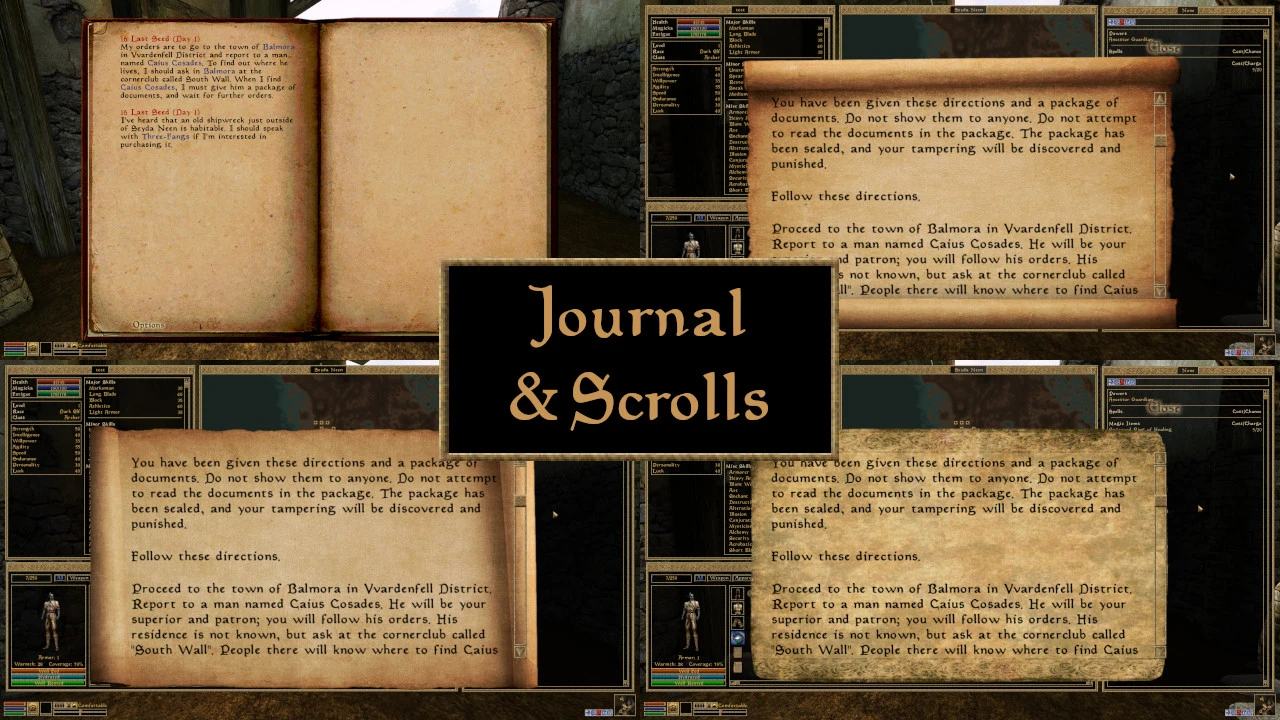
Take your pick from four new scroll textures, each of which is bundled with the matching journal texture.
Please note that I created the scroll textures with the improved typography option from Morrowind Code Patch activated (Interface changes > Better Typography), which isn't selected by default. If you want the journal text to line up as intended, I recommend doing this, but as the vanilla spacing is more condensed, the text should fit regardless.
For manual installation, unpack the zip and put the textures folder in the Data FIles in your base Morrowind directory. Otherwise use a mod manager.
Concentre had the original idea to retouch the Oblivion journal with the excellent Journal and Scroll BG Replacement, and I've carried it over to this mod with a few changes (smoothed edges, recolouration, extra aging). I've been unable to contact Concentre as he hasn't logged in for a number of years, but as the original mod was a vanilla Bethesda edit, I hope that this will not be a problem. Please contact me if needed!
A small UI texture mod that adds four new scroll textures and an enhanced journal texture for players who want to customize their in-game documents. With 149 endorsements and 7,409 downloads, it's a niche but appreciated addition for those seeking visual variety.
✨ Key Features
📊 Pros & Cons
✅ Pros
- Decent community support with 149 endorsements and over 7,000 downloads.
- Gives you multiple scroll options and a nicer journal in one package.
- Lightweight and easy to install—just drop in and go.
⚠️ Cons
- Last updated in September 2022—might not be compatible with the latest game patches.
- No screenshots or detailed previews provided, so you're flying blind on the look.
- Only affects scrolls and journal—if you wanted more UI changes, this won't cut it.
For players who want to freshen up the look of in-game scrolls and journals without overhauling the entire UI. If you're into lore-friendly or aesthetic tweaks, this is a quick win. Skip if you're looking for functional UI changes or broader customization.
💡 Beginner Tips
- Since it's a texture mod, make sure to place the files in the correct data folder or use a mod manager to avoid overwriting vanilla files.
- Check if the mod requires any specific game version—if you're on a newer patch, test it in a save before committing.
- If you're using other UI mods, load order might matter—put this one after to ensure it takes effect.
📊 Mod Details
- Game
- Morrowind Mods
- Author
- marblemist
- Version
- 1.0
- Downloads
- 7,409
- Endorsements
- 149
- Category
- User Interface
- Created
- 9/15/2022
- Updated
- 9/15/2022
🔧 How to Install Morrowind Mods
Download from Nexus.
📖 Full step-by-step install guide for Morrowind →
Visit the official mod page for specific installation instructions for this mod.
🎮 Need cheat codes or console commands? Check ur gaming wiki for Morrowind commands, item IDs, and more.
Keep browsing — more Morrowind mods await