Bloodmoon Hide Replacer BHR
⚪ Last updated 2010⚠️ Install Order · 2 steps
Install in this order, then this mod last — most mods fail to load without their framework and dependencies in place.
Preview
🔍 Analysis
- 👍 3.0% endorsement rate — high engagement, a strong quality signal
- 🏆 #290 of 544 Models and Textures mods in this game by downloads
📋 About This Mod
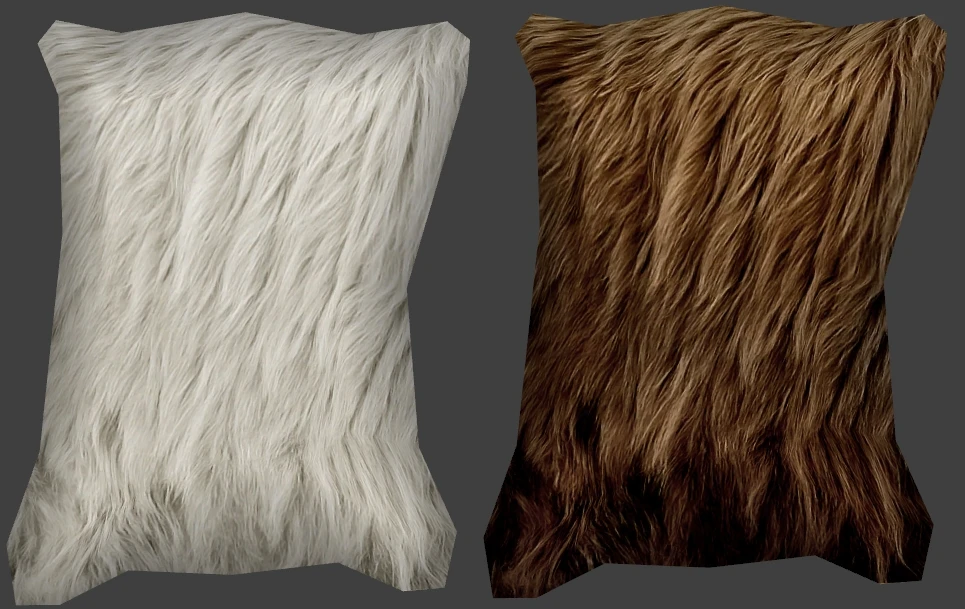
Name: Bloodmoon Hide Replacer BHR Version: 2. 1 Date: 12/12/2010 Category: Models and Textures Author: Alaisiagae Description =========== Replaces the Bear, Snow Bear, Wolf, and Snow Wolf ingredients so that they look like pelts instead of mutilated heads. Details ======= This mod changes the meshes and textures of the wolf and bear ingredients so that they look like pelts/hides instead of chopped-off, gory heads. Now you can decorate your homes with luxurious fur pelts. The meshes are the same as the pelts decorating the walls, but the textures are completely new. All textures are hi-res, 512x512 in .dds format. Custom icons with alphas (transparency) are included. Does not require an .esp. + Heremod Production\'s \"Realistic Pelts\" mod inspired me to create my own version. I used the meshes from his/her mod, but the textures and icons are completely new. + To get the pelts decorating the walls to look as pretty, download my Bloodmoon Pelt Replacer mod. In Version 2. 0: - pelt meshes oriented correctly (no longer upside-down when placed in-game) - adjusted vertex colors on all pelts - adjusted pelt UV maps (no more squished or stretched textures) - improved the icons for all pelts - made the gray wolf pelt use the same mesh as the white wolf pelt. Now the wolf pelts have one type of mesh, and the bear pelts have a bigger, slightly different-shaped mesh. Install ======= 1. Extract the files to a temporary location. 2. Examine the folder structure and make corrections where necessary. 3. Copy files to (install folder)\\Morrowind\\Data Files\\ 4. Start Morrowind Launcher and play. Uninstall ========= To remove this mod, simply delete the following textures, icons, and meshes: Morrowind\\Data Files\\textures\\tx_ing_brnbear.dds Morrowind\\Data Files\\textures\\tx_ing_grywolf.dds Morrowind\\Data Files\\textures\\tx_ing_whtbear.dds Morrowind\\Data Files\\textures\\tx_ing_whtwolf.dds Morrowind\\Data Files\\icons\\n\\tx_ingred_hide_brnbear.dds Morrowind\\Data Files\\icons\\n\\tx_ingred_hide_grywolf.dds Morrowind\\Data Files\\icons\\n\\tx_ingred_hide_whtbear.dds Morrowind\\Data Files\\icons\\n\\tx_ingred_hide_whtwolf.dds Morrowind\\Data Files\\meshes\\n\\ingred_hide_brnbear.nif Morrowind\\Data Files\\meshes\\n\\ingred_hide_grywolf.nif Morrowind\\Data Files\\meshes\\n\\ingred_hide_whtbear.nif Morrowind\\Data Files\\meshes\\n\\ingred_hide_whtwolf.nif Upgrade ======= 1. Remove the previous version\'s textures. 2. Add the new version\'s textures. 3. Start Morrowind and play. There is no effect on saved games and shouldn\'t corrupt any saves. Incompatibility =============== This mod will conflict with another mod that modifies the exact same textures, icons, and meshes (see the \"Uninstall\" section for the names of the files contained in this mod). This mod IS compatible with mods that modify the properties of the hides - such as mods that change price, name, weight, alchemic
Bloodmoon Hide Replacer BHR swaps the Bear, Snow Bear, Wolf, and Snow Wolf ingredient icons in Morrowind's Bloodmoon expansion from mutilated heads to realistic pelts. A simple texture mod with 876 endorsements, last updated in 2010, ideal for players who prefer a cleaner, more lore-friendly look.
✨ Key Features
📊 Pros & Cons
✅ Pros
- Community favorite with 876 endorsements and 28,750 downloads.
- Fixes a common visual complaint—mutilated heads look out of place.
- Lightweight and easy to install, just drop-in textures.
⚠️ Cons
- Last updated in 2010, so it may not be compatible with newer Morrowind mod setups or engine patches.
- Only affects four ingredients—if you want more variety, this is limited.
- No screenshots or detailed install instructions provided by the author.
For Morrowind players who want a more immersive, less gory look for animal ingredients. If you're a purist who prefers the original heads, skip it. This is purely cosmetic, so don't expect any gameplay changes.
💡 Beginner Tips
- Place the texture files in your Morrowind Data Files folder, overwriting the originals—backup first if you want to revert.
- Use a mod manager like Wrye Mash to track installations and avoid conflicts with other texture mods.
- Check if you have the Bloodmoon expansion installed; this mod won't work without it.
📊 Mod Details
- Game
- Morrowind Mods
- Author
- Alaisiagae
- Version
- 2.1
- Downloads
- 28,750
- Endorsements
- 876
- Category
- Models and Textures
- Created
- 1/1/2009
- Updated
- 12/12/2010
🔧 How to Install Morrowind Mods
Download from Nexus.
📖 Full step-by-step install guide for Morrowind →
Visit the official mod page for specific installation instructions for this mod.
🎮 Need cheat codes or console commands? Check ur gaming wiki for Morrowind commands, item IDs, and more.
Keep browsing — more Morrowind mods await