Auto Resupply Item Set
⚪ Last updated 2024Preview
🔍 Analysis
- 👍 3.2% endorsement rate — high engagement, a strong quality signal
- 🏆 #7 of 17 Scripts mods in this game by downloads
📋 About This Mod
IntroductionThis mod can automatically resupply at the end of a mission according to a preset combination of item sets.
Requirements:
-
[]REFramework
[
]REFramework D2D
-
[]Install REFramework and REFramework D2D;
[
]Download the mod;[]Unzip the mod to the Monster Hunter Rise root directory. So the final directory seems like ./reframework/autorun/itemSetAutoResupply.lua.
How To Use:
-
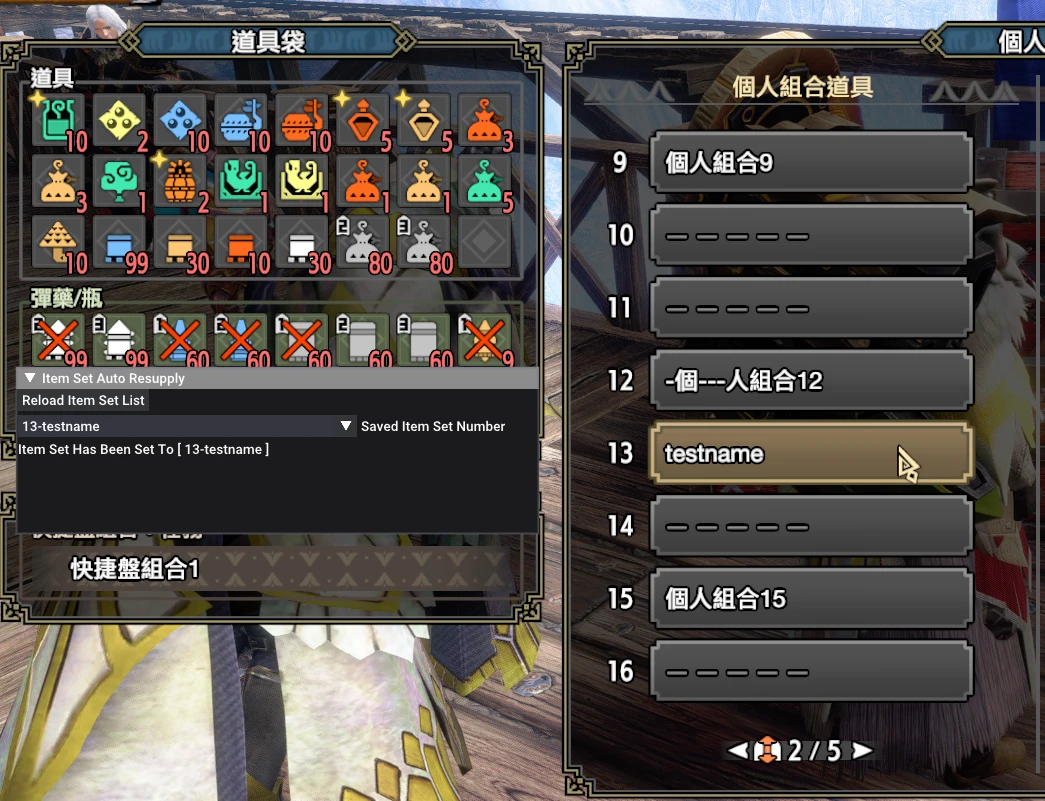
[]First Use: (1) Open REFramework menu and unfold the Script Generated UI menu item. You will find the Item Set Auto Resupply window. (2) Click the Reload Item Set List button to read your item set list. (3) Select an item set you want to use then there is a tip "Item Set Has Been Set To " below. It means your selection has been saved and the mod is working!
[]No First Use: When you select your item set following the above steps, you don't need to do any more operations, the mod will work automatically.
这个MOD可以在你完成任务时自动加载你的道具个人组合。
-
[]REFramework
[]REFramework D2D (大于等于Ver1. 3版本时需要!)
-
[]安装REFramework和REFramework D2D;
[]下载MOD;
[]将MOD解压缩后存放至Monster Hunter Rise根目录,即./reframework/autorun/itemSetAutoResupply.lua。
如何使用:
-
[]首次使用:(1)打开REFramework菜单并且点击Script Generated UI,此时会打开一个新的窗口叫做Item Set Auto Resupply。(2)点击Reload Item Set List按钮读取已保存的道具个人组合。(3)在下拉框中选择一个你想要的道具组合,此时下拉框下方会显示“Item Set Has Been Set To ”,表明MOD已经设置成功!
[
]后续使用:因为已按照上述步骤设置完成,因此后续不需要做任何操作,MOD即可自动运行。View source code on Github: https://github.com/dzxrly/MHR-ItemSetAutoResupplyMod
Update Logs:
Ver1. 4 - FEATURE UPDATE:
1. Update Chinese fonts support. / 更新了中文支持。
Ver1. 3 - FEATURE UPDATE:
1. In this version, item set load tip and item NOT ENOUGH tip will show in the game. [New Additional Requirements: REFramework D2D] / 添加了游戏内显示个人组合已自动加载和个人组合物品不足的提示。【需要安装新的依赖库:REFramework D2D】
To open the feature above, you should open the REFramework menu and click the Script Generated UI, then check two SHOW BUTTONs! / 开启上述功能需要打开REF菜单然后点击Script Generated UI,再勾选两个带有Show字样的按钮。
Ver1. 2 - BUG FIX:
1. Fix a bug that makes REF UI start flickering in the Training Area, thx for @bbacmk's reporting. / 修复了一个在训练场中使用MOD时导致REF UI闪屏的BUG。
PS: Please DO NOT click the Reload Item Set List button in the Training Area, it will cause the options in the dropmenu to disappear. / 请尽量不要在训练场中点击Reload Item Set List按钮,会导致下拉菜单内容消失。
Ver1. 1 - BUG FIX:
1. Fix a bug that makes your selection locked on the first item set, caused by the converter of String & Integer & Float. / 修复了一个会导致个人组合被锁定在第一套的BUG,应该是因为隐式类型转换导致的。
-
[]首次使用:(1)打开REFramework菜单并且点击Script Generated UI,此时会打开一个新的窗口叫做Item Set Auto Resupply。(2)点击Reload Item Set List按钮读取已保存的道具个人组合。(3)在下拉框中选择一个你想要的道具组合,此时下拉框下方会显示“Item Set Has Been Set To ”,表明MOD已经设置成功!
-
[]REFramework
-
[]First Use: (1) Open REFramework menu and unfold the Script Generated UI menu item. You will find the Item Set Auto Resupply window. (2) Click the Reload Item Set List button to read your item set list. (3) Select an item set you want to use then there is a tip "Item Set Has Been Set To " below. It means your selection has been saved and the mod is working!
Auto Resupply Item Set automatically restocks your inventory at mission end based on preset item combinations. With 1,144 endorsements and 35,915 downloads, it's a popular convenience mod for players who want to skip manual resupply. Last updated September 2024.
✨ Key Features
📊 Pros & Cons
✅ Pros
- Community-approved with 1,144 endorsements
- Saves time by automating a tedious task
- Customizable via preset item sets
⚠️ Cons
- May require configuration to set up your desired item sets
- Last updated September 2024 — check compatibility with your game version
For players who frequently forget to resupply or want to streamline their post-mission routine. Ideal for those who use preset loadouts and want consistency. Skip if you prefer manual control over inventory.
💡 Beginner Tips
- Check if your game version is compatible with the mod's last update (September 2024).
- Look for a config file or in-game settings to define your item sets.
- Test with a single mission to ensure the auto-resupply works as expected.
📊 Mod Details
- Game
- Monster Hunter Rise Mods
- Author
- EggTargaryen
- Version
- 1.4
- Downloads
- 35,919
- Endorsements
- 1,142
- Category
- Scripts
- Created
- 7/19/2022
- Updated
- 9/16/2024
🧩 Commonly Used Together
Users add these mods to the same collections — a real compatibility signal, not an AI guess.
🔧 How to Install MHRise Mods
Install REFramework. Drop mod files into game directory.
📖 Full step-by-step install guide for MHRise →
Visit the official mod page for specific installation instructions for this mod.
🎮 Need cheat codes or console commands? Check ur gaming wiki for MHRise commands, item IDs, and more.
Keep browsing — more MHRise mods await