CustomSaveDirs
🟠 Updated over a year ago⚠️ Install Order · 2 steps
Install in this order, then this mod last — most mods fail to load without their framework and dependencies in place.
🖼️ Gallery (1 images)
🔍 Analysis
- 👍 0.0% endorsement rate
- 🏆 #4 of 11 babric mods in this game by downloads
📋 About This Mod
# Mod Synopsis This is a lightweight mod run on client-side, which allows you use custom directories for singleplayer worlds' reading and saving instead of the hard-coded `${GAME_DIR}/saves` by the game. No game relaunching required when setting the directories. # How to Use This Mod After loading this mod, click “Options...” button in Main Menu, and then “Configure Save Directories...”(If you did not see the button, it shows that the button is pushed away by buttons added by other mods, try to increase the window's height). When `${GAME_DIR}/config/customsavedirs.json` does not exist, the text in the highest button in the screen should be “Current: Default”. Then you can click “Edit customsavedirs.json” button, a text editor will be opened after clicking. Edit for the directories you want to let this mod read. Absolute and relative paths are supported. For example, if you want this mod to read “/tmp” “saves” “../../saves” 3 directories, you need to write the following content to `${GAME_DIR}/config/customsavedirs.json`: ```json ``` After saving `customsavedirs.json`, click “Reload customsavedirs.json” in the game. Click “Current: 0: /tmp” button to switch to next valid directory declared in `customsavedirs.json`(“valid directory” here stands for a string that is capable to successfully create a `Path` object by `java.nio.file.FileSystems.getDefault().getPath(xxx)` or `java.nio.file.Path.of(xxx)` in Java), switch to “1: saves” in this example. And note that first valid directory's index is 0 rather than 1 in `customsavedirs.json`. If you want the game load the worlds under default save directory again, just delete `customsavedirs.json` or change its content to ``, then click “Reload customsavedirs.json”. The save directory will be changed to index 0 or the game default after game relaunching. When changing directory with singleplayer world opening, the directory will be applied after the world is saved and quitted. For example, open “New World” when using “0: /tmp”, and change it to “2: ../../saves” with the world opening, and then save and quit, the saving directory of that world will still be `/tmp`, “New World” under `../../saves` will not be affected. # Notice Fabric API run on Fabric or Legacy Fabric API run on Legacy Fabric is strongly recommended in order to apply language files in this mod's JAR. Without them, you can still launch the game, but texts related to this mod will be shown as fallback English texts or translation keys. Some mods storing there config files on folder names only instead of worlds' full paths will behave abnormally with this mod loading.
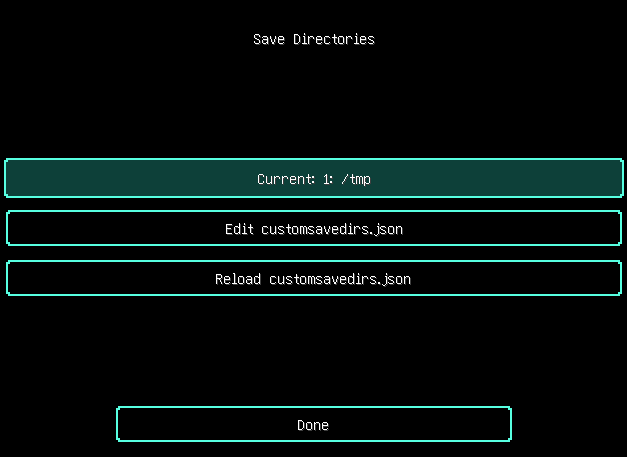
# Mod Synopsis This is a lightweight mod run on client-side, which allows you use custom directories for singleplayer worlds' reading and saving instead of the hard-coded `${GAME_DIR}/saves` by the game. No game relaunching required when setting the directories. # How to Use This Mod After loading this mod, click “Options...” button in Main Menu, and then “Configure Save Directories...”(If you did not see the button, it shows that the button is pushed away by buttons added by other mods, try to increase the window's height). When `${GAME_DIR}/config/customsavedirs.json` does not exist, the text in the highest button in the screen should be “Current: Default”. Then you can click “Edit customsavedirs.json” button, a text editor will be opened after clicking. Edit for the directories you want to let this mod read. Absolute and relative paths are supported. For example, if you want this mod to read “/tmp” “saves” “../../saves” 3 directories, you need to write the following content to `${GAME_DIR}/config/customsavedirs.json`: ```json [ "/tmp", "saves", "../../saves" ] ``` After saving `customsavedirs.json`, click “Reload customsavedirs.json” in the game. Click “Current: 0: /tmp” button to switch to next valid directory declared in `customsavedirs.json`(“valid directory” here stands for a string that is capable to successfully create a `Path` object by `java.nio.file. FileSystems.getDefault().getPath(xxx)` or `java.nio.file. Path.of(xxx)` in Java), switch to “1: saves” in this example. And note that first valid directory's index is 0 rather than 1 in `customsavedirs.json`. If you want the game load the worlds under default save directory again, just delete `customsavedirs.json` or change its content to `[]`, then click “Reload customsavedirs.json”. The save directory will be changed to index 0 or the game default after game relaunching. When changing directory with singleplayer world opening, the directory will be applied after the world is saved and quitted. For example, open “New World” when using “0: /tmp”, and change it to “2: ../../saves” with the world opening, and then save and quit, the saving directory of that world will still be `/tmp`, “New World” under `../../saves` will not be affected. # Notice Fabric API run on Fabric or Legacy Fabric API run on Legacy Fabric is strongly recommended in order to apply language files in this mod's JAR. Without them, you can still launch the game, but texts related to this mod will be shown as fallback English texts or translation keys. Some mods storing there config files on folder names only instead of worlds' full paths will behave abnormally with this mod loading.
📊 Mod Details
- Game
- Minecraft Mods
- Author
- IAmREGE
- Version
- 0.0.4
- Downloads
- 5,219
- Endorsements
- 2
- Category
- babric
- Created
- 11/25/2024
- Updated
- 1/23/2025
- Game Versions
- 1.7.10
- Tags
- management, storage, utility
🔧 How to Install Minecraft Mods Mods
Download from Modrinth. Use Prism Launcher or drop into your mods folder.
📖 Full step-by-step install guide for Minecraft Mods →
Visit the official mod page for specific installation instructions for this mod.
🎮 Need cheat codes or console commands? Check ur gaming wiki for Minecraft Mods commands, item IDs, and more.
❓ Frequently Asked Questions
Which Minecraft Mods versions does CustomSaveDirs support?
The author lists 1.7.10. Other versions may work but are untested by the author.
What is the latest version of CustomSaveDirs?
Version 0.0.4, published 2025-01-23 with 5,219 downloads recorded at the source.
Keep browsing — more Minecraft Mods mods await