MineGIT
🟡 Updated this year⚠️ Install Order · 2 steps
Install in this order, then this mod last — most mods fail to load without their framework and dependencies in place.
🖼️ Gallery (4 images)
🔍 Analysis
- 👍 1.9% endorsement rate — high engagement, a strong quality signal
- 🏆 #11 of 11 babric mods in this game by downloads
📋 About This Mod
!(https://cdn.modrinth.com/data/cached_images/4f0611f314c35fd2497b44f3cfee9d85b3e69d80_0.webp)
### Cloud sync for Minecraft worlds! Sync and back up your worlds between multiple devices! Fully integrated into the Minecraft client for a seamless experience when loading, saving, and downloading worlds from the cloud.
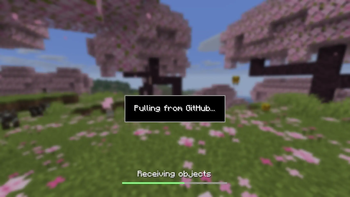
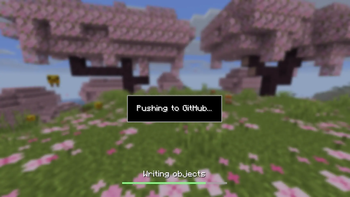
## How does it work? Worlds that you select are uploaded to a Git host of your choice as repositories. Every time you quit to the title screen, a commit of the current state of your world is created and pushed to the remote repository. Whenever the world is loaded, the mod will check if any new versions of the world are available in the cloud, and if so, they will be downloaded to your device.
Since this mod uses Git internally, it also means that only the files in your world save folder that you modify will be uploaded and downloaded each time, saving storage space and internet bandwidth.
## How do I set it up?
There are several steps to setting up this mod, which include creating a personal access token for your chosen Git service, as well as choosing the worlds you would like to enable MineGIT for.
### Video guide:
### First-time setup Many options are available to host your remote world storage, including GitHub, GitLab, Codeberg, or even self-hosting a Gitea or Forgejo instance! For beginners, I would recommend using GitHub as your service of choice. Assuming you're using GitHub, you will need to generate a personal access token through the following steps: 1. Create an account on GitHub if you do not have one already (https://github.com) 2. Navigate to the (https://github.com/settings/personal-access-tokens) 3. Click `Generate new token` 4. Enter any name (such as MineGIT) under `Token name` 5. Scroll to `Expiration` and set it to `No expiration` (so that you do not have to repeat this process when the token expires) 6. Under `Repository access` choose `All repositories` 7. Under `Permissions`, click `Add permissions` and select `Administration` and `Contents` 8. Set `Access` on the `Administration` and `Contents` lines to `Read and write` 9. Press `Generate token` and copy the generated token to be pasted into Minecraft later (the generated token should start with `github_pat_` and be followed by a long string of letters and numbers)
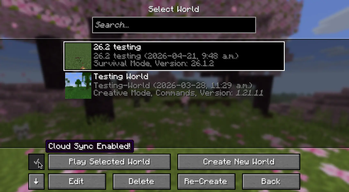
### Setting up in-game Once the mod is installed and you are in-game, do the following steps to link your GitHub account with the mod: 1. Click on the cloud button on the bottom left corner of the world creation or world selection screen (If the button does not appear, you have already previously linked your account; see the section below entitled 'Reconfiguring account linking') 2. Enter your GitHub username and personal access token (PAT) that you created in the previous step on the new page that appears 3. Press the button labeled `Test credentials` to make sure you've entered the information properly 4. You may now exit the screen and proceed to either enable sync for a world or clone an existing one
#### Reconfiguring account linking If you have already previously set up account linking and would like to change settings afterwards, you have a couple of options to get back to the configuration screen: - Configure through ModMenu: If you have (https://modrinth.com/mod/mod-menu) installed, simply find the mod in the mods list and open the configuration from there - From the world clone screen: There is a button in the top right corner of the world cloning screen that will open the configuration screen - From the world selection screen: By holding alt and clicking on the world sync button on the bottom left of the world selection screen, you will be brought back into the configuration screen
### Enabling sync for a world World syncing needs to be enabled individually for each world you would like to sync to your Git host. To enable sync for a world, do the following: 1. Select a world on the world selection screen 2. Press the cloud button in the bottom left of the screen labeled `Enable world sync` 3. Confirm your decision on the next screen
This process will create a new repository named `minegit_` on your account, initialize a Git repository in your world save folder, and push its current state to the cloud. From this point forward, loading the world will pull the latest changes from your Git host, and exiting the world will push changes.
You can now download this world on another device to effectively sync changes between them through the next step: cloning.
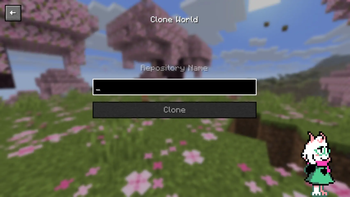
### Downloading a world on a different device (Cloning) Cloning a world will download the exact stat
📊 Mod Details
- Game
- Minecraft Mods
- Author
- ModMonster
- Version
- 1.5.2+1
- Downloads
- 4,110
- Endorsements
- 80
- Category
- babric
- Created
- 5/2/2026
- Updated
- 7/24/2026
- Game Versions
- b1.7.3
- Tags
- management, utility
🔧 How to Install Minecraft Mods Mods
Download from Modrinth. Use Prism Launcher or drop into your mods folder.
📖 Full step-by-step install guide for Minecraft Mods →
Visit the official mod page for specific installation instructions for this mod.
🎮 Need cheat codes or console commands? Check ur gaming wiki for Minecraft Mods commands, item IDs, and more.
❓ Frequently Asked Questions
Which Minecraft Mods versions does MineGIT support?
The author lists b1.7.3. Other versions may work but are untested by the author.
What is the latest version of MineGIT?
Version 1.5.2+1, published 2026-07-24 with 4,110 downloads recorded at the source.
Keep browsing — more Minecraft Mods mods await