Chest Tracker (NeoForge port)
🟡 Updated this year⚠️ Install Order · 2 steps
Install in this order, then this mod last — most mods fail to load without their framework and dependencies in place.
🖼️ Gallery (3 images)
🔍 Analysis
- 👍 0.1% endorsement rate
- 🏆 #4 of 6 management mods in this game by downloads
📋 About This Mod
# Chest Tracker - Unofficial NeoForge Port **Client-side item storage and searching for Minecraft 1.21.1, 1.21.4, and 1.21.11 on NeoForge.** Chest Tracker helps you remember where you stored your items. Open containers as you play, then search your saved storage data later from a client-side GUI. No server-side installation is required. > **Unofficial port** > > This is an unofficial NeoForge port of (https://modrinth.com/mod/chest-tracker) by JackFred. This project has been approved by the original author. If you use Fabric or Quilt, use the original project instead. ## What It Does Chest Tracker stores remembered container contents locally on your client. This means it can work in singleplayer, multiplayer, and Realms-style environments without requiring the server to install the mod. You can use it to: - Find which chest, barrel, shulker, or other remembered container has an item. - Search saved storage from the in-game Chest Tracker GUI. - Highlight matching containers in the world. - Keep separate local storage data through memory banks. - Display remembered or custom container names. ## Features - Client-side storage memory. - Main searchable storage browser. - Item search from the Chest Tracker GUI. - World highlights for matching containers. - Remembered/custom container names. - Local memory banks. - Works without a server-side mod. ## Usage 1. Open containers while playing so Chest Tracker can remember their contents. 2. Press the **Grave** key, usually `` ` ``, to open the Chest Tracker GUI. 3. Click an item in the GUI to search for it in remembered containers. 4. Use the search bar and filters to narrow down stored items. ## Requirements | Requirement | Version | | --- | --- | | Minecraft | 1.21.1, 1.21.4, 1.21.11 | | Loader | NeoForge | | Dependency | YetAnotherConfigLib (YACL) for your respective Minecraft version | ## Differences From The Original Fabric Version This port focuses on the core Chest Tracker experience for NeoForge. Some optional Fabric-side integrations from the original project are not included here. Known differences: - Fully supports saving storage data on moving contraptions (e.g., from the **Create** mod) and minecart chests. - No Fabric API dependency. - No ModMenu integration (uses YACL). - Litematica integration is not included. - **Jade** integration is included. - **Searchables** integration is included. - **Shulker Box Tooltip** integration is included. ## Compatibility Notes This mod is client-side. It should not need to be installed on servers. Because this is an unofficial port, compatibility with large modpacks may vary. If you find a crash or broken behavior, include your latest log and mod list when reporting it. ## Credits - Original mod: (https://modrinth.com/mod/chest-tracker) - Original author: JackFred - Original source: (https://github.com/JackFred2/ChestTracker) All original project ownership and credit belong to the original author. This project is only an unofficial NeoForge compatibility port. 📩 For questions and bug reports: Telegram / Discord — **@b1nt1n**
# Chest Tracker - Unofficial NeoForge Port
Client-side item storage and searching for Minecraft 1. 21. 1, 1. 21. 4, and 1. 21. 11 on NeoForge.
Chest Tracker helps you remember where you stored your items. Open containers as you play, then search your saved storage data later from a client-side GUI. No server-side installation is required.
> Unofficial port > > This is an unofficial NeoForge port of (https://modrinth.com/mod/chest-tracker) by JackFred. This project has been approved by the original author. If you use Fabric or Quilt, use the original project instead.
## What It Does
Chest Tracker stores remembered container contents locally on your client. This means it can work in singleplayer, multiplayer, and Realms-style environments without requiring the server to install the mod.
You can use it to:
- Find which chest, barrel, shulker, or other remembered container has an item.
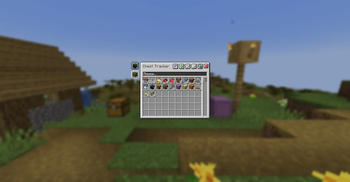
- Search saved storage from the in-game Chest Tracker GUI.
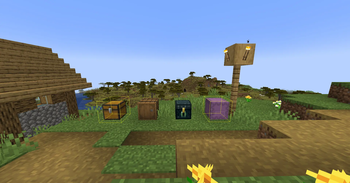
- Highlight matching containers in the world.
- Keep separate local storage data through memory banks.
- Display remembered or custom container names.
## Features
- Client-side storage memory.
- Main searchable storage browser.
- Item search from the Chest Tracker GUI.
- World highlights for matching containers.
- Remembered/custom container names.
- Local memory banks.
- Works without a server-side mod.
1. Open containers while playing so Chest Tracker can remember their contents. 2. Press the Grave key, usually `` ` ``, to open the Chest Tracker GUI. 3. Click an item in the GUI to search for it in remembered containers. 4. Use the search bar and filters to narrow down stored items.
## Requirements
| Requirement | Version | | --- | --- | | Minecraft | 1. 21. 1, 1. 21. 4, 1. 21. 11 | | Loader | NeoForge | | Dependency | YetAnotherConfigLib (YACL) for your respective Minecraft version |
## Differences From The Original Fabric Version
This port focuses on the core Chest Tracker experience for NeoForge. Some optional Fabric-side integrations from the original project are not included here.
Known differences:
- Fully supports saving storage data on moving contraptions (e.g., from the Create mod) and minecart chests.
- No Fabric API dependency.
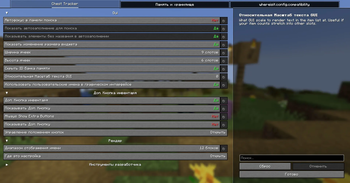
- No ModMenu integration (uses YACL).
- Litematica integration is not included.
- Jade integration is included.
- Searchables integration is included.
- Shulker Box Tooltip integration is included.
## Compatibility Notes
This mod is client-side. It should not need to be installed on servers.
Because this is an unofficial port, compatibility with large modpacks may vary. If you find a crash or broken behavior, include your latest log and mod list when reporting it.
- Original mod: (https://modrinth.com/mod/chest-tracker)
- Original author: JackFred
- Original source: (https://github.com/JackFred2/ChestTracker)
All original project ownership and credit belong to the original author. This project is only an unofficial NeoForge compatibility port.
📩 For questions and bug reports: Telegram / Discord — @b1nt1n
📊 Mod Details
- Game
- Minecraft Mods
- Author
- b1nt1n
- Version
- 2.6.8+1.21.1-neoforge
- Downloads
- 4,592
- Endorsements
- 5
- Category
- management
- Created
- 6/12/2026
- Updated
- 7/25/2026
- Game Versions
- 1.21.1
- Tags
- management, storage, utility
🔧 How to Install Minecraft Mods Mods
Download from Modrinth. Use Prism Launcher or drop into your mods folder.
📖 Full step-by-step install guide for Minecraft Mods →
Visit the official mod page for specific installation instructions for this mod.
🎮 Need cheat codes or console commands? Check ur gaming wiki for Minecraft Mods commands, item IDs, and more.
❓ Frequently Asked Questions
Which Minecraft Mods versions does Chest Tracker (NeoForge port) support?
The author lists 1.21.1. Other versions may work but are untested by the author.
What is the latest version of Chest Tracker (NeoForge port)?
Version 2.6.8+1.21.1-neoforge, published 2026-07-25 with 4,592 downloads recorded at the source.
Keep browsing — more Minecraft Mods mods await