Portrait and HUD distortion effect
⚪ Last updated 2022Preview
🔍 Analysis
- 👍 3.5% endorsement rate — high engagement, a strong quality signal
- 🏆 #17 of 107 User Interface mods in this game by downloads
📋 About This Mod
F9zok45GwpY
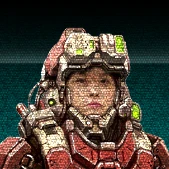
The small black scanline the vanilla game use on the portraits is a bit plain. So I touched up the shader to make it a bit more lively.
I added a combination of grid pattern, noise, distortion and refresh line to give the portrait a low fi video effect.
Update 1. 5
- New similar effect for the HUD as a separate mod
Install Instructions:
1. Unzip the file and place the entire folder in the Mods directory (default is C:\Program Files\Epic Games\MW5Mercs\MW5Mercs\Mods)
2. Launch the game and click Mods in the main menu.
3. Check the mod to enable it and hit Apply.
4. Restart the game and enjoy!
More of my stuff:
Ultra Visual and Weather
Improved Mech Shader
Source HD Texture
Atlas Eye Glow
Radio only (No portrait in mission)
Infantry Visual Tweak
Infantry Outline Remover
More Subtle Artillery Marker
Laser visual tweak
This UI mod replaces the subtle portrait scanline effect with a more noticeable, low-fi animated version, and adds a similar effect to the HUD. Compatible with DLC4, it's a small cosmetic tweak for players who want a retro aesthetic.
✨ Key Features
📊 Pros & Cons
✅ Pros
- Community-approved with 402 endorsements
- Gives your UI a distinct retro vibe that stands out
- Simple cosmetic change that doesn't affect gameplay
⚠️ Cons
- Last updated in 2022 — may not work with the latest game version
- Effect might be too distracting for some players
For players who want a more retro, low-fi look to their UI without changing gameplay. Skip if you prefer a clean, modern interface or if you're on a newer game version.
💡 Beginner Tips
- Make sure your game version matches the mod's compatibility (DLC4) to avoid issues.
- If you're using a mod manager, preview the effect in-game before committing.
- Consider pairing with other UI mods for a cohesive retro theme.
📊 Mod Details
- Game
- Mechwarrior5mercenaries Mods
- Author
- Lt-47
- Version
- 1.3
- Downloads
- 11,371
- Endorsements
- 402
- Category
- User Interface
- Created
- 5/1/2020
- Updated
- 3/5/2022
🧩 Commonly Used Together
Users add these mods to the same collections — a real compatibility signal, not an AI guess.
🔧 How to Install MechWarrior 5: Mercenarie Mods
Download from Nexus Mods.
📖 Full step-by-step install guide for MechWarrior 5: Mercenarie →
Visit the official mod page for specific installation instructions for this mod.
🎮 Need cheat codes or console commands? Check ur gaming wiki for MechWarrior 5: Mercenarie commands, item IDs, and more.
Keep browsing — more MechWarrior 5: Mercenarie mods await