Cockpit Glass
🟡 Updated this yearPreview
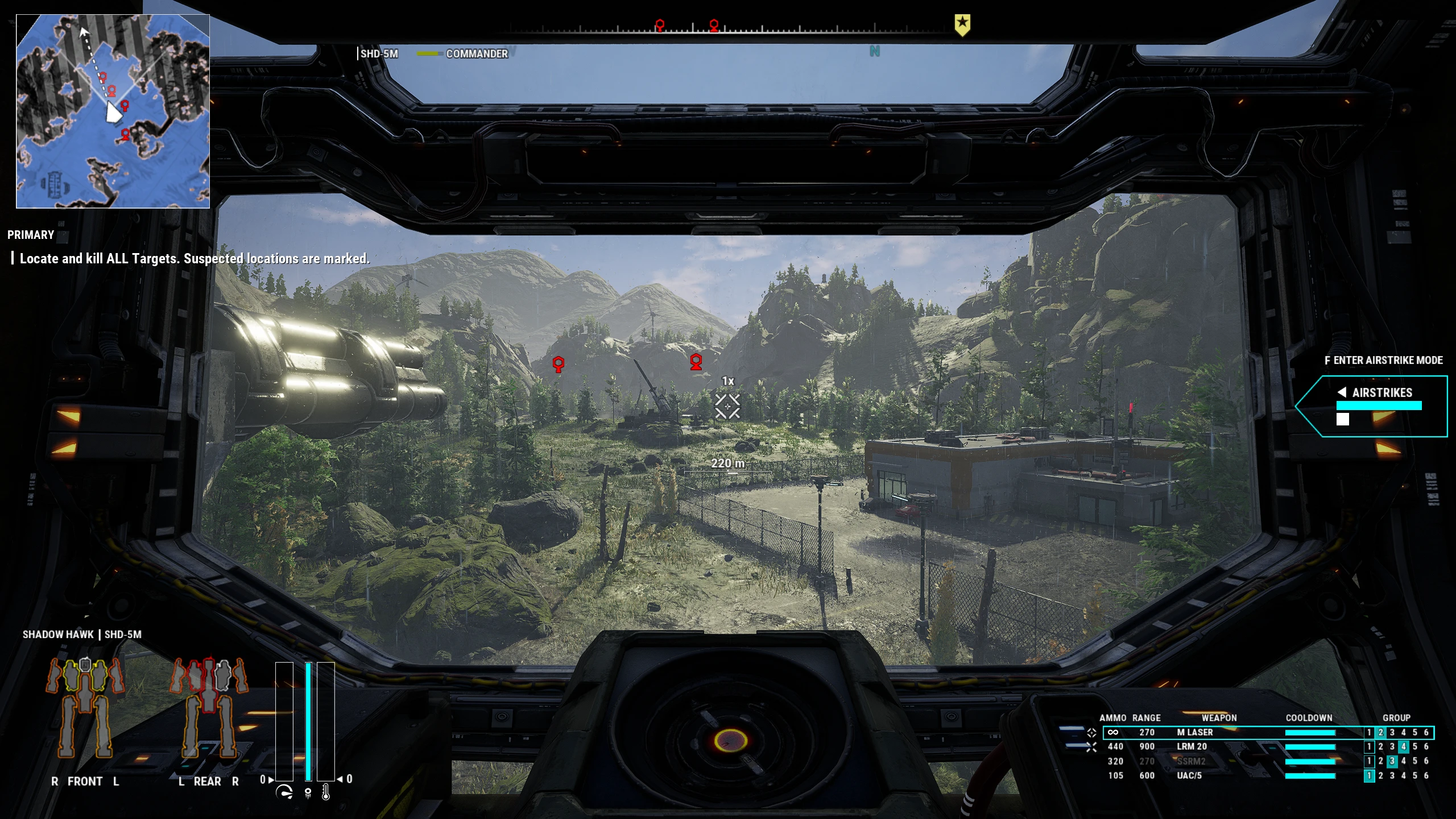
🔍 Analysis
- 👍 2.9% endorsement rate — high engagement, a strong quality signal
- 🏆 #2 of 152 Visuals and Graphics mods in this game by downloads
📋 About This Mod
Mod features
- Dynamic Weather Effects on the glass ( requires "Effects Quality" of game options to be set to "High" or "Maximum" )
- Glass Lighting
- Biome Lighting Correction
Dynamic Weather Effects
Shows rain and ice on the glass depending on weather conditions. Better visible with FXAA antialiasing mode.
In versions 0. 84 - 0. 91 have same appearance. Can not be configured or disabled for these versions.
In versions from 0. 92 weather effects are affected by:
- Time ( increases water or ice amount to maximum value defined by rain/snow intensity )
- Any cover above mech like any objects, buildings or terrain arcs ( prevent from raining and freezing )
- Mech temperature ( causes ice melting )
Some weather effects can be configured for versions from 0. 92 and above.
Check section Gameplay influence of Dynamic Weather Effects below for details.
Glass Lighting
Imitate dynamic glass lighting depending on surrounding. Influenced by obstacles in front of cockpit, and by direct sun light.
Available in version 0. 90 and later.
Can be configured or disabled.
Biome Lighting Correction
Changes biome lighting to allow Glass Lighting system look better. These changes are also trying to increase time of day difference: nights and dawns becomes darker.
Available in version 0. 91 and later.
Required for Glass Lighting system to work. Can be disabled along with it.
Gameplay influence of Dynamic Weather Effects
Target reticle zone is not clear from weather effects by default in versions from 0. 92. It means that you may see droplets and ice covering your target. In bad weather conditions it may lower your accuracy. Or may not, it depends on you. But you can lower rain drips and flows intensity a bit by standing under some cover. It may be building or terrain arcs. Also, you can melt ice by rising a heat of your mech to values more than 50% ( by default ) and keeping high temperature. When it will drop below 50%, it will start to freeze again. Although freezing is not so fast as melting. It will take few minutes to be covered with ice again. When you start your mission outside of dropship ( it means you had a long way to this point under open sky ) you'll start with already frozen glass. So if weather conditions is very bad, maybe you will need to melt ice right at the mission start time.
If you don't like this mechanics, you can set parameter Transparency_Reticle_Zone to 100 to keep your reticle zone always clear from weather effects like it was in versions before 0. 92. Also you can tune other parameters like melting speed, freezing time or water and ice amount and weather effects contrast in main settings file. Check Problems resolving part of this description to know more ab
Cockpit Glass adds a windshield to mech cockpits, creating a visual barrier between the pilot and the outside world. The glass reacts to weather like rain and ice, and mimics environmental lighting for a more immersive experience. With over 3,300 endorsements and 116k downloads, it's a popular visual enhancement for mech pilots.
✨ Key Features
📊 Pros & Cons
✅ Pros
- Huge community trust with 3,318 endorsements and over 116k downloads.
- Weather-reactive glass adds immersion—rain and ice actually show on the windshield.
- Lighting imitation makes the cockpit feel more connected to the environment.
⚠️ Cons
- Only affects visuals—no gameplay impact, so if you want mechanics, skip.
- Last updated June 2026—check if it works with your current game version.
For mech sim players who want a more immersive cockpit experience without changing gameplay. If you love weather effects and environmental storytelling, this is a must-have. Skip if you're after gameplay tweaks—this is purely cosmetic.
💡 Beginner Tips
- Make sure your game is updated to the latest version to avoid conflicts with the mod.
- If you use other cockpit mods, test this one in a separate save to see if they clash.
- Check the mod's comments section for any user-reported issues with specific mechs.
📊 Mod Details
- Game
- Mechwarrior5mercenaries Mods
- Author
- Nek
- Version
- pre-0.98
- Downloads
- 116,385
- Endorsements
- 3,318
- Category
- Visuals and Graphics
- Created
- 12/7/2020
- Updated
- 6/2/2026
🧩 Commonly Used Together
Users add these mods to the same collections — a real compatibility signal, not an AI guess.
🔧 How to Install MechWarrior 5: Mercenarie Mods
Download from Nexus Mods.
📖 Full step-by-step install guide for MechWarrior 5: Mercenarie →
Visit the official mod page for specific installation instructions for this mod.
🎮 Need cheat codes or console commands? Check ur gaming wiki for MechWarrior 5: Mercenarie commands, item IDs, and more.
Keep browsing — more MechWarrior 5: Mercenarie mods await