3D HUD (WITH ADV. ZOOM) - NO LONGER FUNCTIONAL
⚪ Last updated 2020Preview
🔍 Analysis
- 👍 4.4% endorsement rate — high engagement, a strong quality signal
- 🏆 #5 of 107 User Interface mods in this game by downloads
📋 About This Mod
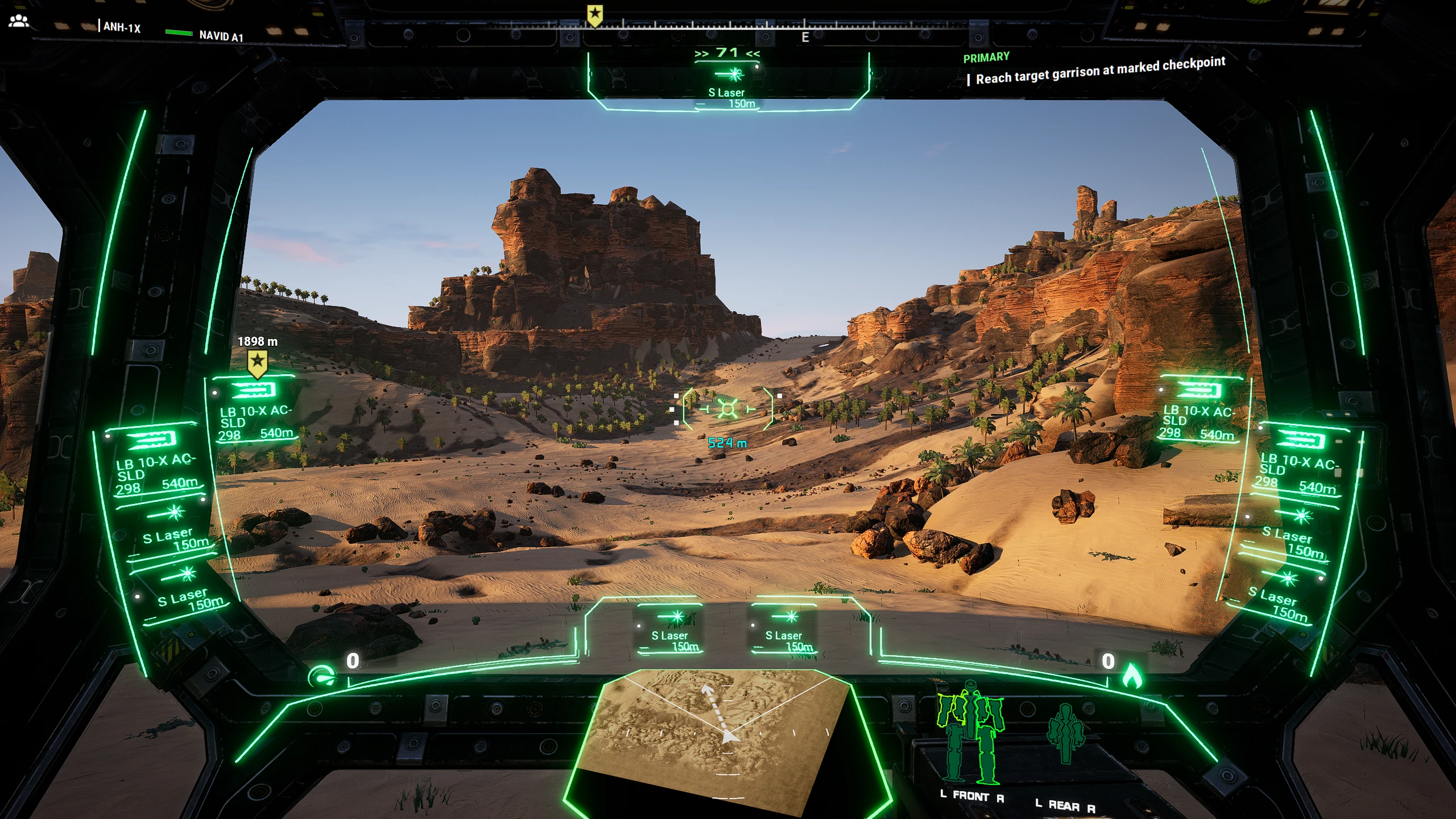
3D Holographic HUD.
Note:
This mod is not compatible with the new version of MW5 that is released on Steam or any other platform, and there is no immediate plan for an update. Thanks to all players who downloaded and played this mod and I apologize for any shortcoming that this mod had. Things might change in the distant future, but for now... <o
NOTE:
You can control the Brightness of the HUD (Glow) by darkening or lightening of the selected color. Darker color results in less glow, brighter color results in more glow
If you have a mod conflict and you don't have access to the options color wheel, go to "C:\MW5hud\3dhudcolor.ini" and set the colors thereDescription:
For those who remember the 2016 Demo of MW5, this will be a welcome surprise.
This is(was) a new approach to conveying information to the player... a break from the traditional MW huds since the early 90s.
Kudos to Dave over at PGI for this innovative concept back in 2016.
Features:
- A more visual approach towards providing the player with information about their mechs and gameplay (The HUD is projected onto a 3D curved screen 30 cm in front of the player)
- Icons for Inner sphere weapons up to civil war era tech is included (yes, that means a full set of MRMs, UACs, etc.)
- weapon icons are chosen based on wording in the weapon name. Should be compatible with most weapon mods right out of the door
- New, not possible before post-processing effects, including glow.
- Custom color support (available in options menu)
- You can control the amount of glow using the color intensity... if you see a color gives too much glow, try darkening it in the options
- Weapon grouping is now done in a pop-up window (activate by pressing any weapon group associated buttons). Weapon group window closes after 4 seconds of inactivity
- Advanced Zoom (set on Left Alt as default. Configurable in options menu at the very end of the "controls" section) - CO-OP IS SUPPO
📊 Mod Details
- Game
- Mechwarrior5mercenaries Mods
- Author
- Navid A1
- Version
- 3.12
- Downloads
- 33,863
- Endorsements
- 1,482
- Category
- User Interface
- Created
- 3/8/2020
- Updated
- 6/17/2020
🔧 How to Install MechWarrior 5: Mercenarie Mods
Download from Nexus Mods.
📖 Full step-by-step install guide for MechWarrior 5: Mercenarie →
Visit the official mod page for specific installation instructions for this mod.
🎮 Need cheat codes or console commands? Check ur gaming wiki for MechWarrior 5: Mercenarie commands, item IDs, and more.
Keep browsing — more MechWarrior 5: Mercenarie mods await