Hogwarts Legacy Modding Guide
🟠 Updated over a year ago⚠️ Install Order · 1 step
Install in this order, then this mod last — most mods fail to load without their framework and dependencies in place.
Preview
🔍 Analysis
- 👍 4.6% endorsement rate — high engagement, a strong quality signal
- 🏆 #95 of 179 Visuals mods in this game by downloads
📋 About This Mod
"GUIDE IS CURRENTLY OUTDATED DUE TO LATEST GAME UPDATE BUT WILL BE REVISITING AT A FUTURE DATE"
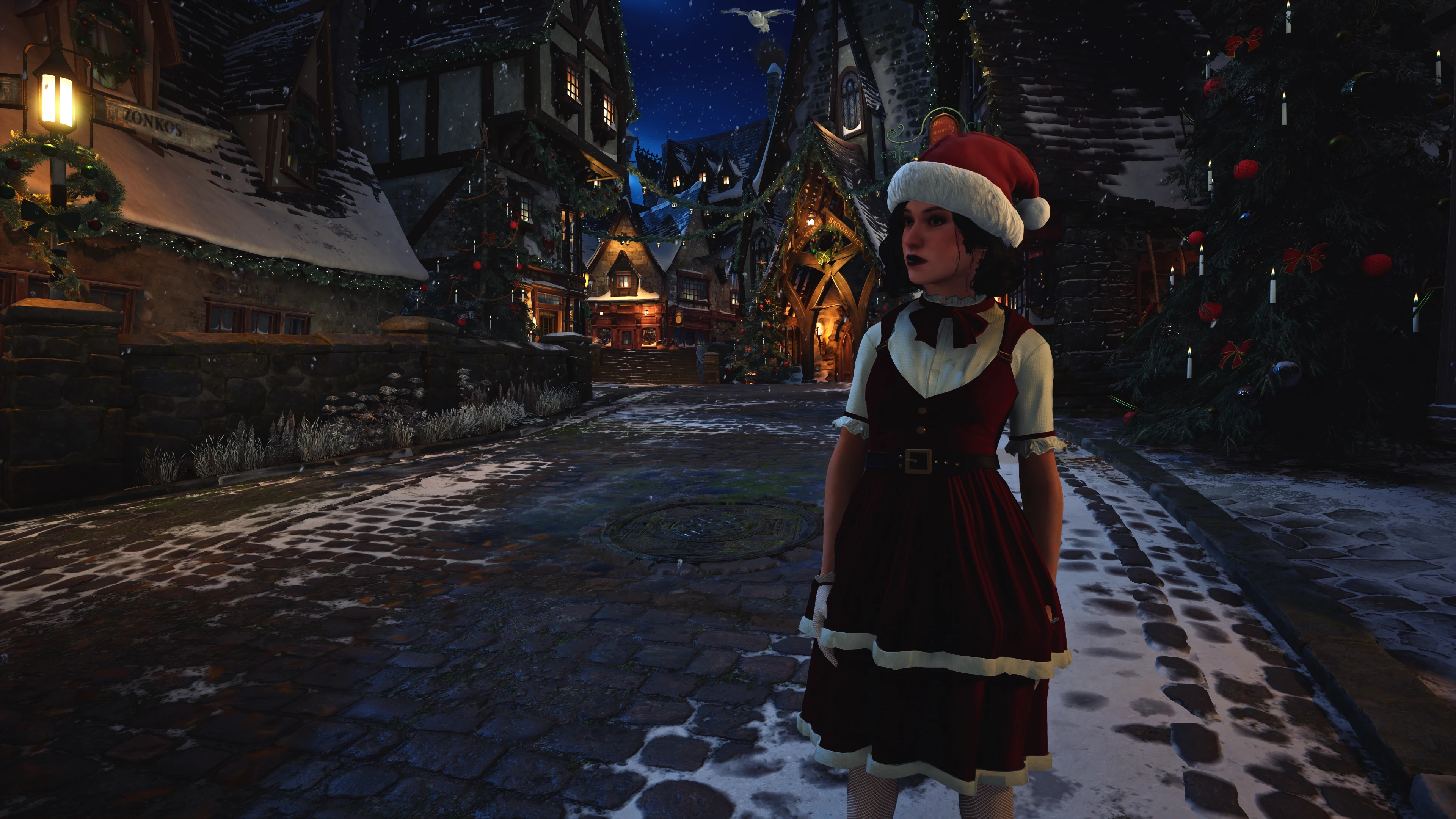
This is a guide for Hogwarts Legacy that will transform your experience at Hogwarts school of Witchcraft and Wizardry. I've included a list of my favorite mods that touches on many aspects of the game. From visuals, to performance, clothing, UI improvements and even bugfixes. My own reshade preset is also available for download in the files tab.
Requirements:
below are PC requirements that Avalanche Software recommends
Recommendations:
1. 7zip (recommended) or WinRAR since we'll be downloading many mods that require you have at least one.
2. 15GB of free drive space (not including the game install).
3. We'll be starting the game from a fresh install, which means you have to uninstall the game via either Steam or Epic. Whichever place you purchased it.Q: But TheWitch, I already have 100+ hours in the game so why should I???
A: You're free to use your previous save, but to get the most out of your experience, it's recommended to start fresh as a new 5th year!
4. After uninstalling, make sure all traces of the game is removed from your drive. navigate to Steam/steamapps/common. If a Hogwarts Legacy folder is present, delete it.
5. Navigate to C:/Users/YourUserName/Appdata/Local/HogwartsLegacy/Saved/SavedGames/Filewithnumber. For me that number is 130219447, but it might be different for you! Open that folder up and this is where your save files are.
6. If you wish to backup your previous saves, now is your chance to do so. If not, then proceed to step 7.
Q: But I can't find the AppData folder! Help!
A: For Windows 10, in the upper left-hand corner of the window click on "View" then put a checkmark beside "Hidden Items". For Windows 11, click the "View" button in the upper right-hand corner, "Show", then "Hidden Items".
7. Delete the Hogwarts Legacy folder (C:/Users/YourUserName/Appdata/Local/Hogwarts Legacy)
8. For some users, disabling HAGS (Hardware Accelerated GPU Scheduling) seems to solve many issues related to crashing. keep in mind that disabling HAGS also
A visual modding guide for Hogwarts Legacy, offering a curated setup to improve the game's appearance. With 44 endorsements and 949 downloads, it's a niche resource for players seeking a better visual experience. Last updated in December 2024.
✨ Key Features
📊 Pros & Cons
✅ Pros
- Community-tested guide with 44 endorsements
- Nearly 1,000 downloads show it's helping players
- Updated recently (December 2024) so it's likely current
⚠️ Cons
- Only 44 endorsements, so it's not widely vetted
- No screenshots or before/after examples provided
For Hogwarts Legacy players who want a better-looking game but don't know where to start. If you're new to modding, this guide can point you in the right direction. Skip if you prefer to discover mods on your own.
💡 Beginner Tips
- Read the guide fully before installing anything to understand the recommended mods
- Check the mod's comments section for user feedback and potential issues
- Make sure to back up your save files before adding mods, just in case
📊 Mod Details
- Game
- Hogwarts Legacy Mods
- Author
- TarnishedTheWitch
- Version
- 2.5
- Downloads
- 949
- Endorsements
- 44
- Category
- Visuals
- Created
- 7/25/2024
- Updated
- 12/24/2024
🔧 How to Install Hogwarts Legacy Mods
Download from Nexus.
📖 Full step-by-step install guide for Hogwarts Legacy →
Visit the official mod page for specific installation instructions for this mod.
🎮 Need cheat codes or console commands? Check ur gaming wiki for Hogwarts Legacy commands, item IDs, and more.
Keep browsing — more Hogwarts Legacy mods await