Sharp and natural lighting (performance friendly) Hogwarts Legacy reshade
⚪ Last updated 2023⚠️ Install Order · 2 steps
Install in this order, then this mod last — most mods fail to load without their framework and dependencies in place.
Preview
🔍 Analysis
- 👍 1.8% endorsement rate — high engagement, a strong quality signal
- 🏆 #3 of 179 Visuals mods in this game by downloads
📋 About This Mod
Mod description
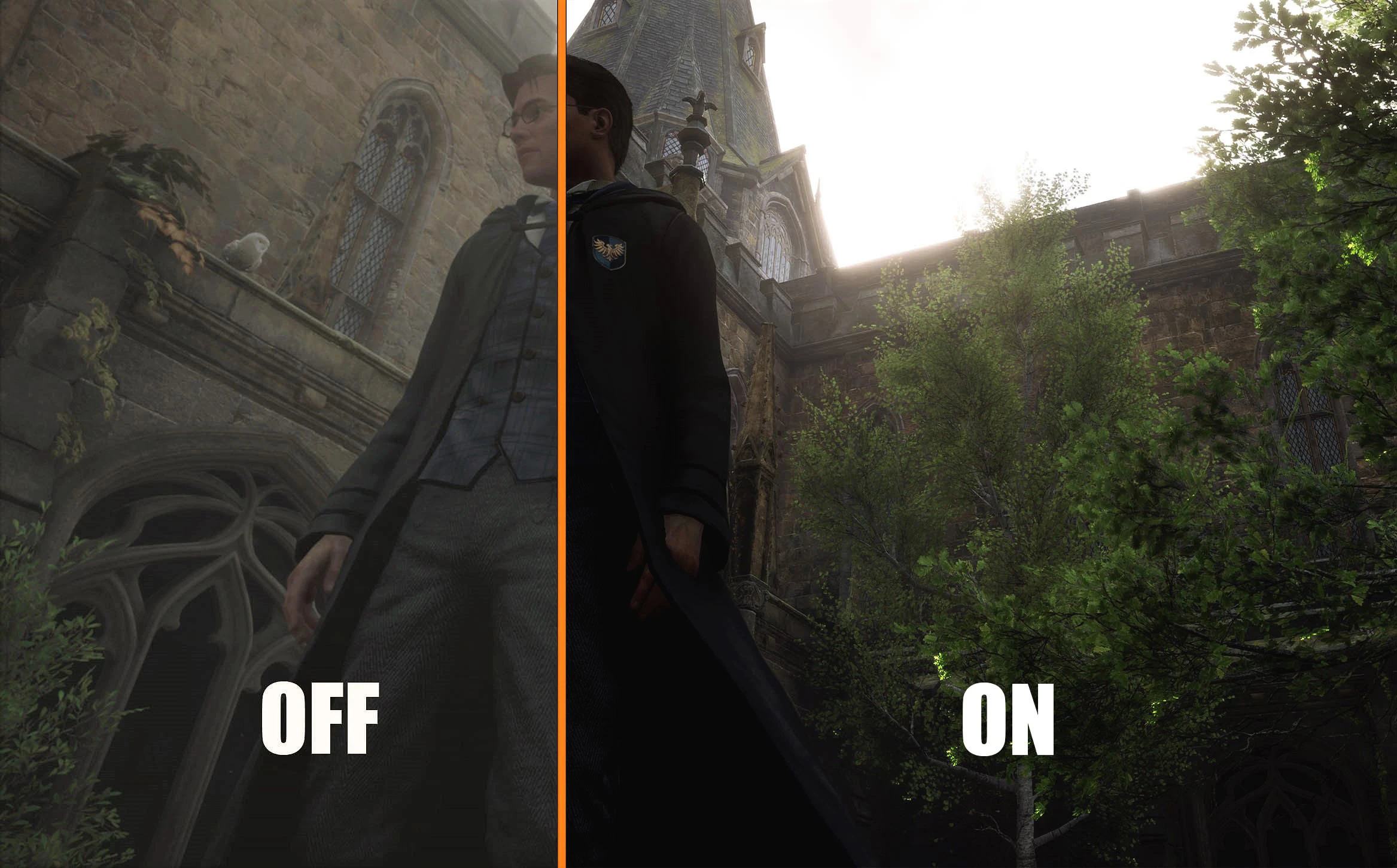
-Replace gray ambient light with sharper natural lighting, while maintaining the spirit of the game.
-Now colors are more "natural"
-I try my best to make the game less foggy
-Lighting sources look more realistic and brighter
-Contrast and luminosity are automatically adjusted according to the scene
This is a reshade preset, i did my best to keep de feeling of Hogwarts Legacy. I didn't want an overcontrasty or saturated reshade like many others.
This reshade has been optimized for the game's default brightness. I recommand set upscal sharpness of the game to 0 in "display option", as it's already corrected by the reshade.
Couldn't find a ReShade I was 100% happy with, so I make my own. I spent hours tweaking it in different locations to make it look good in most situations.
This is my first time on NexusMods, so if you have any problems feel free to report them.
If the preset doesn't match exactly what your looking for, here are some tips for you:
-If windows pop too much for you, you can decrease "bloom_adapt_exposure" of the Bloom shader
-If corners are too dark for you, you can decrease "gamma" of the Tonemap shader
Be careful, because it can change the rendering of other scenes.
My English can be a little clumsy, sorry for that :)
_______________________________________________________________________________________________________________
Shaders used:
1. LumaSharpen
4. Vibrance
6. Vignette
7. Clarity
Installation instructions:
-First Install Reshade:
> Download Reshade at https://reshade.me/
> Run the installer and run Reshade to select your game for the installation - You need to select HogwardLegacy.exe.
> Click Direct3D 10/11/12.
> Effect package needed in the list are :
- Standard effects
- AstrayFX
-After that, install NaturalLighting:
> Manual download through Nexus in the 'files' tab. There are different versions, you can download one or more
> Unzip 'NaturalLighting.ini' to your game main folder, probably C:\Program Files (x86)\Steam\steamapps\common\Hogwarts Legacy\Phoenix\Binaries\Win64
> Launch the game.
> In the bar at the top of your screen, Reshade will indicate that it has loaded successfully.
> Press the 'Home' button on your keyboard to bring up Reshade, then select NaturalL
This Reshade preset for Hogwarts Legacy replaces the game's washed-out gray lighting with sharper, more natural tones, reducing fog and enhancing color vibrancy while preserving the original atmosphere. With over 1,000 endorsements and 56,000 downloads, it's a popular choice for players seeking a visual upgrade without performance hits.
✨ Key Features
📊 Pros & Cons
✅ Pros
- Huge community trust with 1,049 endorsements and 56,955 downloads
- Delivers on its promise: less fog, more natural colors, and sharper light
- Performance-friendly, so you won't tank your FPS for better visuals
⚠️ Cons
- Requires Reshade, which some players find intimidating to set up
- No before/after screenshots in the description, so you're flying blind until you try it
- Last updated in 2023, so it might not be optimized for the latest game patches
For Hogwarts Legacy players who want a more vibrant, natural look without the heavy performance cost of other presets. If you're tired of the game's gray, foggy atmosphere and want a quick visual upgrade, this is for you. Skip if you prefer the original look or don't want to mess with Reshade.
💡 Beginner Tips
- Make sure to download the latest Reshade version and select Hogwarts Legacy's executable during installation.
- If the preset doesn't show up in-game, check that you've placed the files in the correct folder (usually the game's root directory).
- Use the in-game Reshade overlay (Home key) to tweak the preset's intensity to your liking.
📊 Mod Details
- Game
- Hogwarts Legacy Mods
- Author
- Chtictory
- Version
- 2.0
- Downloads
- 56,955
- Endorsements
- 1,049
- Category
- Visuals
- Created
- 2/13/2023
- Updated
- 2/16/2023
🔧 How to Install Hogwarts Legacy Mods
Download from Nexus.
📖 Full step-by-step install guide for Hogwarts Legacy →
Visit the official mod page for specific installation instructions for this mod.
🎮 Need cheat codes or console commands? Check ur gaming wiki for Hogwarts Legacy commands, item IDs, and more.
Keep browsing — more Hogwarts Legacy mods await