Final Flash - a Cinematic ReShade with DoF
⚪ Last updated 2018⚠️ Install Order · 1 step
Install in this order, then this mod last — most mods fail to load without their framework and dependencies in place.
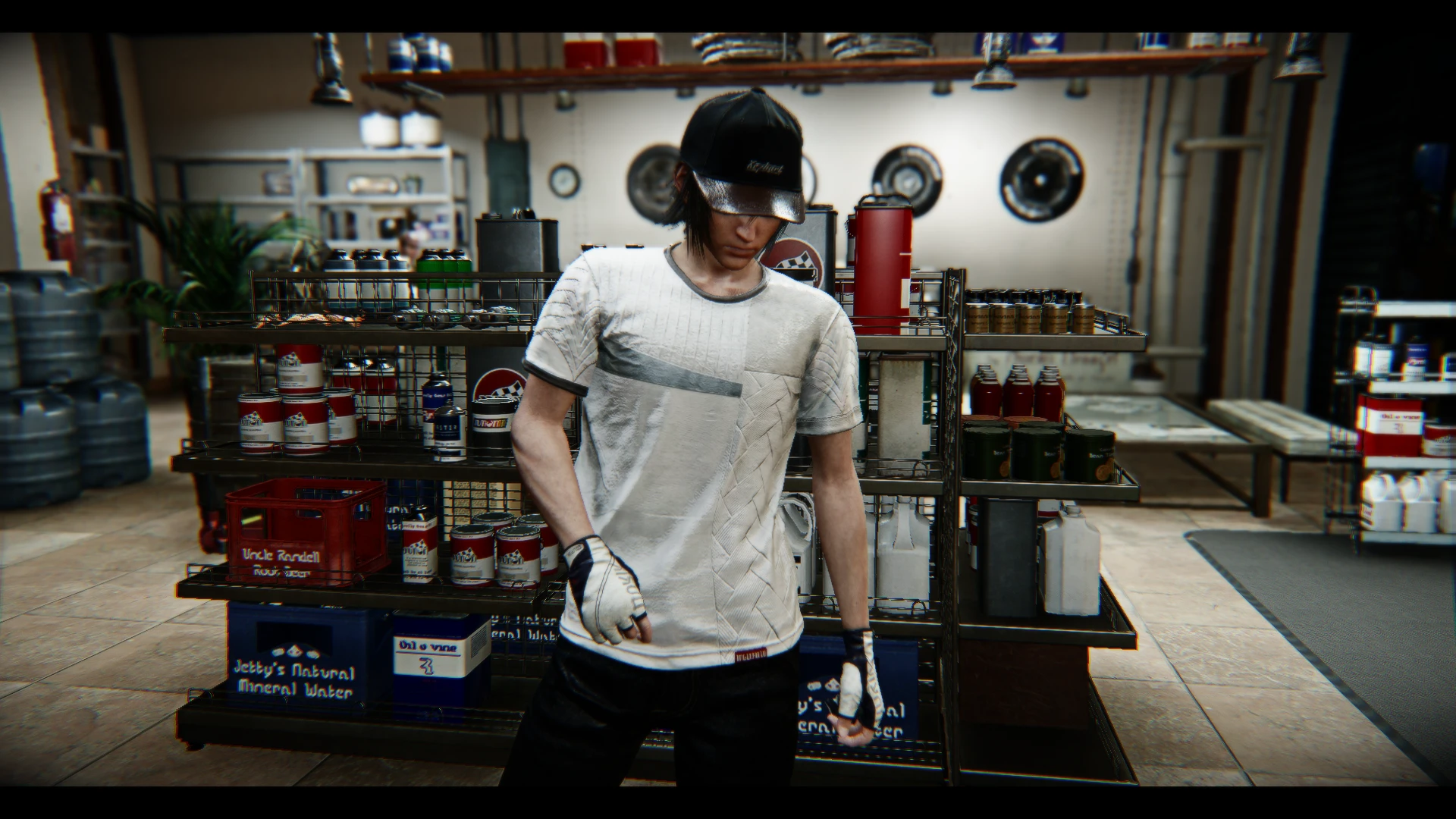
Preview
🔍 Analysis
- 👍 3.1% endorsement rate — high engagement, a strong quality signal
- 🏆 #3 of 19 Visuals mods in this game by downloads
📋 About This Mod
*Please note the new install instructions in the Critical section, even if just updating from a previous version. You must set the Far Plane to 10000 now as of version 1. 4.
Version 1. 4 includes a major rework of the DoF to make it both more cinematic, have more options, AND make it less intrusive in moment-to-moment gameplay. Also reworked film grain. More updates likely to come soon.
x67RSI8u41woHnSiBdwal8
INSTALLATION TUTORIAL VIDEO
clDk9ew838g
DESCRIPTION:
This uses the ReShade 3. 0 framework to deliver realistic and cinematic, knock-your-socks-off visuals. Almost every cinematic feature is on a toggle key... and there are many, DoF and lens flares to lens dirt, anamorphic camera distortion, and godrays. Please let me know if you need help disabling a feature or tweaking a setting to your liking.
Also, toggle off the reshade DoF with the division key on the numberpad during cutscenes to avoid unintended blur.
I've been working on this preset since the game launched, as in that's all I've done with the game instead of actually playing it, lol. I do hope the work shows.
CRITICAL INSTALL INSTRUCTIONS:
1) Once you've installed ReShade through the reshade.me page, you must then go to the in-game ReShade settings menu and make sure your settings are as follows:
RESHADE_DEPTH_LINEARIZATION_FAR_PLANE=10000. 0
RESHADE_DEPTH_INPUT_IS_UPSIDE_DOWN=0
RESHADE_DEPTH_INPUT_IS_REVERSED=0
RESHADE_DEPTH_INPUT_IS_LOGARITHMIC=1
Then, go back to the main "Home" reshade menu tab and click "reload" at the bottom of that reshade menu.
Failure to do this will render your entire screen either 100% blurry or give you odd ghost transparent projections everywhere DOF should be while Depth-of-Field (DoF) is on.
2) After finishing all the install steps below, you need to overwrite the default "reshade-shaders" folder with the one included in this download in your main Final Fantasy XV folder, where the game's .exe file is. Failure to do this will give you massive lens dirt splotches that are discolored and extremely bright bloom.
INSTALLATION INSTRUCTIONS:
1) Download latest version of ReShade from here: https://reshade.me/
2) Run the .exe in admin mode and selec
Final Flash is a cinematic ReShade preset for ReShade 3.0, offering realistic visuals with toggleable features like depth of field, lens flares, lens dirt, and anamorphic camera effects. With 137 endorsements and 4,461 downloads, it's a niche but appreciated visual overhaul for players seeking a movie-like experience.
✨ Key Features
📊 Pros & Cons
✅ Pros
- Community-approved with 137 endorsements and over 4,400 downloads
- Toggleable features give you control over the cinematic look
- Adds a dramatic, movie-like atmosphere to your game
⚠️ Cons
- Last updated in 2018 – may not work with current game versions or newer ReShade releases
- Requires ReShade 3.0 framework, which is outdated and may need manual setup
For players who want to transform their game into a cinematic experience with depth of field and lens effects. If you're comfortable with ReShade and enjoy tweaking visual presets, this is for you. Skip if you prefer vanilla graphics or want a plug-and-play solution without configuration.
💡 Beginner Tips
- Make sure you have ReShade 3.0 installed before adding this preset, as it's built specifically for that framework.
- Use the toggle keys to turn effects on/off in-game to find the perfect balance for your taste.
- If you're using a newer ReShade version, you may need to manually adapt the preset or use an older version for compatibility.
📊 Mod Details
- Game
- Finalfantasy15 Mods
- Author
- TheMercsAssassin
- Version
- 1.5-WIP
- Downloads
- 4,461
- Endorsements
- 137
- Category
- Visuals
- Created
- 3/16/2018
- Updated
- 3/18/2018
🔧 How to Install Final Fantasy XV Mods
Download from Nexus Mods.
📖 Full step-by-step install guide for Final Fantasy XV →
Visit the official mod page for specific installation instructions for this mod.
🎮 Need cheat codes or console commands? Check ur gaming wiki for Final Fantasy XV commands, item IDs, and more.
Keep browsing — more Final Fantasy XV mods await