Radio Tuner - Playback Export and Replace the Regalia's Music Library
⚪ Last updated 2020Preview
🔍 Analysis
- 👍 5.0% endorsement rate — high engagement, a strong quality signal
- 🏆 #1 of 9 Utilities mods in this game by downloads
📋 About This Mod
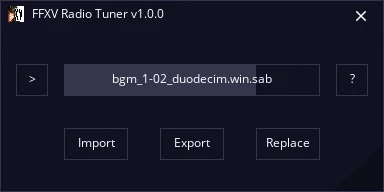
Radio Tuner is a simple application for Final Fantasy XV: Windows Edition to completely customize your roadtrip audio experience. Listen to built-in tunes outside the game, export them to your own MP3s, or add your own music library into the game via file replacement--all in a few clicks with a simple GUI.
Simply download and extract the contents of the .zip file anywhere on your hard drive. No installation is required.
Known Issues
-
[]Not all .sab/.mab files are compatible with Radio Tuner. You may receive error messages from the application itself or in-game audio may fail to play as expected. Use at your own risk!
[
]In-game audio length is limited 18 minutes max. If the replacement track is longer, it will be cut off.1. Unlock Music
Important! Before you can actually listen to any modified tracks, you must have unlocked them in-game. This can be achieved at many gas stations and other vendors throughout Eos who offer music albums for a small fee.
2. Import
Run FFXV Radio Tuner and wait for the application to load. Once it's ready, import a .sab file from your Final Fantasy XV's ...\SteamLibrary\SteamApps\common\FINAL FANTASY XV\datas\sound\resources\20000music\jp\ folder. This is where the Regalia's music is stored (as opposed to regular game soundtrack).
Once the file has been imported, you can listen to it directly within Radio Tuner. Click the Play button on the left to begin, and click anywhere in the center status box to adjust volume.
3. Export (Optional)
Radio Tuner features the ability to export FFXV audio to a variety of more common formats, such as MP3, OGG, and WAV. Find a tune you really like? Add it to playlists of your own!
4. Replace
To add your own music to Final Fantasy XV, you'll need to replace a built-in track. Once you've imported a track you have unlocked in the game, click Replace and navigate to the audio file you'd like to replace the in-game track with. Input audio files can be virtually any format, including MP3.
Important! .mab files are not currently replaceable.
Once a file has been selected, a backup of the original will be made (with the extension *.orig) and your track will be converted to FFXV format in its place. To verify everything worked correctly, import the file again and have a listen!
5. Commandline
Warning! Commandline execution is an advanced feature and has the potential to execute code that ma
Radio Tuner is a utility for Final Fantasy XV: Windows Edition that lets you customize the in-game radio. It allows exporting built-in tunes as MP3s and importing your own music library. With 766 endorsements and 15,257 downloads, it's a popular tool for players wanting to personalize their road trip audio.
✨ Key Features
📊 Pros & Cons
✅ Pros
- Community favorite with 766 endorsements and 15k downloads
- Gives you full control over the Regalia's radio, a feature many players wanted
- Simple utility that does exactly what it says—no bloat
⚠️ Cons
- Last updated in January 2020—may not work with the latest game patches
- Requires manual setup to get your music files in the right format
- No detailed instructions provided, so you might need to figure out some steps yourself
For Final Fantasy XV players who love road trips and want to hear their own tunes instead of the same old radio tracks. Also great for completionists who want to collect the game's music as MP3s. Skip if you're fine with the default soundtrack and don't care about customization.
💡 Beginner Tips
- Make sure your music files are in MP3 format before importing, as the tool likely expects that.
- Back up your original game files before replacing anything, just in case.
- Check the mod's forum or comments for user-made guides if you get stuck.
📊 Mod Details
- Game
- Finalfantasy15 Mods
- Author
- Lulech23
- Version
- 1.0.7
- Downloads
- 15,257
- Endorsements
- 766
- Category
- Utilities
- Created
- 3/16/2018
- Updated
- 1/12/2020
🔧 How to Install Final Fantasy XV Mods
Download from Nexus Mods.
📖 Full step-by-step install guide for Final Fantasy XV →
Visit the official mod page for specific installation instructions for this mod.
🎮 Need cheat codes or console commands? Check ur gaming wiki for Final Fantasy XV commands, item IDs, and more.
Keep browsing — more Final Fantasy XV mods await