Duscaen ReShade - An Episode Duscae Adjacent Shader
⚪ Last updated 2021⚠️ Install Order · 1 step
Install in this order, then this mod last — most mods fail to load without their framework and dependencies in place.
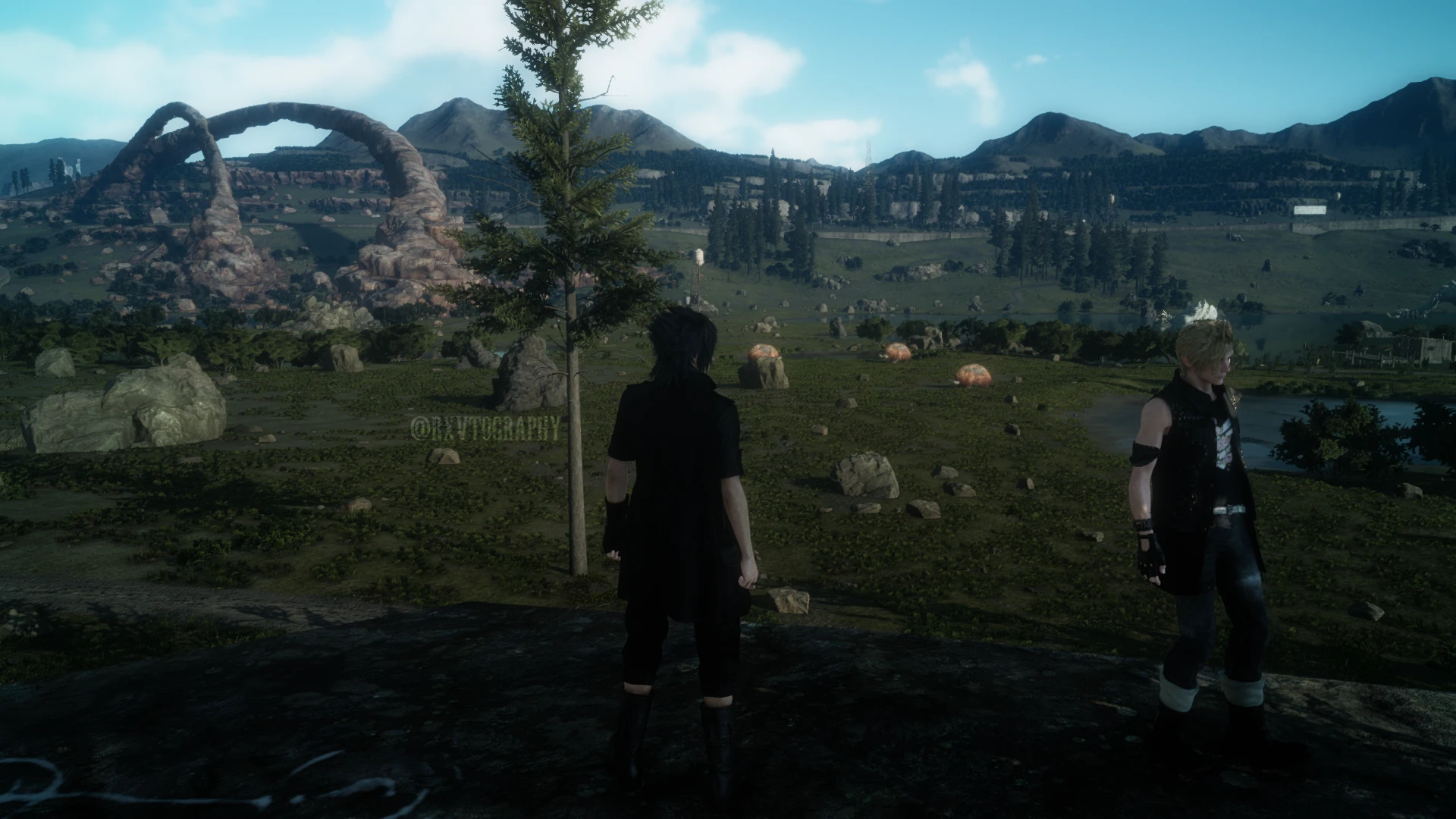
Preview
🔍 Analysis
- 🏆 #14 of 19 Visuals mods in this game by downloads
📋 About This Mod
I attempted to replicate what Episode Duscae looked like into ReShade to the best of my ability (I'm very new to using ReShade in general). Unfortunately (and obviously) it isn't exact since XV's game engine has changed since then. This is my very first actual mod, so I apologize if there are mistakes.
KEY FEATURES:
-
[]Applied bloom / glowing on/from bright surfaces
[
]Desaturated colours[]Applied blue vignette seen in ED
[]Higher contrast
[]Slight sharpening
INSTALLATION:
-
[]To install this shader, simply download it.
[]Assuming that you already have ReShade (Version 5. 0. 2) installed, unzip the file into your Final Fantasy XV contents folder where 'ffxv_s.exe' is located.
[]Load the game and open Reshade and select 'Duscaen ReShade' in the drop down menu.
If you do not have the latest version of ReShade, you can download it here.
DISCLAIMERS:
-
[]There will be visibility issues in darker areas and night time and the flashlight will be brighter due to hightened contrast of this shader.
[
]There may be a frame rate drop.[]Due to the change in game engine from ED to finalized XV, the water doesn't appear as realistic as it did in ED.
[]Some text over bright backgrounds will be difficult to read for some people. If need be, switch the shader off to read the text if you need to.
The mod I have installed for Noctis's shirt is made by CommanderBoxers
┈┈┈┈┈┈┈┈┈┈┈┈┈┈┈┈┈┈┈日本語:
私はまだ日本語を勉強していますが、流暢に話せるほどではないので、翻訳者に頼っています。理解するのは難しくないことを願っています。
ReShadeを使用してエピソード ダスカの外観を可能な限り複製しようとしました(私はReShadeでの作業に不慣れです)。残念ながら、そして明らかに、それ以来XVのゲームエンジンが変更されたため、正確ではありません。これは私の最初の実際のmodなので、間違いがあった場合はお詫びします。
最も顕著な機能:
※明るい表面の輝きを持つアプライドブルーム
※エピソードダスカで見られる適用された青いビネット
インストールする方法:
1.このシェーダーをインストールするには、ダウンロードしてください。
2. ReShade(バージョン5. 0. 2)がすでにインストールされている場合は、ファイルを「ffxv_s.exe」が配置されているファイナルファンタジーXVコンテンツフォルダーに解凍します。
3.ゲームをロードしてReshadeを開き、ドロップダウンメニューで「DuscaenReShade」を選択します。
ReShadeの最新バージョンをお持ちでない場合は、此処からダウンロードできます。
免責事項:
※このシェーダーのコントラストが高いと、暗い場所や夜間に視界の問題が発生し、懐中電灯も明るくなります
※フレームレートが低下する可能性があります
※ゲームエンジンがエピソードダスカから完成したXVに変更されたため、水はエピソードダスカのようにリアルに見えません
※明るい背景のテキストの中には、一部の人にとっては読みにくいものがあります。必要に応じて、シェーダーをオフにしてテキストを読みます。
私の写真のノクティスシャツにインストールされているmodはCommanderBoxersによって作られています。
-
[]There will be visibility issues in darker areas and night time and the flashlight will be brighter due to hightened contrast of this shader.
-
[]To install this shader, simply download it.
A ReShade preset for Final Fantasy XV that aims to replicate the visual style of the Episode Duscae demo. It's a niche visual mod with no endorsements and a modest download count, last updated in 2021.
✨ Key Features
📊 Pros & Cons
✅ Pros
- Aims to bring back the unique look of Episode Duscae for fans of the original demo
- Simple concept: just a shader preset, no complex gameplay changes
- Decent download count (372) despite zero endorsements
⚠️ Cons
- Zero endorsements — no community validation yet
- Last updated in 2021 — may not work with the latest game patches or ReShade versions
For Final Fantasy XV players who miss the visual style of the Episode Duscae demo and want to recreate it in the main game. Skip if you're not into tweaking graphics with ReShade or prefer a more modern look.
💡 Beginner Tips
- Make sure you have ReShade installed and set up for Final Fantasy XV before adding this preset.
- After applying the preset, tweak the shader settings in-game using the ReShade overlay to match your taste.
- Check the mod's comments or forum posts for any user-reported compatibility fixes, since the author didn't provide instructions.
📊 Mod Details
- Game
- Finalfantasy15 Mods
- Author
- RXVTOGRAPHY
- Version
- 1.0
- Downloads
- 372
- Endorsements
- 0
- Category
- Visuals
- Created
- 9/7/2021
- Updated
- 9/7/2021
🔧 How to Install Final Fantasy XV Mods
Download from Nexus Mods.
📖 Full step-by-step install guide for Final Fantasy XV →
Visit the official mod page for specific installation instructions for this mod.
🎮 Need cheat codes or console commands? Check ur gaming wiki for Final Fantasy XV commands, item IDs, and more.
Keep browsing — more Final Fantasy XV mods await