Pure Light for FFXV
⚪ Last updated 2018⚠️ Install Order · 1 step
Install in this order, then this mod last — most mods fail to load without their framework and dependencies in place.
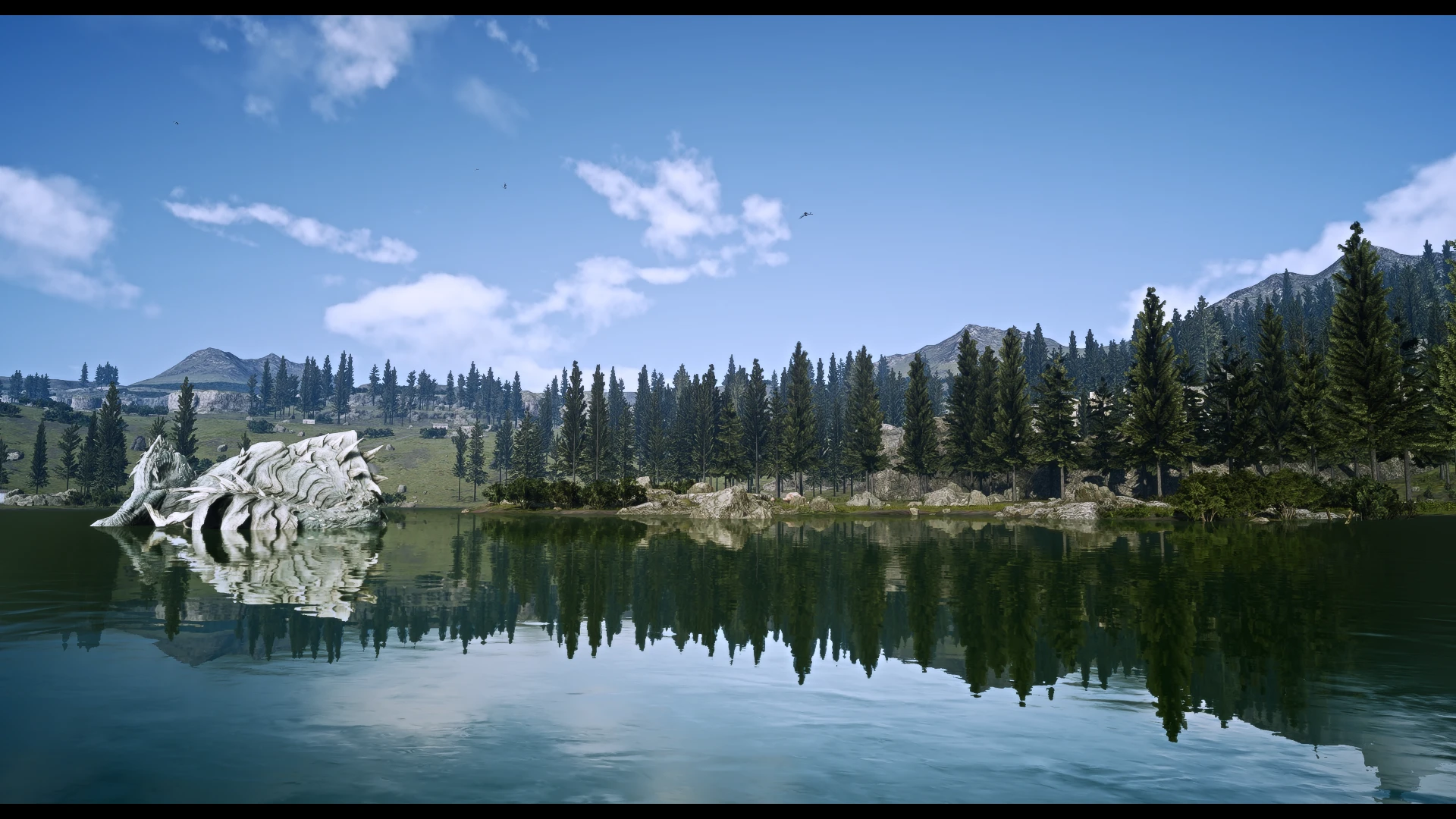
Preview
🔍 Analysis
- 👍 4.1% endorsement rate — high engagement, a strong quality signal
- 🏆 #1 of 19 Visuals mods in this game by downloads
📋 About This Mod
9u67eIqa3Kw
Some of the features of this preset:
-
[]Slighty altered color palette (less yellow) for a more cinematic feel (and a deeper blue sky on sunny days).
[
]Darker shadows & improved ambient light (e.g. darkens places which are not well lit) for a more realistic feel.[]Sharper textures. This preset reduces the blurriness FFXV has due to antialiasing.
[]Higher luminance of the sun: the sun feels more powerful and objects which are illuminated by the sun are brighter.
[]The nights are slighty darker, light sources during nights appear slighty brighter.
[]Enhanced reflections on objects like rocks.
[]You can toggle the border with F3 in case you don't like it.
Installation:
-
[]Download the zip file under the files section and extract its content into the FFXV games folder (located at ./Steam/steamapps/common/FINAL FANTASY XV).
[]For the activation of this preset you need to put the game in borderless mode. Press "Shift + F2" to open the Reshade Menu. IMPORTANT: you need to "Alt + Tab" out of the game and return to it in order to access your mouse while the Reshade menu is active!
[]Now activate the preset by selecting the "Pure Light.ini" from the drop down list.
[]Now the preset should be active and can be toggled with the "Scroll Lock" Key.
[]I recommend setting "filtering" to low in the graphics settings. My full graphics settings are listed below under "performance".
Delete the files "dxgi.dll", "dxgi.ini", "Pure Light.ini" and the folder "reshade-shaders" from your FFXV games folder.
Performance & Graphics Settings:
The hit on performance depends on the hardware. On my system (GTX 1080, Intel i7 6700, 16 GB Ram) the fps-hit varies between 5 and 15 fps. Here are my graphics settings for FFXV with which I created the preset and took the screenshots:
[]Resolution: 100%
[]Assets: On (primary because of the increased grass density that comes with the texture pack)
[]Model LOD: High
[]TRAM: Highest
[]Anisotropic Filtering: High
[]Geomapping: Off (there are only a few places where I even notice the effect so I turned it off for better performance)
[]Lighting: High (Highest doesn't look better IMO but slightly decreases performance)
[]Shadows: Highest for th
-
[]Download the zip file under the files section and extract its content into the FFXV games folder (located at ./Steam/steamapps/common/FINAL FANTASY XV).
Pure Light for FFXV is a ReShade preset by Urquath that enhances the game's visuals with a cinematic, photorealistic look. It has 1,168 endorsements and 28,335 downloads, last updated in May 2018. Ideal for players seeking a film-like atmosphere without heavy modding.
✨ Key Features
📊 Pros & Cons
✅ Pros
- Community-approved with 1,168 endorsements
- High download count (28,335) shows real interest
- Simple preset—just drop in and tweak to taste
⚠️ Cons
- Last updated in 2018—may not be compatible with current game patches or ReShade versions
- Requires ReShade, which isn't included and needs separate setup
For FFXV players who want a quick visual upgrade with a cinematic, photorealistic feel without diving into complex modding. Skip if you prefer vanilla graphics or want gameplay changes—this is purely cosmetic.
💡 Beginner Tips
- Make sure ReShade is installed and configured for FFXV before applying this preset.
- After installing, use ReShade's in-game overlay to adjust intensity to your liking.
- Check the mod's comments for any compatibility notes with the latest game version.
📊 Mod Details
- Game
- Finalfantasy15 Mods
- Author
- Urquath
- Version
- 1.0
- Downloads
- 28,335
- Endorsements
- 1,168
- Category
- Visuals
- Created
- 5/17/2018
- Updated
- 5/18/2018
🔧 How to Install Final Fantasy XV Mods
Download from Nexus Mods.
📖 Full step-by-step install guide for Final Fantasy XV →
Visit the official mod page for specific installation instructions for this mod.
🎮 Need cheat codes or console commands? Check ur gaming wiki for Final Fantasy XV commands, item IDs, and more.
Keep browsing — more Final Fantasy XV mods await