Tag and plan model number (jp.strings)
🟡 Updated this yearPreview
🔍 Analysis
- 👍 1.7% endorsement rate — high engagement, a strong quality signal
- ✅ Updated 0 day after the latest game patch — actively maintained
- 🏆 #58 of 116 User Interface mods in this game by downloads
📋 About This Mod
sorry. This is a file for Japanese people.
日本人向けの文字列ファイル。使い方はfallout76のDETAフォルダに、stringsフォルダごといれてください。
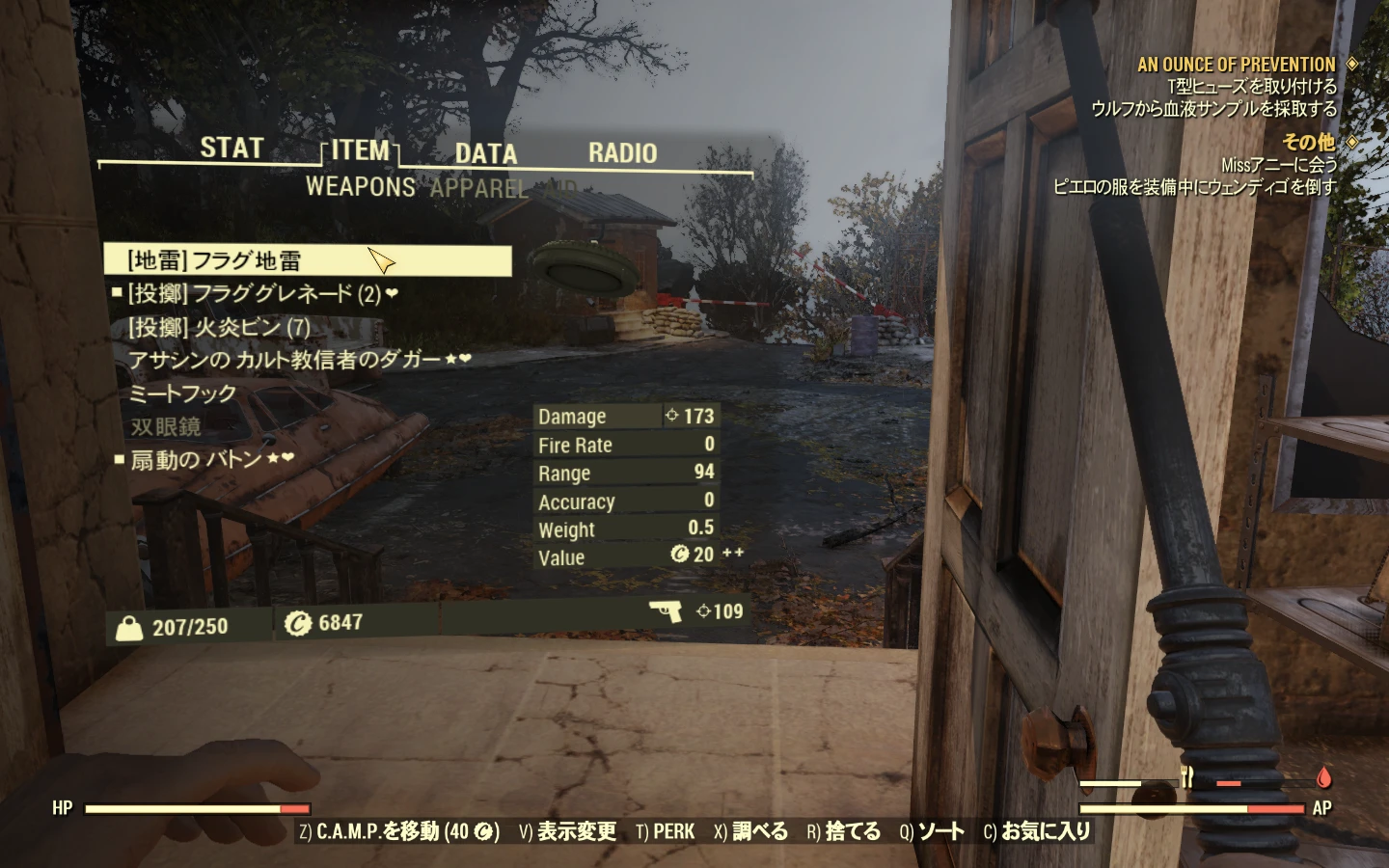
元々はどの設計図をもっているかメモをとれるように、設計図に型番をいれるために作っていました。今は使用済みのものがわかるようになったので、とにかくアイテム欄がスッキリ見られるようないろいろなタグを追加してます。ジャンクは(バルク)(素材)[種類] {バラク} AIDは((きれいな水、沸騰した水)、((総重量が増える料理)、(ヌカコーラや犬のエサ)などのパークに関係あるもの、(薬品、医薬品)、[酒類、食料、飲料、飲食]、{汚染、腐敗、発酵中の酒}など。飲食はスープなどです。レジェンダリには最初に★、◆、ユニーク品には☆、◇がつきます。他に地雷と手榴弾、メモとホロテープ、帽子や服などタグ付けして ます。
パーク選択時にマスターやエキスパートでバラバラに表示されるパークがまとめて表示されるように、語順を調整しました。
『Master 〇〇』 → 『〇〇 Master』
誤訳とされつつ特に修正されない敵の名前や、メモ、ホロテープの名前、バグでズレて表示されるコレクトロンのセリフの翻訳、一部のわかりにくい翻訳、ちょくちょく巻き戻る翻訳など気になったところをちょこちょこと直してます。
またインベンリ内でバラバラに表示されがちな服の名前についても手を加え、同系統のものが固まって表示されるようになりました。
くたびれた病院職員の制服 → [衣服] 病院職員の制服(くたびれた)
ナース制服 → [衣服] 病院職員の制服(ナース制服)
フィールドスクライブの制服 → [衣服] B. O. S.フィールドスクライブの制服
儀式の縁飾り → [衣服] カルト教の儀式の縁飾り
A Japanese language string file for Fallout 76 that adds tags to item names for better inventory sorting, reorders perk names, and fixes various mistranslations. It has 156 endorsements and 9,298 downloads, last updated July 2026. For Japanese-speaking players who want a cleaner inventory UI.
✨ Key Features
📊 Pros & Cons
✅ Pros
- Community-approved with 156 endorsements and nearly 10k downloads.
- Actively maintained — last updated July 2026.
- Solves real inventory clutter issues with smart tagging and renaming.
⚠️ Cons
- Japanese-only — no English translation or support for non-Japanese players.
- Requires manual installation into the game's DETA folder, which may confuse less technical users.
- Only affects Japanese text strings; no impact on gameplay or other languages.
For Japanese-speaking Fallout 76 players who want a cleaner, more organized inventory and better readability. If you play in English or another language, this mod won't help you. Skip if you're looking for gameplay changes — this is purely a text/UI tweak.
💡 Beginner Tips
- Place the 'strings' folder directly into the DETA folder in your Fallout 76 installation directory — don't merge it with other folders.
- Make sure to back up the original string files before replacing, so you can revert if needed.
- If you use a mod manager, you may need to manually copy files since this mod is designed for manual installation.
📊 Mod Details
- Game
- Fallout 76 Mods
- Author
- Color panda
- Version
- VER3.82
- Downloads
- 9,298
- Endorsements
- 156
- Category
- User Interface
- Created
- 12/1/2018
- Updated
- 7/21/2026
🔧 How to Install Fallout 76 Mods
Use Vortex. Place .ba2 files in Data folder. Use cautiously online.
📖 Full step-by-step install guide for Fallout 76 →
Visit the official mod page for specific installation instructions for this mod.
🎮 Need cheat codes or console commands? Check ur gaming wiki for Fallout 76 commands, item IDs, and more.
Keep browsing — more Fallout 76 mods await