ShowHealth
⚪ Last updated 2019Preview
🔍 Analysis
- 👍 4.8% endorsement rate — high engagement, a strong quality signal
- 🏆 #41 of 116 User Interface mods in this game by downloads
📋 About This Mod
Description
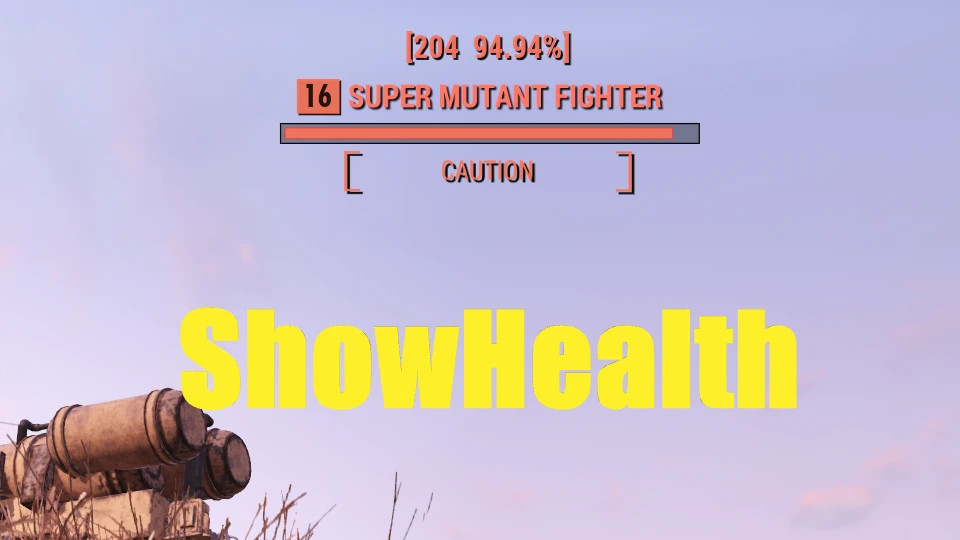
ShowHealth simply shows target's health above the name bar.
Could be helpful to test weapon damage or monitor boss HP.
The ability to show actual hp value needs language support.
It will only shows hp percentage when playing with languages not in the list below.
ShowHealth currently support:
English, French, Korean, Japanese, Chinese simplified, Chinese traditional, Russian, Spanish, Polish
Polish support has been added to ShowHealth.
Changed some Spanish keywords.
Installation
1. Extract ShowHealth.ba2 into "...\Fallout76\Data"
2. Create "...\Fallout76\Fallout76Custom.ini", copy and paste the following two lines into Fallout76Custom.ini:
SResourceArchiveList2 = ShowHealth.ba2
Compatibility
This mod modifies the hudmenu.swf file and will not be compatible with other mods that do so.
Future game updates to this file may need an update to this mod.
ShowHealth is a UI mod for Fallout 76 that displays target health above the name bar, aiding in damage testing and boss monitoring. It supports multiple languages, but non-supported languages only show percentages. Requires manual installation and a custom INI edit.
✨ Key Features
📊 Pros & Cons
✅ Pros
- Community-trusted with 697 endorsements and 14,454 downloads.
- Simple, focused feature that helps with damage testing and boss HP monitoring.
- Supports a wide range of languages for actual HP display.
⚠️ Cons
- Last updated in 2019 — may be incompatible with current game updates.
- Modifies hudmenu.swf, so it conflicts with any other mod touching that file.
- Non-supported languages only get percentage display, not actual HP values.
For Fallout 76 players who want a quick, at-a-glance view of enemy health, especially for testing weapon damage or tracking boss HP. If you play in a supported language and don't use other UI mods, this is a handy lightweight addition. Skip it if you rely on other mods that modify the HUD or if you need actual HP in an unsupported language.
💡 Beginner Tips
- Make sure to create Fallout76Custom.ini in the Fallout 76 root folder, not in Documents, and paste the exact line SResourceArchiveList2 = ShowHealth.ba2.
- If you use other UI mods, check if they also modify hudmenu.swf — this mod will conflict with them.
- After installing, verify the health display appears above enemy name bars; if not, double-check the INI syntax.
📊 Mod Details
- Game
- Fallout 76 Mods
- Author
- pepezoro
- Version
- 1.23
- Downloads
- 14,454
- Endorsements
- 697
- Category
- User Interface
- Created
- 12/21/2018
- Updated
- 1/15/2019
🔧 How to Install Fallout 76 Mods
Use Vortex. Place .ba2 files in Data folder. Use cautiously online.
📖 Full step-by-step install guide for Fallout 76 →
Visit the official mod page for specific installation instructions for this mod.
🎮 Need cheat codes or console commands? Check ur gaming wiki for Fallout 76 commands, item IDs, and more.
Keep browsing — more Fallout 76 mods await