Old Mappalachia Maps
⚪ Last updated 2019Preview
🔍 Analysis
- 👍 3.5% endorsement rate — high engagement, a strong quality signal
- 🏆 #89 of 116 User Interface mods in this game by downloads
📋 About This Mod
This mod is now obsolete.
There are better quality map mods with many more options than this one.
I recommend TZMap.
You can use TZMap's BuildersPack or Mappalachia to create your own maps.
---------------------------------------------------------------------------------------------------------------------------------------------------------------------------------------------------------------------------------------------
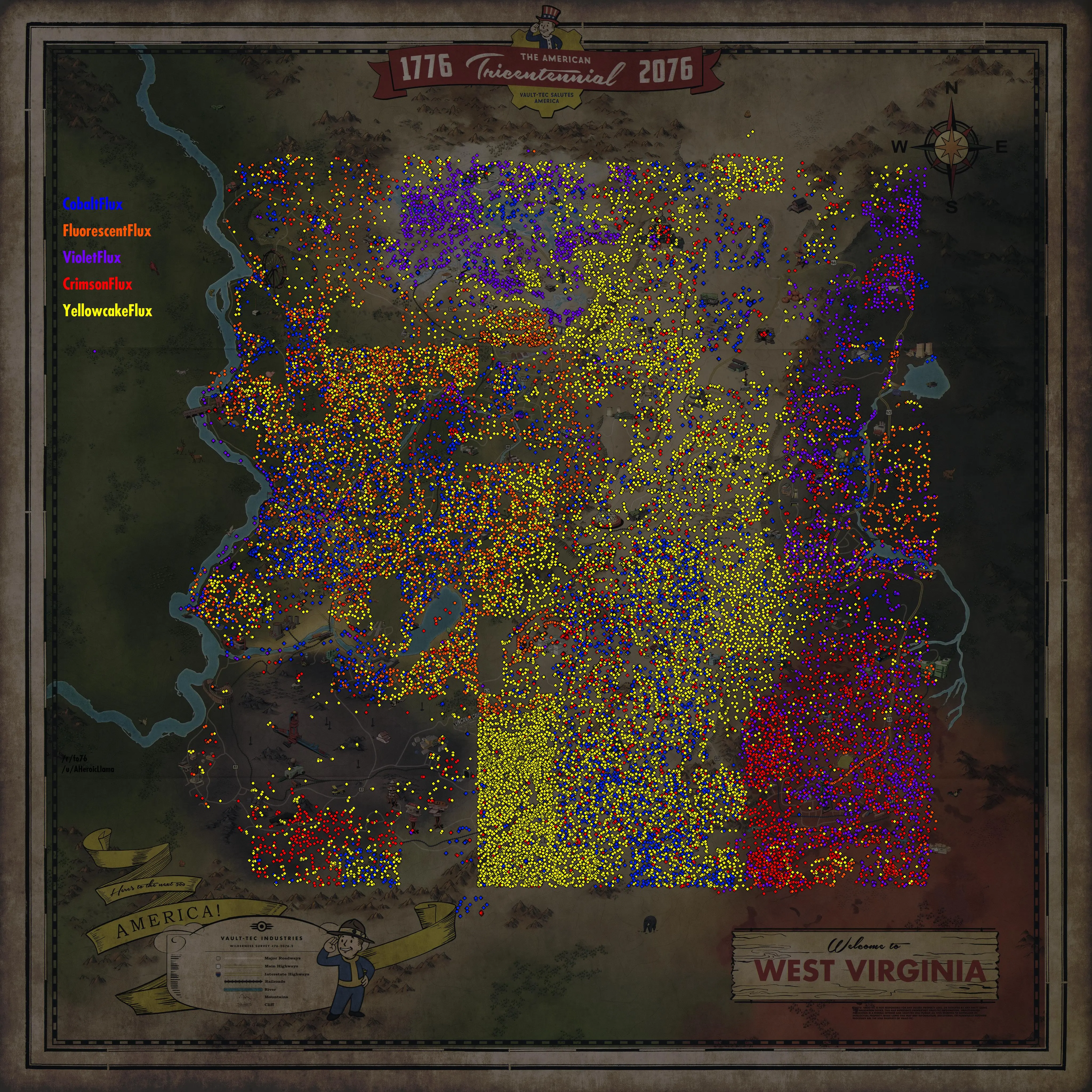
Replaces your map with one of the maps from the Mappalachia project by u/AHeroicLlama on Reddit: https://www.reddit.com/r/fo76/comments/bmwpx9
Installation
1. Extract the contents from the zipped file to the Data folder of the game files.
a) Bethesda.net version: C:\Program Files (x86)\Bethesda.net Launcher\games\Fallout76\Data
b) Steam version: C:\Program Files (x86)\Steam\steamapps\common\Fallout76\Data
2. Open Fallout76Custom.ini located in %UserProfile%\Documents\My Games\Fallout 76
3. Add the name of the extracted file (Mappalachia.ba2), including the extension (.ba2), (and a comma before it if you already have other mods installed) at the end of the line with sResourceArchive2List (You can find the line by pressing Ctrl+F and typing sResourceArchive2List)
Example: sResourceArchive2List=OtherMods.ba2,Mappalachia.ba2
4. Save the changes to Fallout76Custom.ini
If you don't have Fallout76Custom.ini, copy Fallout76.ini and rename the copy to Fallout76Custom.ini
My other mods
This mod replaces the Fallout 76 map with a version from the Mappalachia project, but the author has marked it obsolete and recommends TZMap instead. It has 156 endorsements and 4,410 downloads, last updated in 2019. Suitable for players wanting a different map look, though better alternatives exist.
✨ Key Features
📊 Pros & Cons
✅ Pros
- Decent community traction with 156 endorsements and 4,410 downloads
- Clear installation instructions provided by the author
- Author is honest about the mod's status and points to better alternatives
⚠️ Cons
- Officially obsolete — author recommends TZMap instead
- Last updated in 2019, so likely incompatible with current game patches
- Only replaces the map; no additional features or options
For Fallout 76 players who want a different map aesthetic and are okay with an older, unsupported mod. If you're looking for a modern, feature-rich map replacement, skip this and go with TZMap as the author suggests.
💡 Beginner Tips
- Make sure to back up your Fallout76Custom.ini before editing it, so you can revert if something goes wrong.
- If you don't have Fallout76Custom.ini, copy Fallout76.ini and rename it — the game will read it as a custom ini.
- Since the mod is obsolete, test it in-game after installation; if the map doesn't appear, consider switching to TZMap.
📊 Mod Details
- Game
- Fallout 76 Mods
- Author
- AHeroicLlama
- Version
- 1.3.0
- Downloads
- 4,410
- Endorsements
- 156
- Category
- User Interface
- Created
- 5/19/2019
- Updated
- 6/30/2019
🔧 How to Install Fallout 76 Mods
Use Vortex. Place .ba2 files in Data folder. Use cautiously online.
📖 Full step-by-step install guide for Fallout 76 →
Visit the official mod page for specific installation instructions for this mod.
🎮 Need cheat codes or console commands? Check ur gaming wiki for Fallout 76 commands, item IDs, and more.
Keep browsing — more Fallout 76 mods await