Imperfect Ultrawide
⚪ Last updated 2019Preview
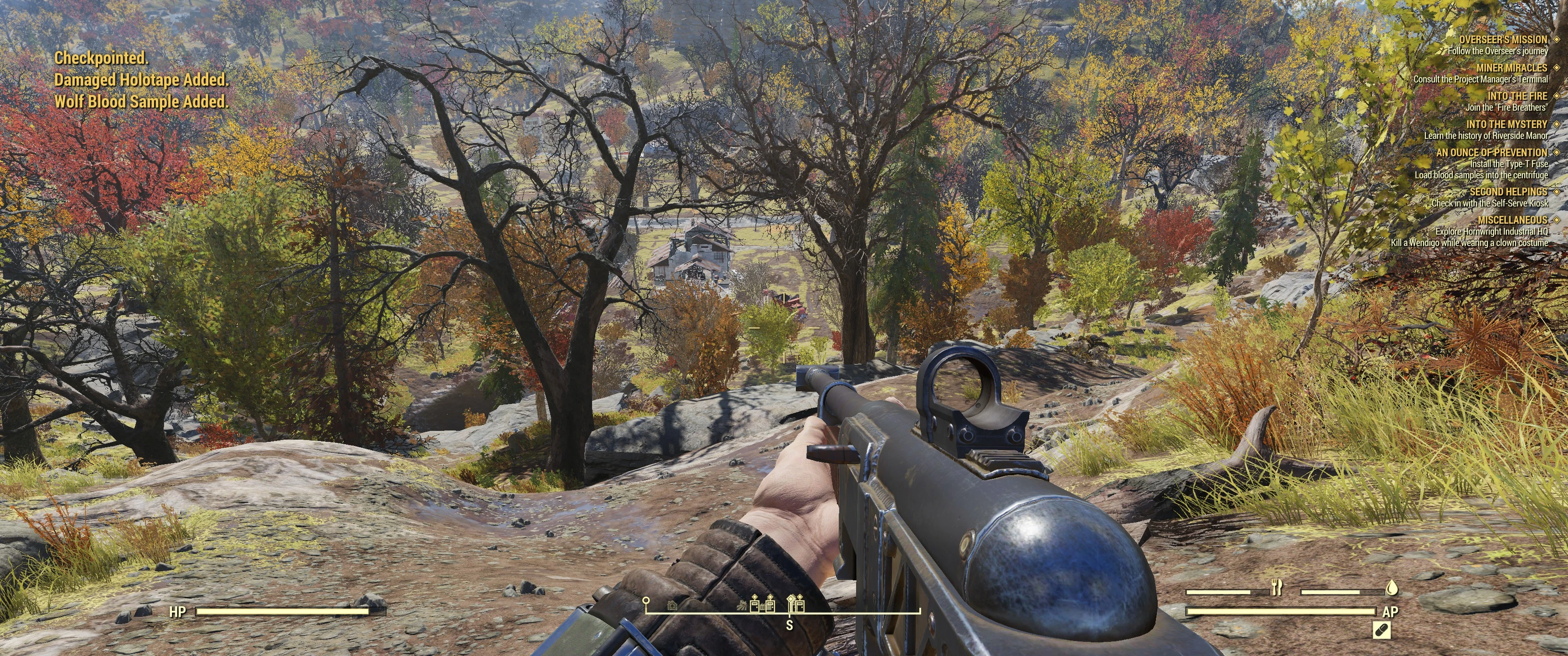
🔍 Analysis
- 👍 2.5% endorsement rate — high engagement, a strong quality signal
- 🏆 #62 of 116 User Interface mods in this game by downloads
📋 About This Mod
THIS MOD IS NO LONGER BEING MAINTAINED, IT WILL NOT WORK FOR CURRENT VERSIONS.
Please head over to Unstretched Ultrawide for a less in-depth but working fix for 21:9.
For those wanting a fix for 32:9 or some other crazy resolution, you'll want to look up JPEXS FFDEC, and get an extraction tool for betheda's files. I recommend their own Archive2, however baka should also work. Movement of elements is done by finding the 'matrix' sub element inside the different 'frames'. This used to be much easier to see before Bethesda started better general support for ultrawide, since all the elements would actually play out their animations. Now you have to actually go into games to see what your change did for some stuff because it's just invisible on the previews. Otherwise it'll just take a lot of guesswork on your part.
FO76 Version compatibility: 1. 2. 0. 15
A note before digging in:
This specific edit has been formatted for 3440x1440 specifically and will run great. I have not tested 2560x1080, but from having modded the files, I can tell you there will be some oddities, most of which will include elements that are on the right to likely appear slightly off screen. ((I haven't heard of anything being off enough to make a difference, and no one has stated specifically that it does look weird, so I'm assuming it's ok))
As a side, I have FINALLY figured out a ba2 setup that works! For those who are changing from loose files to the ba2 archive, you will need to delete the loose files first, as loose files overwrite the ba2 archive. Unfortunately, the ba2 version no longer works, and I cannot figure out why. Until I can figure it out, we are limited to using the baka tool once again. (Why, I have no idea. The baka file tool MAKES A BA2 FILE. THAT ONE WORKS. WHY?!)
---------------- INSTALLATION: ----------------
READ ALL THE DIRECTIONS! Power armor requires an ini file edit!
First thing's first, the creation of Fallout76Custom.ini. Go to C:\Users\******\Documents\my games\Fallout 76
Create a new file named Fallout76Custom.ini and add in:
fUIPowerArmorGeometry_TranslateY=265 << This setting is REQUIRED (power armor UI will look bad without it)
fHUD3DModelScreenPosX=0. 70 << (recommended, it moves the weapon popup for legendaries, it will appear to the side and doesn't interrupt where you aim)
{{ You no longer need to edit TranslateZ (most likely)! My translate setting is for those using fDefaultFOV=80 under . If you set it to 90, you'll probably want 270. If you haven't changed it, you should probably use 260. In the case you haven't edited that particular FOV setting, you may need to also set fUIPowerArmorGeometry_TranslateZ=1, however this shouldn't be necessary unless your compass clips the bottom of the screen. }}
Go to Fallout76prefs.ini file and set it to READ-ONLY. I recommend accomplishing this step only after you've set all your in-game settings, as locking the Fallout76Prefs.ini file will lock out any control edits. (I don't know why this is, as the controls are saved elsewhere...)
Ba2 Installation:
1. Drop the ImpUlt.ba2 file into the Data folder.
2. Create a file (or modify if you already have it) called Fallout76Custom.ini in the folder Documents\my games\Fallout 76
3. Add ImpUlt.ba2 to:
sResourceStartUpArchiveList=SeventySix - Interface.ba2, SeventySix - Localization.ba2, SeventySix - Shaders.ba2, SeventySix - Startup.ba2, ImpUlt.ba2
3a. This can also be put behind any other startup mod. Unfortunately, it is required to be in this list for the mod to fully function.
4. Add IUMesh.ba2 to:
sResourceArchive2List=SeventySix - 00UpdateMain.ba2, SeventySix - 01UpdateMain.ba2, SeventySix - 00UpdateStream.ba2, SeventySix - 01UpdateStream.ba2, SeventySix - 00UpdateTextures.ba2, SeventySix - 01UpdateTextures.ba2, SeventySix - MeshesExtra.ba2, SeventySix - 02UpdateMain.ba2, SeventySix - 03UpdateMain.ba2, SeventySix - 04UpdateMain.ba2, SeventySix - 02UpdateStream.ba2, SeventySix - 03UpdateStream.ba2, SeventySix - 04UpdateStream.ba2, SeventySix - 02UpdateTextures.ba2, SeventySix - 03UpdateTextures.ba2, SeventySix - 04UpdateTextures.ba2, SeventySix - GeneratedMeshes.ba2, SeventySix - StaticMeshes.ba2, SeventySix - 05UpdateMain.ba2, SeventySix - 06UpdateMain.ba2, SeventySix - 07UpdateMain.ba2, SeventySix - 05UpdateStream.ba2, SeventySix - 07UpdateStream.ba2, SeventySix - 05UpdateTextures.ba2, SeventySix - 06UpdateTextures.ba2, SeventySix - 07UpdateTextures.ba2, IUMesh.ba2 ((Get this list updated e
Imperfect Ultrawide is an abandoned UI mod for Fallout 76 that fixes 21:9 ultrawide support for version 1.2.0.15. It is no longer maintained and won't work with current game versions. The author recommends Unstretched Ultrawide as a working alternative. It has 212 endorsements and 8,578 downloads.
✨ Key Features
📊 Pros & Cons
✅ Pros
- Community-tested with 212 endorsements and 8,578 downloads
- Specifically tuned for 3440x1440, which is a common ultrawide resolution
- Author provides detailed instructions for manual file editing
⚠️ Cons
- Abandoned since 2019 and won't work with current game versions
- Only tested for 3440x1440; 2560x1080 may have off-screen elements
- The ba2 archive version is broken, requiring loose files and extra tools
For Fallout 76 players stuck on an old game version who want a proper 21:9 UI fix. If you're on a current version, skip this and grab Unstretched Ultrawide instead. Not for anyone expecting ongoing support or compatibility with modern patches.
💡 Beginner Tips
- If you're on a current Fallout 76 version, don't install this—use Unstretched Ultrawide instead.
- When using loose files, make sure to delete them before trying the ba2 archive, as loose files override archives.
- For 32:9 or other resolutions, you'll need JPEXS FFDEC and an extraction tool like Archive2 or baka—be prepared for manual matrix tweaking.
📊 Mod Details
- Game
- Fallout 76 Mods
- Author
- Matakor
- Version
- 13.3
- Downloads
- 8,578
- Endorsements
- 212
- Category
- User Interface
- Created
- 11/1/2018
- Updated
- 6/17/2019
🔧 How to Install Fallout 76 Mods
Use Vortex. Place .ba2 files in Data folder. Use cautiously online.
📖 Full step-by-step install guide for Fallout 76 →
Visit the official mod page for specific installation instructions for this mod.
🎮 Need cheat codes or console commands? Check ur gaming wiki for Fallout 76 commands, item IDs, and more.
Keep browsing — more Fallout 76 mods await