Compatible Weight Indicator
⚪ Last updated 2024Preview
🔍 Analysis
- 👍 3.2% endorsement rate — high engagement, a strong quality signal
- 🏆 #60 of 116 User Interface mods in this game by downloads
📋 About This Mod
Description:
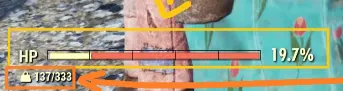
This is my second mod ever, and the first "compatible" one following Compatible Show Health Redux approach, it is just a weight indicator in the main hud.
How to install (Description was copied from Keretus): (if your are using the game pass version then paths and config file name are differente)
-
[]Extract the CompatibleWeightIndicator.ba2 file to your Fallout 76 Data folder (default: C:\Program Files (x86)\Bethesda.net Launcher\games\Fallout76\Data)
[
]Navigate to your Fallout 76 settings folder in "My Games" (default: %USERPROFILE%\Documents\My Games\Fallout 76)[]If this is your first mod, extract the optional "Fallout76Custom.ini" file to the current directory. Otherwise, append the name of the new archive, "CompatibleWeightIndicator.ba2", to the list, separated by a comma, like so:
sResourceArchive2List = CompatibleWeightIndicator.ba2
Compatibility:
-
[]I have followed the copatibility mod of Bilbo164, this mod is a stand alone script tested successfully with Compatible Show Health Redux and Segmented Health Bar using the following load order:
sResourceArchive2List=CompatibleShowHealthRedux.ba2,CompatibleWeightIndicator.ba2,SegmentedHealthBar.ba2
How to mod: (This is a summary of my 4hrs travel learning to "mod")
-
[]This video is gold, it showed me how to decompile/compile the fallout 76 files (bae.exe and bakaFileTool.exe).
[
]After looking and reading I realized that the UI of Skyrim, Fallout 4 and Fallout 76 is made using the same technology so I found this mod listing his tools and realized I would need to use JPEXS.[]Bilbo164 has a very good section hin his mod Compatible Show Health Redux that explain how to make your mod compatible with standalone script mods.
Tools:
-
[]bae.exe -> Decompile fallout 76 files
[]bakaFileTool.exe -> Compile fallout 76 files
[]JPEXS -> Manage .swf files (pain)
[]Figma -> Edit .svg
- [] Segmented Health Bar (first one, is a copy of Compatible Show Health Redux without the quest bug)
-
[]bae.exe -> Decompile fallout 76 files
-
[]This video is gold, it showed me how to decompile/compile the fallout 76 files (bae.exe and bakaFileTool.exe).
-
[]I have followed the copatibility mod of Bilbo164, this mod is a stand alone script tested successfully with Compatible Show Health Redux and Segmented Health Bar using the following load order:
A lightweight HUD mod for Fallout 76 that adds a weight indicator to the main interface, designed to be compatible with other standalone script mods like Compatible Show Health Redux and Segmented Health Bar. It requires manual installation and an INI edit, with 290 endorsements and 8,945 downloads.
✨ Key Features
📊 Pros & Cons
✅ Pros
- Community-tested compatibility with popular HUD mods (290 endorsements).
- Simple, focused feature that does one thing well.
- Author includes a helpful installation guide and links to modding resources.
⚠️ Cons
- Manual installation and INI editing required, which may be intimidating for modding newcomers.
- No screenshots or videos provided in the description, so you can't preview the indicator's appearance.
- Last updated in May 2024 — may not be compatible with future game updates.
For Fallout 76 players who want a clean, minimal weight indicator on their HUD without breaking other UI mods. If you're already using Compatible Show Health Redux or Segmented Health Bar, this mod is designed to work alongside them. Skip if you prefer all-in-one UI overhauls or want a more feature-rich HUD mod.
💡 Beginner Tips
- If you're on Game Pass, the paths and config file name differ — check the mod's description for details.
- Make sure to append the BA2 name to the sResourceArchive2List in your Fallout76Custom.ini, separating multiple mods with commas.
- Use a mod manager like Mod Organizer 2 for easier installation and load order management, though manual installation is also fine.
📊 Mod Details
- Game
- Fallout 76 Mods
- Author
- Michael Pico
- Version
- 0.1
- Downloads
- 8,945
- Endorsements
- 290
- Category
- User Interface
- Created
- 5/26/2024
- Updated
- 5/26/2024
🔧 How to Install Fallout 76 Mods
Use Vortex. Place .ba2 files in Data folder. Use cautiously online.
📖 Full step-by-step install guide for Fallout 76 →
Visit the official mod page for specific installation instructions for this mod.
🎮 Need cheat codes or console commands? Check ur gaming wiki for Fallout 76 commands, item IDs, and more.
Keep browsing — more Fallout 76 mods await