FO4 Photo Mode
⚪ Last updated 2021⚠️ Install Order · 2 steps
Install in this order, then this mod last — most mods fail to load without their framework and dependencies in place.
Preview
🔍 Analysis
- 👍 0.7% endorsement rate
- 🏆 #20 of 110 User Interface mods in this game by downloads
📋 About This Mod
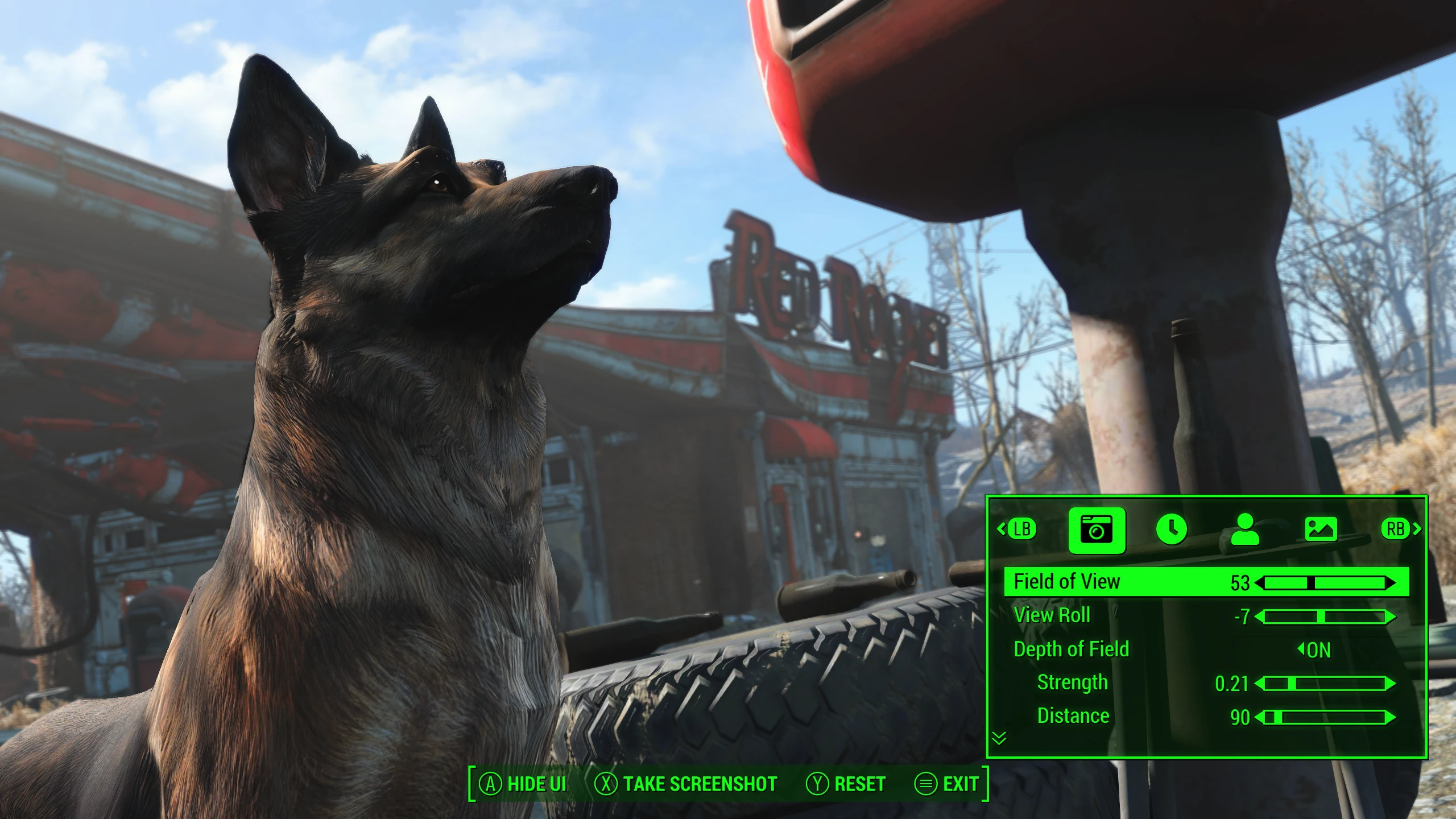
Photo Mode: FO4 Edition
This mod adds Photo Mode to Fallout 4!
Featuring custom, brand new UI designed for Fallout 4, inspired by Photo Mode implementations in modern games.
-
[]Field of View: Control the field of view of the Photo Mode camera. Capture intimate close-ups using low FOV, or sprawling vistas with high FOV.
[
]View Roll: Tilt/rotate the camera.[]Depth of Field: Control the DoF strength, distance, and range. Optionally enable auto-focus on the player. DoF allows you to blur the background while keeping your subject matter in focus.
[]Freeze / Unfreeze Time: Blinked? Unfreeze time without leaving Photo Mode.
[]Time Multiplier: Slow down time to capture the perfect frame.
[]Show/Hide Player: Sometimes, your character isn't the main attraction.
[]Player Positioning: Precisely control the position, rotation and elevation of your character.
[]Effects: Control brightness, contrast, saturation and apply a color tint to the image.
Usage
Access Photo Mode from the Pause menu, or via a hotkey that you can set in the mod's MCM menu.
Photos you take will be saved in the Photos folder in your Fallout 4 installation directory.
Photo Mode works with both KB/M and controllers. A controller will give you finer-grained control over camera movement. If you are a KB/M player wanting to use a gamepad for Photo Mode, use my other mod, Auto Gamepad Switch to seamlessly switch between KB/M and gamepad on-the-fly.
Installation
Prerequisites:
-
[]This mod requires the Fallout 4 Script Extender.
[
]The Mod Configuration Menu is optional, but recommended. You'll need it if you want to set a Photo Mode hotkey and configure the mod in-game. Otherwise, you can still start Photo Mode from the Pause menu if you don't have MCM installed.Instructions:
1. Install with your preferred mod manager or copy the files in the download to your Fallout 4 installation folder.
2. Activate PhotoMode.esp in your preferred mod manager or via the in-game mod manager.
3. Launch the game with the F4SE loader.
Other Notes:
The mod can be placed anywhere in your load order as it does not modify any vanilla files.
The mod does not use any scripts or affect your savegame in any way, and is safe to install or remove at any time.
Acknowledgements
Many thanks to the xSE team, for F4SE.
Thanks to sagittarius22 for testing and providing French translations.
kassent and expire
-
[]This mod requires the Fallout 4 Script Extender.
Adds a photo mode to Fallout 4, accessible from the Pause menu or via hotkey. With over 9,000 endorsements and 1.4 million downloads, this is a highly popular UI mod for capturing in-game moments.
✨ Key Features
📊 Pros & Cons
✅ Pros
- Huge community trust: 9,098 endorsements and 1.4M downloads.
- Simple integration: accessible from the Pause menu or hotkey.
- Last updated in 2021, so it's stable and unlikely to break your game.
⚠️ Cons
- Last updated in 2021 — may not be compatible with the latest game patches or DLC.
- No screenshots or videos in the description, so you can't preview the UI before installing.
For Fallout 4 players who love capturing cinematic screenshots or sharing their adventures. Perfect for content creators and roleplayers who want a dedicated photo tool. Skip if you're looking for gameplay changes — this is purely a UI addition.
💡 Beginner Tips
- If you're on PC, you can install manually by dropping the files into your Data folder, but using a mod manager like Vortex or Mod Organizer 2 makes uninstalling easier.
- After installing, check your Pause menu for the new Photo Mode option — you can also bind a hotkey in the mod's settings if you prefer quick access.
- Since the mod was last updated in 2021, test it with your current game version; if it doesn't work, check the mod's comments for community patches.
📊 Mod Details
- Game
- Fallout 4 Mods
- Author
- reg2k
- Version
- 1.0.3
- Downloads
- 1,395,462
- Endorsements
- 9,098
- Category
- User Interface
- Created
- 2/11/2021
- Updated
- 2/20/2021
🧩 Commonly Used Together
Users add these mods to the same collections — a real compatibility signal, not an AI guess.
🔧 How to Install Fallout 4 Mods
Download from Nexus.
📖 Full step-by-step install guide for Fallout 4 →
Visit the official mod page for specific installation instructions for this mod.
🎮 Need cheat codes or console commands? Check ur gaming wiki for Fallout 4 commands, item IDs, and more.
Keep browsing — more Fallout 4 mods await