Active Effects on HUD
⚪ Last updated 2024⚠️ Install Order · 2 steps
Install in this order, then this mod last — most mods fail to load without their framework and dependencies in place.
Preview
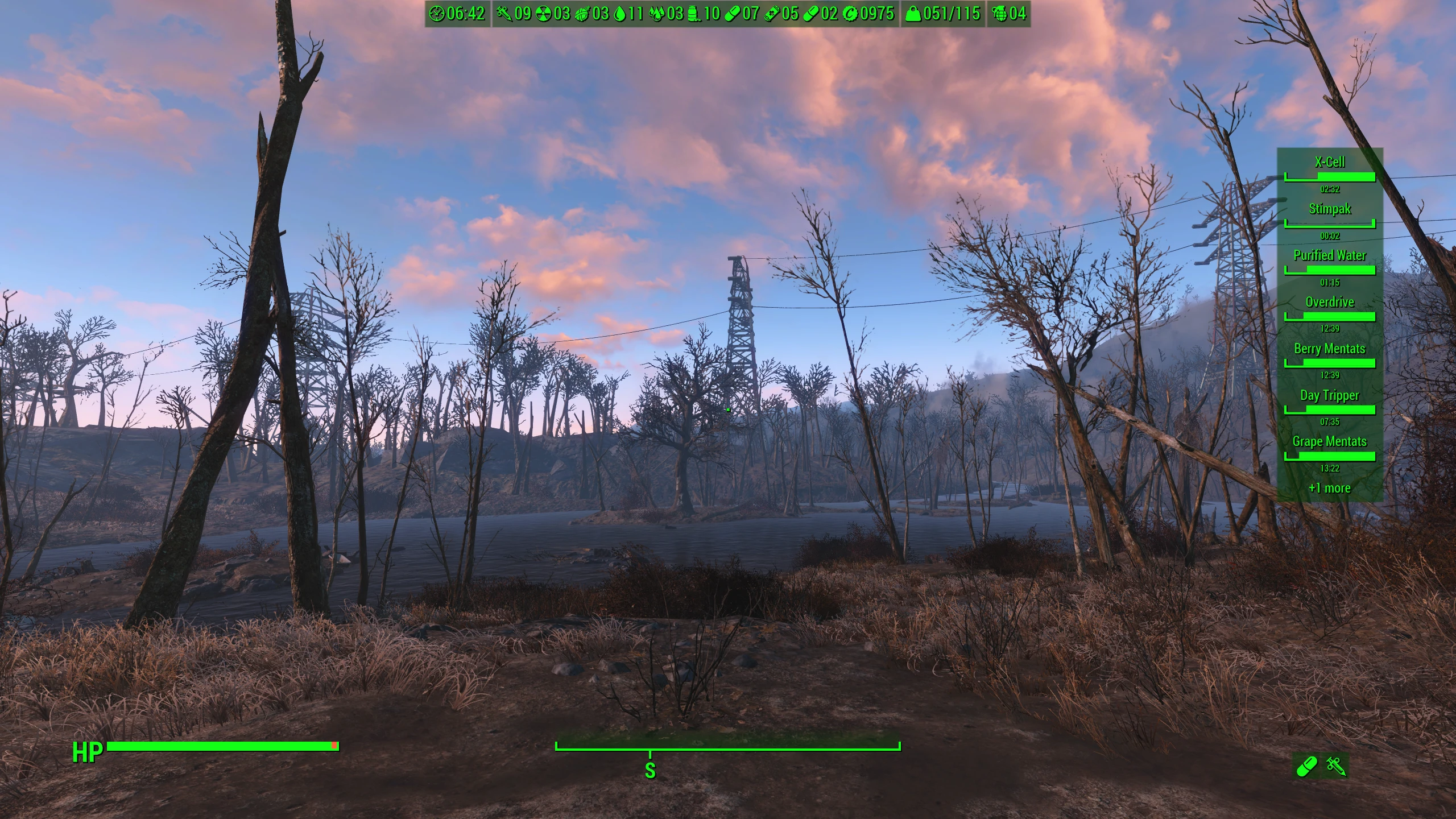
🔍 Analysis
- 👍 1.4% endorsement rate — high engagement, a strong quality signal
- 🏆 #53 of 110 User Interface mods in this game by downloads
📋 About This Mod
INSTALL & UNINSTALL
Install it like any other Fallout 4 mod. To upgrade simply uninstall the old version and then install the new one. Delete the files to uninstall it.
-
[]1. 2. 7 is for Fallout 4 1. 10. 984 ("next-gen") and F4SE 0. 7. 2
[
]1. 2. 6 is for Fallout 4 1. 10. 163 and F4SE 0. 6. 23[]1. 2. 5 is for Fallout 4 1. 10. 163 and F4SE 0. 6. 20
[]1. 2. 4 is the latest version for Fallout 4 1. 10. 162 and F4SE 0. 6. 19
[]1. 2. 3 is the latest version for Fallout 4 1. 10. 138 and F4SE 0. 6. 17
[]1. 2. 2 is the latest version for Fallout 4 1. 10. 130 and F4SE 0. 6. 16
[]1. 2. 1 is the latest version for Fallout 4 1. 10. 120 and F4SE 0. 6. 14/15
[]1. 2. 0 is the latest version for Fallout 4 1. 10. 114 and F4SE 0. 6. 13
- 1. 1. 0 is the latest version for Fallout 4 1. 10. 111 and F4SE 0. 6. 12
Note that the modified settings are stored in Data\MCM\Settings\WmkActiveEffects.ini, a file that is created after the mod is installed and is not removed when the mod is uninstalled using a mod manager. If you want to reset all settings to default values then you must delete this file.
COMPATIBILITY
This mod is incompatible with anything that hides the crosshair, including the option from Display settings menu.
The reason is that the widgets added on HUD by this mod are visible only when the crosshair is visible. If the crosshair is not visible then the widgets won't be visible either. If you want to customize the crosshair (even to hide it, but in a "compatible" way) then you must use the options provided by the mod.
Doesn't require any altered vanilla files, so it should be compatible with most other mods that change the HUD or the Pip-Boy menu. It also doesn't change any vanilla game records (the included ESP is used only for starting a hidden quest that runs a Papyrus script).
ACTOR VALUES PIP-BOY TAB
This mod can add a new Pip-Boy tab with all player's actor values (enabled by default).
This new tab is useful to detect a common bug when temporary changes made by some effects to actor values are not restored when the effects are removed. For example Grilled Radstag increases the Carry Weight with +25 for one hour, but sometimes this becomes permanent if the difficulty is set to survival, the player has the Well Rested perk and the effect expires while sleeping.
From this tab you can even change the temporary modifier for an actor value (this not being possible with console commands).
For more details see the Creation Kit wiki page: https://www.creationkit.com/index.php?title=Actor_Value
CLOCK WIDGET
The mod also can add a basic clock widget on HUD to display the current game time.
The only interesting feature is that the widget can be
Active Effects on HUD adds HUD widgets for active effects, plus two new Pip-Boy Stat tabs for effects and actor values. It also includes optional widgets for clock, counters, and inventory weight. A popular UI enhancement for Fallout 4 with over 6,000 endorsements.
✨ Key Features
📊 Pros & Cons
✅ Pros
- Huge community trust with 6,071 endorsements and nearly 440k downloads.
- Tackles a common annoyance—no way to see active effects without opening menus.
- Adds useful extra widgets like clock and inventory weight, making it a multi-tool HUD upgrade.
⚠️ Cons
- Last updated in May 2024—could be outdated if the game has received patches since then.
- Only a few widgets listed; if you want a full HUD overhaul, this might not cover everything.
For Fallout 4 players who want to see active effects at a glance without digging through menus. Also great for those who like extra HUD info like a clock or inventory weight. Skip if you prefer a minimalist HUD or want a complete overhaul—this is a focused utility mod.
💡 Beginner Tips
- Since it's a UI mod, make sure you have the script extender (F4SE) installed if required—check the mod page for dependencies.
- Use a mod manager like Vortex or Mod Organizer 2 to keep track of the files and avoid overwriting other HUD mods.
- If you use other HUD mods, load this one after them so its widgets don't conflict.
📊 Mod Details
- Game
- Fallout 4 Mods
- Author
- Wolfmark
- Version
- 1.2.7
- Downloads
- 439,963
- Endorsements
- 6,071
- Category
- User Interface
- Created
- 6/25/2018
- Updated
- 5/16/2024
🧩 Commonly Used Together
Users add these mods to the same collections — a real compatibility signal, not an AI guess.
🔧 How to Install Fallout 4 Mods
Download from Nexus.
📖 Full step-by-step install guide for Fallout 4 →
Visit the official mod page for specific installation instructions for this mod.
🎮 Need cheat codes or console commands? Check ur gaming wiki for Fallout 4 commands, item IDs, and more.
Keep browsing — more Fallout 4 mods await