Ultrawide UI Fixes
⚪ Last updated 2024⚠️ Install Order · 1 step
Install in this order, then this mod last — most mods fail to load without their framework and dependencies in place.
Preview
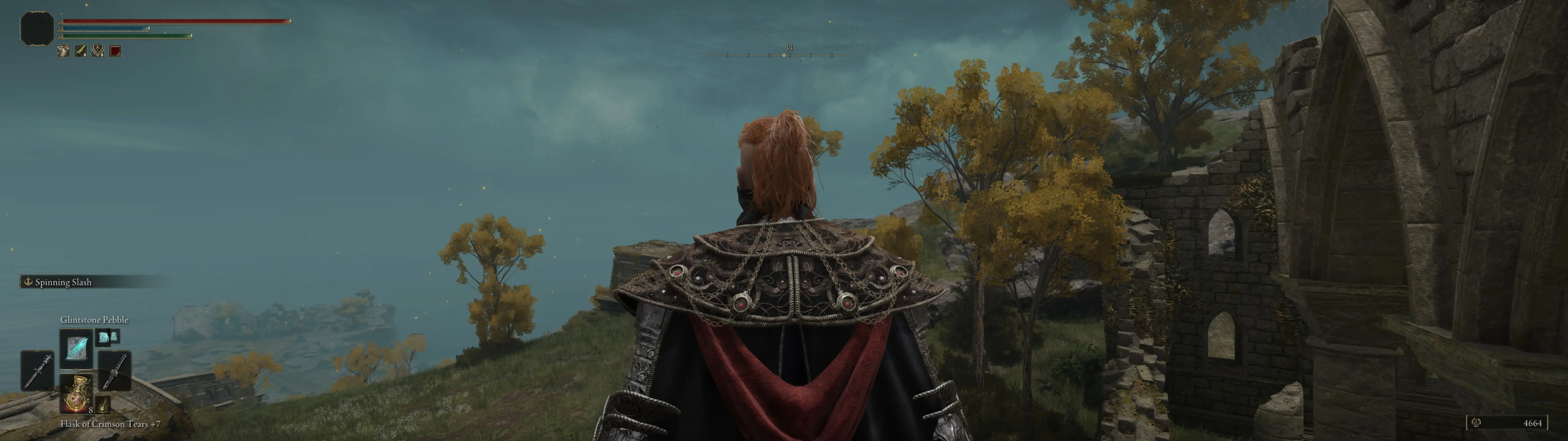
🔍 Analysis
- 👍 1.4% endorsement rate — high engagement, a strong quality signal
- 🏆 #3 of 127 User Interface mods in this game by downloads
📋 About This Mod
💭Comments | 📋Bug Reports | 📺YouTube | 📰Bluesky
Completely fixes all of the UI issues that are present in the vanilla game on 21:9, 32:9, and 48:9 monitors.
-
[] Repositions all HUD elements that are supposed to be on the sides of the screen to be in proper places.
[
] Resizes all menu and pop-up window backgrounds to cover the entire screen, as intended.[] Fixes loading screens and cutscene transitions so you don't see the world loading/flickering on the sides.
[] Expands world map screen to fit the entire screen instead of having empty spaces or black bars on the sides.
Optional Extras
- [] Alternate HUD Ratios: Use 16:9, 21:9, or 32:9 HUD layout with any aspect ratio, if you don't want the HUD elements to be on the edges of the screen.
- [] Alternate Loading Screen Layout: Moves loading screen elements to the outer edges of the screen instead of being centered.
-
[] World Map Border Loading Fix: Expand the area that the world map renders to beyond the visible area of the screen (+50% horizontally, +65% vertically), which removes the annoying visual of the map loading/popping-in on the borders of the screen as you scroll around. That loading/pop-in happens off-screen now. This may cause the map to load slower for some people, so it may not be ideal for everyone to use.
Compatibility Patches
Compatibility patches for the following mods can be found in the Miscellaneous Files section of the Files tab:
- [
-
[] Download and install Mod Engine 2. (Can be installed anywhere on your PC you want - doesn't have to be in the game's folder)
If you are using the Seamless Co-op mod, please refer to this guide for instructions on how to use Mod Engine 2 with it.
[] Download and extract the variant of the mod you want.[
] Move the "menu" folder to be inside Mod Engine 2's "mod" folder.[] You will need to use the Remove Black Bars and Remove Vignette mods to remove the black bars on the sides of the screen.
[] I highly recommend also installing the Increase Animation Distance to fix janky animations outside of the 16:9 aspect ratio.
- Launch the game through Mod Engine 2's launchmod_eldenring.bat file.
Ultrawide UI Fixes by Dziggy addresses all UI issues on ultrawide monitors, supporting 21:9, 32:9, and 48:9 aspect ratios. It is specifically for game version 1.12.x and will not work with older versions. With 1,680 endorsements and 119,724 downloads, it's a popular solution for ultrawide users.
✨ Key Features
📊 Pros & Cons
✅ Pros
- Community-approved with 1,680 endorsements and over 119k downloads.
- Comprehensive fix for all ultrawide UI issues—no more stretched or misaligned elements.
- Covers extreme aspect ratios like 48:9, which is rare in mods.
⚠️ Cons
- Only works with game version 1.12.x—if you're on an older version, you're out of luck.
- No detailed changelog or feature list provided, so you'll have to test it yourself.
- Potential compatibility issues with other UI mods, though not explicitly stated.
For ultrawide monitor users who are tired of broken UI scaling in the current game version. If you're on 1.12.x and want a one-stop fix, this is for you. Skip if you're on an older version or don't use ultrawide.
💡 Beginner Tips
- Make sure your game is updated to version 1.12.x before installing, or it won't work.
- If you use other UI mods, test them together to ensure no conflicts.
- Back up your original UI files just in case you want to revert.
📊 Mod Details
- Game
- Elden Ring Mods
- Author
- Dziggy
- Version
- 2.0.2
- Downloads
- 119,724
- Endorsements
- 1,680
- Category
- User Interface
- Created
- 3/20/2022
- Updated
- 7/7/2024
🔧 How to Install Elden Ring Mods
Download from Nexus.
📖 Full step-by-step install guide for Elden Ring →
Visit the official mod page for specific installation instructions for this mod.
🎮 Need cheat codes or console commands? Check ur gaming wiki for Elden Ring commands, item IDs, and more.
Keep browsing — more Elden Ring mods await