PS5 PS4 Controller UI for ELDEN RING (updated for 1.12)
⚪ Last updated 2024⚠️ Install Order · 1 step
Install in this order, then this mod last — most mods fail to load without their framework and dependencies in place.
Preview
🔍 Analysis
- 👍 1.7% endorsement rate — high engagement, a strong quality signal
- 🏆 #2 of 127 User Interface mods in this game by downloads
📋 About This Mod
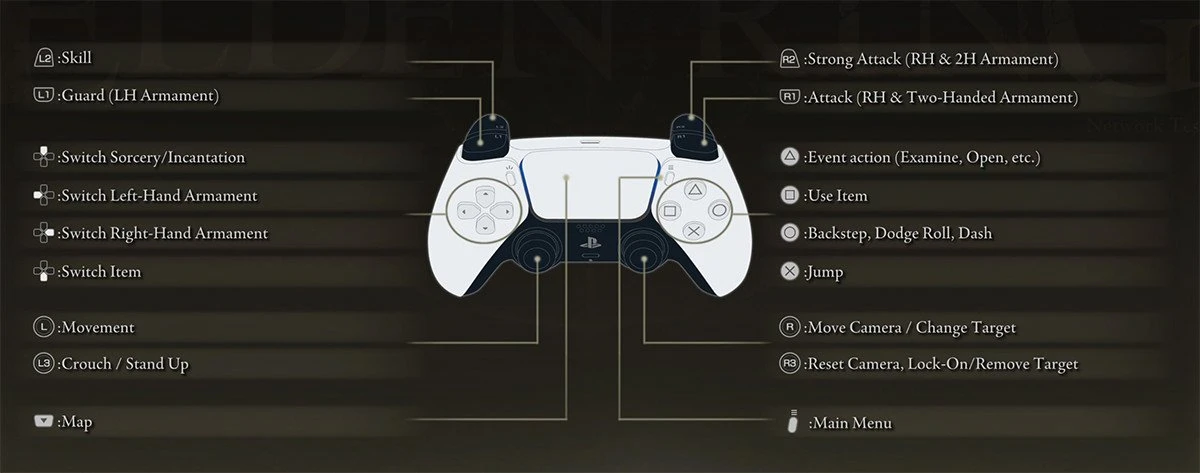
This mod patches the internal texture layout files for Elden Ring to use Dualsense or Dualshock UI for buttons prompts and gamepad (settings screen).
This mod has now been updated for v1. 12.
Installation:
1. Download & extract the latest version of ModEngine 2.
2. Download this mod - choose from either the DualShock 4 for PS4 or Dualsense for PS5.
3. Extract menu folder from the PS5.zip or PS4.zip file, into the mods folder in the ModEngine 2 folder.
4. Start Elden Ring using the "launchmod_eldenring.bat" script!
Yes! You can finally use this mod without having to unpack the game.
Please place the relevant PS4/5 files into the ModEngine2 mods folder.
This mod is also compatible with most other Mod loaders for Elden Ring.
Tools used:
Exclusively unpacked/repacked using: Yabber+ by JKAnderson. Updated by Nordgaren for Elden Ring. Hosted by SekiroDubi on GitHub.
Visual verification of game texture: Paint.net and .dds mod for Paint.net
Editing layout files: Sublime Text because VSCode on my computer died the other day
Special thanks to: Sekiro Resurection Modding Wiki for making the only good resource on modding modern FromSoftware games
GitHub:
Track progress and create any issues on the GitHub repo for this mod: https://github.com/losh11/EldenRingGamepadUI
For Older Version of Elden Ring:
Please use the appropriate version of this mod with your version of Elden Ring.
v1. 02-1. 03 uses version 1. 02. 1 of this mod.
v1. 04-1. 07 uses version 1. 05 of this mod.
v1. 08-1. 10 uses version 1. 08 of this mod.
You can find the older mod files under Files > Old Files
This UI mod replaces Elden Ring's button prompts and gamepad display with PlayStation DualSense or DualShock icons, patching internal texture layout files. Updated for game version 1.12, it's a popular choice for PS controller users, with over 4,400 endorsements and 252,000 downloads.
✨ Key Features
📊 Pros & Cons
✅ Pros
- Huge community trust with 4,411 endorsements and over 250k downloads.
- Specifically updated for patch 1.12, so it's current with the latest game version.
- Does exactly what it says: swaps prompts to PlayStation icons, no bloat.
⚠️ Cons
- Only affects UI prompts—no gameplay changes, so if you're not using a PS controller, it's useless.
- Requires manual installation or mod manager setup, which might trip up newcomers.
- No mention of compatibility with other UI mods, so conflicts are possible.
For Elden Ring players using a DualSense or DualShock controller who want the UI to match their input device. Skip if you use keyboard/mouse or Xbox controllers—this mod won't help you.
💡 Beginner Tips
- Use a mod manager like Mod Engine 2 to avoid overwriting game files manually.
- Back up your original regulation.bin if you're patching manually, so you can revert if needed.
- Check the mod page for any notes about other UI mods to avoid conflicts.
📊 Mod Details
- Game
- Elden Ring Mods
- Author
- losh11
- Version
- 1.12
- Downloads
- 252,996
- Endorsements
- 4,411
- Category
- User Interface
- Created
- 3/5/2022
- Updated
- 6/20/2024
🔧 How to Install Elden Ring Mods
Download from Nexus.
📖 Full step-by-step install guide for Elden Ring →
Visit the official mod page for specific installation instructions for this mod.
🎮 Need cheat codes or console commands? Check ur gaming wiki for Elden Ring commands, item IDs, and more.
Keep browsing — more Elden Ring mods await