Giga Item Configuration
⚪ Last updated 2024Preview
🔍 Analysis
- 👍 3.4% endorsement rate — high engagement, a strong quality signal
- 🏆 #64 of 125 Miscellaneous mods in this game by downloads
📋 About This Mod
Heavily customize item values such as weight, buy price, sell price, decay, and stacksize!
Updated 3-27-2024 @ 12:31am
Lots of new requested options, logic, and values!
Make sure you're leveraging a Saved Game Manager (DD2 Save Manager v1+ recommended)
Available Options:
-
[]Buy Price
[
]Sell Price[]Weight
[]Anti Decay On/Off
[]Use Decay List On/Off
[]Decay Allow List
[]Stackable item sizes (999 for example)
This mod was based on xyzkljl1's original "Item Zero Weight" mod found here. I then leveraged that to find a bunch of other modifiable values for items and making those configurable
New Major Logic:
-
[]Any on/off option that is set to "-1" will be disabled (ex: "sellpricemod": -1 will disable any sell price modifiers)
[]Lists for advanced decay logic, add/remove at your leisure
[]New toggleable values
Default Mod Values:
-
[] "buyprice": -1,
[
] "sellpricemod": 0. 5,[] "weightval": 1,
[] "anti_decay": 1, ["Decay" renamed to "Anti Decay" for clarify, -1 to turn it off, 1 to enable]
[] "use_decay_list": 1,
[] "decay_allow_list: [].
[] "maxstacksize": 999
- []Leave "Buy Price" at the default `-1` value if you want sell price to be higher than default because SellPrice is based on BuyPrice. If BuyPrice is changed to anything other than `-1` then SellPrice will not change. Otherwise, if you want BuyPrice for all items to be "1" then change it to "1".
- []Sell Price is a % modifier based on the item's "BuyPrice". Meaning, a value of "0. 5" will set an item to sell for 50% of its Buy price. In example, if a sword sells for 10k gold, and the config value for "sellpricemod" is set to "0. 5" the sword will sell for 5k gold.
-
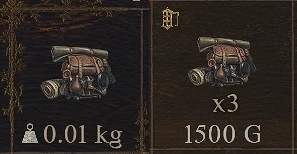
[]Weight values are actually divided by 100 by the game. Example: ("weightval": 1) will result in all items being changed to "0. 01kg"
[*]Anti Decay, set to 1, will disable ALL item decay. If you want some items to decay (eg: App
-
[] "buyprice": -1,
-
[]Any on/off option that is set to "-1" will be disabled (ex: "sellpricemod": -1 will disable any sell price modifiers)
📊 Mod Details
- Game
- Dragonsdogma2 Mods
- Author
- Braxton01
- Version
- 1.0.1
- Downloads
- 2,560
- Endorsements
- 87
- Category
- Miscellaneous
- Created
- 3/26/2024
- Updated
- 3/28/2024
🔧 How to Install Dragon's Dogma 2 Mods
Download from Nexus Mods.
📖 Full step-by-step install guide for Dragon's Dogma 2 →
Visit the official mod page for specific installation instructions for this mod.
🎮 Need cheat codes or console commands? Check ur gaming wiki for Dragon's Dogma 2 commands, item IDs, and more.
Keep browsing — more Dragon's Dogma 2 mods await