Dragon's Dogma 2 Save Manager for Multiple Characters
⚪ Last updated 2024Preview
🔍 Analysis
- 👍 2.7% endorsement rate — high engagement, a strong quality signal
- 🏆 #40 of 125 Miscellaneous mods in this game by downloads
📋 About This Mod
Thank you to our contributors!
ImmortanJoel - https://www.nexusmods.com/users/35791885
How to upgrade versions:
Download the up to date zip file. Extract anywhere and copy the SaveManager.py file.
Open your current installation of the save manager.
Delete SaveManager.py and replace with the new version of SaveManager.py
New Features (v1. 1. 0):
-
[]Automatic backups while playing
Features:
- [
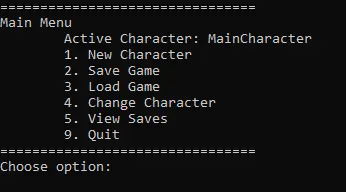
[]Create multiple characters and switch between them seamlessly
[]Unlimited number of save files for each individual character you create.
[]Roll back to old saves
[]Automatic backups while playing
- If none of the above apply to you, you can still use it to back up your saves in the event that something happens to them.
The program is controlled through the command prompt and thus requires essentially zero resources while playing the game. Can be left open or closed.
Open to feature suggestions / contributions. The code is a bit messy at the moment but if people are interested in it I can clean it up.
Requirements
Just Python 3.
Installation
Download the .zip file here and extract wherever you want to put it.
Open the folder and run save-manager.bat
Alternate Installation (no .bat file)
Download the .zip file here and extract wherever you want to put it.
In the file explorer, click on the long bar above the files with the file path.
Delete the file path and type `cmd` and press enter
Type python SaveManager.py
Will this program trigger Denuvo?
The only answer I can really give is I don't know. I have had no problems with it, and so far none have been reported to me, however some users claim that starting too many save games in a short period of time (more than 5 in 24 hours) can cause you too exceed the daily PC activation limit. I have not been able to confirm or deny this, so I would recommend staying below that limit to be safe.
Permissions:
The code is licensed under the MIT License. You are free to download, distribute, modify, etc as specified in the license.
This utility adds new game, multiple save, and multiple character profile functionality to Dragon's Dogma 2. It's for players who want to run several characters without juggling files manually. With 253 endorsements and 9,259 downloads, it's a proven solution for save management.
✨ Key Features
📊 Pros & Cons
✅ Pros
- Community-approved with 253 endorsements and 9,259 downloads.
- Solves a real pain point: managing multiple characters without messing up saves.
- Simple concept, likely easy to use for most players.
⚠️ Cons
- Last updated in March 2024, so may not be compatible with the latest game patches.
- Potential conflicts with other save-related mods or cloud saves.
- Limited to save management—no extra features beyond that.
For Dragon's Dogma 2 players who love experimenting with multiple builds and characters. If you're tired of manually backing up save files to switch between playthroughs, this is a must-have. Skip if you only play one character and don't need save management.
💡 Beginner Tips
- Before installing, back up your current save files to avoid any accidental loss.
- If you use cloud saves, disable them for Dragon's Dogma 2 to prevent conflicts.
- Test the mod with a new character first to ensure it works as expected.
📊 Mod Details
- Game
- Dragonsdogma2 Mods
- Author
- Llama
- Version
- 1.1.1
- Downloads
- 9,259
- Endorsements
- 253
- Category
- Miscellaneous
- Created
- 3/23/2024
- Updated
- 3/29/2024
🔧 How to Install Dragon's Dogma 2 Mods
Download from Nexus Mods.
📖 Full step-by-step install guide for Dragon's Dogma 2 →
Visit the official mod page for specific installation instructions for this mod.
🎮 Need cheat codes or console commands? Check ur gaming wiki for Dragon's Dogma 2 commands, item IDs, and more.
Keep browsing — more Dragon's Dogma 2 mods await