Dark Arisen All Natural
⚪ Last updated 2018Preview
🔍 Analysis
- 👍 4.1% endorsement rate — high engagement, a strong quality signal
- 🏆 #9 of 77 Visuals and Graphics mods in this game by downloads
📋 About This Mod
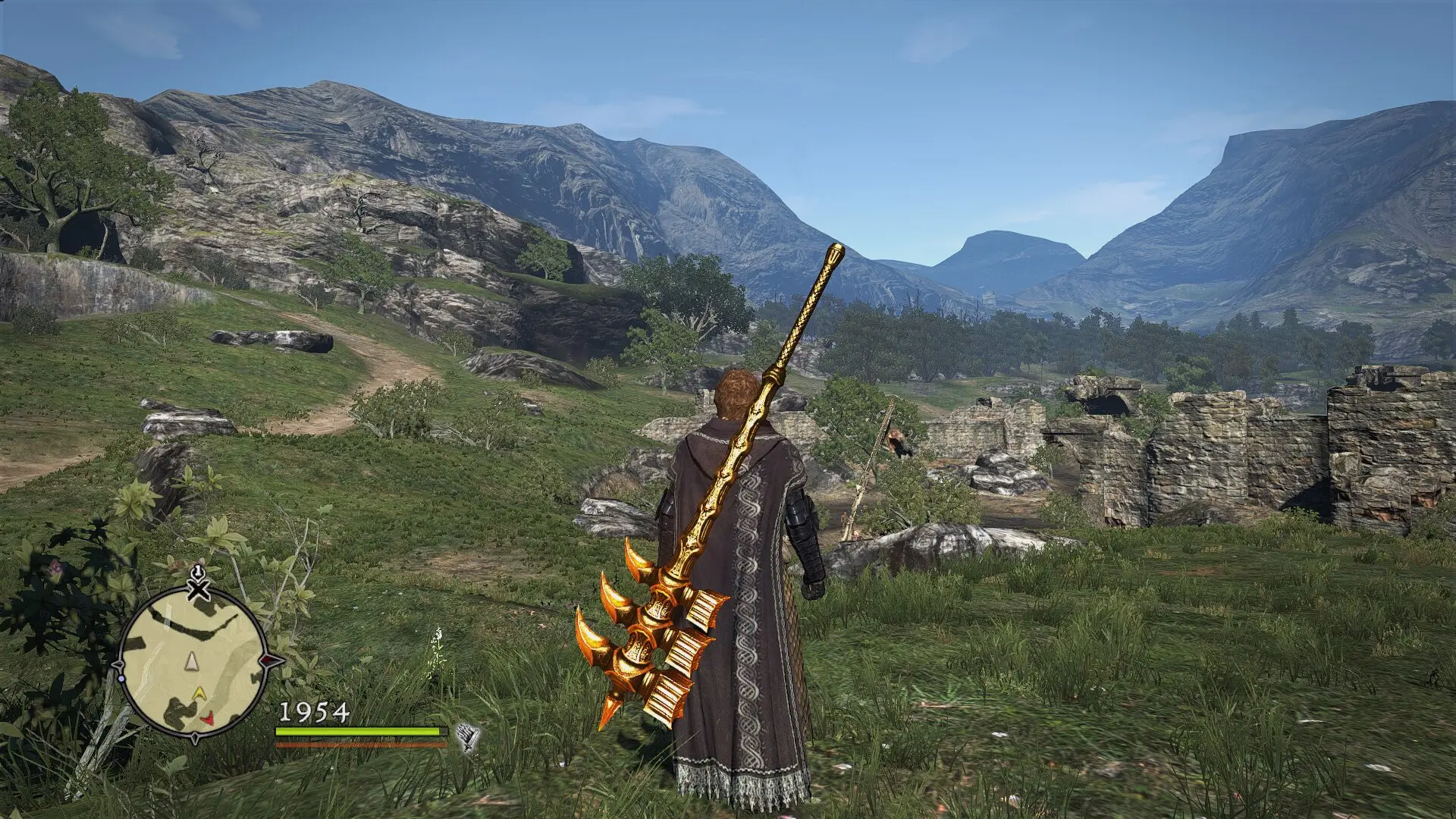
An all natural preset with small changes but great differences,a small but significant graphic overhaul that gives the game a more natural feel without changing the originally intended aesthetics
What it does:
No overly saturated or desaturated colors which make the sunrise appear like the apocalypse is coming or someone stole the colors
No crushed blacks midday or in general
No radioactive sky or people a la vanilla oblivion with hdr on
No fancy filtering
Also with custom sharpening that makes the textures look less ''washed out'' but not so much that your eyes bleed
And custom Anti-Aliasing that AA-es better than the ingame option, bit with less performance cost (1-2fps max)
also made the darker area and night a just a bit more brighter, since shadows at midday cannot be that dark in reality
just all natural like outside
How to use: Paste the files (inside the archive) into ''...\Dragons Dogma Dark Arisen\'' and start your game
Also for the best possible effect disable ingame sharpening and AA, and also activate ingame bloom
thats it!
also further modifications can be done through the ''SweetFX_settings.txt'' file found in ''...\Dragons Dogma Dark Arisen\SweetFX''
Problems/Issues: This mod should work flawlessly on freshly intallled (und a up-to-date version) folder but if you have any trouble after experimenting with other graphic enhancements mods try this:
Make sure you don't have some other custom .dlls from other graphic enhancement mods (for example ''d3d11.dll'' or ''d3d9.dll'' or something like that)
Second look out if you have some other files with the ending ''.fx'' that might caused you also some trouble
make sure to get rid of those files first and try adding my preset again
as always make sure your drivers up-to-date
Uninstalling:
Uninstalling is pretty easy you just delete the same exact files you added (meaning the ones inside the archive file)
Disclaimer:
I used used the ''reshade +sweetfx'' to create my own style with it .
Also mod it, distribute it as much as you want, you don't need to credit me, It's all in the name of the community after all!
And happy playing!
Dark Arisen All Natural is a lightweight visual overhaul for Dragon's Dogma: Dark Arisen that enhances the game's natural feel while preserving its original aesthetic. It is performance-friendly, making it suitable for players with modest hardware. With 996 endorsements and 24,337 downloads, it has a solid following.
✨ Key Features
📊 Pros & Cons
✅ Pros
- Community-approved with 996 endorsements and over 24k downloads
- Performance-friendly, so you won't tank your FPS for prettier visuals
- Keeps the game's original look, just more natural - no jarring changes
⚠️ Cons
- Last updated in 2018 - might have issues with newer game versions or mods
- No screenshots or videos provided, so you're flying blind
For Dragon's Dogma players who want a subtle visual upgrade without sacrificing performance or changing the game's core aesthetic. If you're on a lower-end PC or just prefer a more natural look, this is a good pick. Skip if you want dramatic graphical overhauls or if you're on a newer game version where compatibility is uncertain.
💡 Beginner Tips
- Since it's a visual mod, make sure to back up your original game files before installing, just in case.
- Check the mod's comments section for any user reports on compatibility with the latest game patch.
- If you're using other graphics mods, test this one alone first to see if they conflict.
📊 Mod Details
- Game
- Dragonsdogma Mods
- Author
- some_guy
- Version
- 1.00
- Downloads
- 24,337
- Endorsements
- 996
- Category
- Visuals and Graphics
- Created
- 2/12/2016
- Updated
- 3/24/2018
🔧 How to Install Dragon's Dogma: Dark Aris Mods
Download from Nexus Mods.
📖 Full step-by-step install guide for Dragon's Dogma: Dark Aris →
Visit the official mod page for specific installation instructions for this mod.
🎮 Need cheat codes or console commands? Check ur gaming wiki for Dragon's Dogma: Dark Aris commands, item IDs, and more.
Keep browsing — more Dragon's Dogma: Dark Aris mods await