dinput8.dll hooks
⚪ Last updated 2017This mod may not work until the author updates it. Check for an update, or see the rollback guide.
Preview
🔍 Analysis
- 👍 4.0% endorsement rate — high engagement, a strong quality signal
- 🏆 #1 of 45 Miscellaneous mods in this game by downloads
📋 About This Mod
Features
Save backups
A hook is placed just before the game creates a save. When it gets there, the current save gets duplicated with a timestamp added to it.
If you need to revert to previous save, simply rename it to "ddda.sav".
It should find the save path automatically, if not see dinput8.ini.
You can limit the number of backups it keeps in dinput8.ini.
Hotkeys
Shortcuts to some menu items. It just simulates the keypresses you would normally do, so it has to press ESC, wait for the main menu to come up -> press additional keys. That waiting is just a normal pause for x milliseconds, so you may need to adjust it in dinput8.ini if its not entering the second menu.
You can change the hotkeys in dinput8.ini, set to 0xFF to disable.
-
[]F5 = autosave, F9 = save checkpoint, M = map, J = journal/quests, U = equipment, K = status, Num5 = hide/show ingame clock
[
]changing in-game time - Num4/Num6 = substract/add a minute, Num2/Num8 = substract/add an hourCharacter customization screen
Allows you to enter the character customization screen at any time.
It replaces the Manual menu (the one on the very first screen).
You need to enter it with keyboard (press enter), doesn't work with mouse.
Misc
-
[]Disable auto cam - prevents camera from autocorrecting when moving around with sheathed weapon
[
]Extend vertical cam - extends the vertical range you can view with the camera (works with bow aiming too)[]Borderless fullscreen - turns windowed mode into borderless fullscreen
[]Gathering speed - allows you to speed up gathering/mining
[]Jump mod - allows you changes the behavior of regular jump and jump while running
[]Fall height - option to change from which height you start taking dmg (-1000 is default, with Grace augment -1500, so you want to set lower number)
[]Movement speed - allows you to mod movement speed (running/walking)
Cheats
-
[]Share weapon skills - allows you to use all learnt weapon skills regardless of your vocation
[]Ignore equip vocation - allows you to equip anything regardless of your vocation
[]Run type outside of towns - allows you to force the town running animation (and/or remove the stamina drain) outside of towns as well
[]Time interval - allows you modify the speed of in-game time (so you can make the day longer/shorter)
[]Affinity mod - allows you to ignore negative/positive affinity changes, make any change positive or set affinity to max on any change
Third level skills
Allows you to upgrade your lvl 2 skills to lvl 3.
You can cho
-
[]Share weapon skills - allows you to use all learnt weapon skills regardless of your vocation
-
[]Disable auto cam - prevents camera from autocorrecting when moving around with sheathed weapon
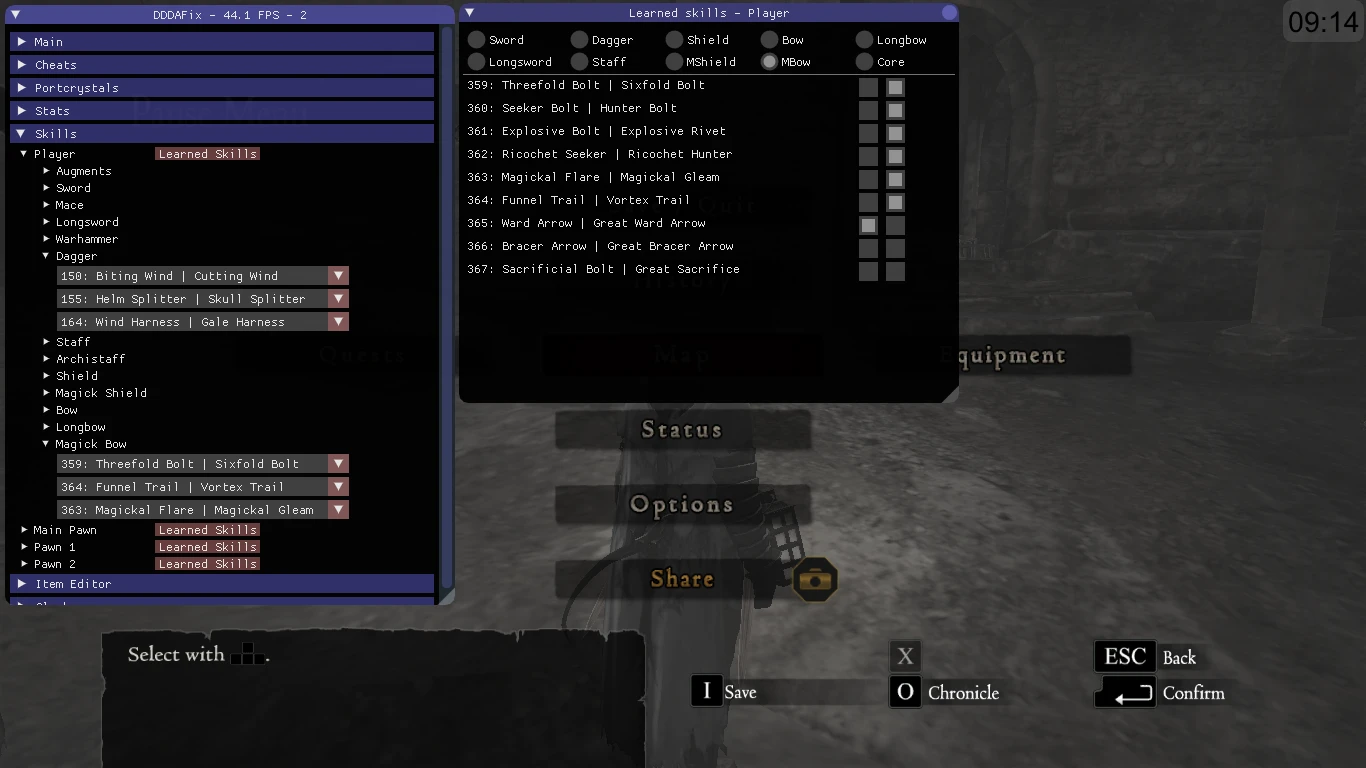
dinput8.dll hooks is a versatile utility mod for Dragon's Dogma: Dark Arisen that adds save backups, hotkeys, an in-game overlay with item/stats editing, equipping/learning skills, camera fixes, day length control, character customization, augment mods, and various cheats. It's a must-have for players seeking quality-of-life improvements and tweaking options.
✨ Key Features
📊 Pros & Cons
✅ Pros
- Huge community trust with 10,963 endorsements and 275k downloads.
- Packed with features: save backups, hotkeys, overlay editor, camera fixes, and more.
- One-stop tool for tweaking gameplay and fixing annoyances.
⚠️ Cons
- Last updated in 2017 — may not work with the latest game patches.
- Potential conflicts with other mods that use dinput8.dll.
For Dragon's Dogma players who want a Swiss Army knife of utilities: save protection, editing tools, and gameplay tweaks. Perfect for veterans who want to customize their experience or fix camera issues. Skip if you prefer a vanilla experience or dislike using external tools.
💡 Beginner Tips
- Make sure to disable Steam overlay or other programs that might hook into dinput8.dll to avoid conflicts.
- Use the hotkeys to quickly access the overlay and test features without restarting the game.
- Back up your save files manually before using the item/stats editor to avoid corruption.
📊 Mod Details
- Game
- Dragonsdogma Mods
- Author
- Jaryn123
- Version
- 3.5.0
- Downloads
- 275,442
- Endorsements
- 10,963
- Category
- Miscellaneous
- Created
- 1/26/2016
- Updated
- 12/19/2017
🔧 How to Install Dragon's Dogma: Dark Aris Mods
Download from Nexus Mods.
📖 Full step-by-step install guide for Dragon's Dogma: Dark Aris →
Visit the official mod page for specific installation instructions for this mod.
🎮 Need cheat codes or console commands? Check ur gaming wiki for Dragon's Dogma: Dark Aris commands, item IDs, and more.
Keep browsing — more Dragon's Dogma: Dark Aris mods await