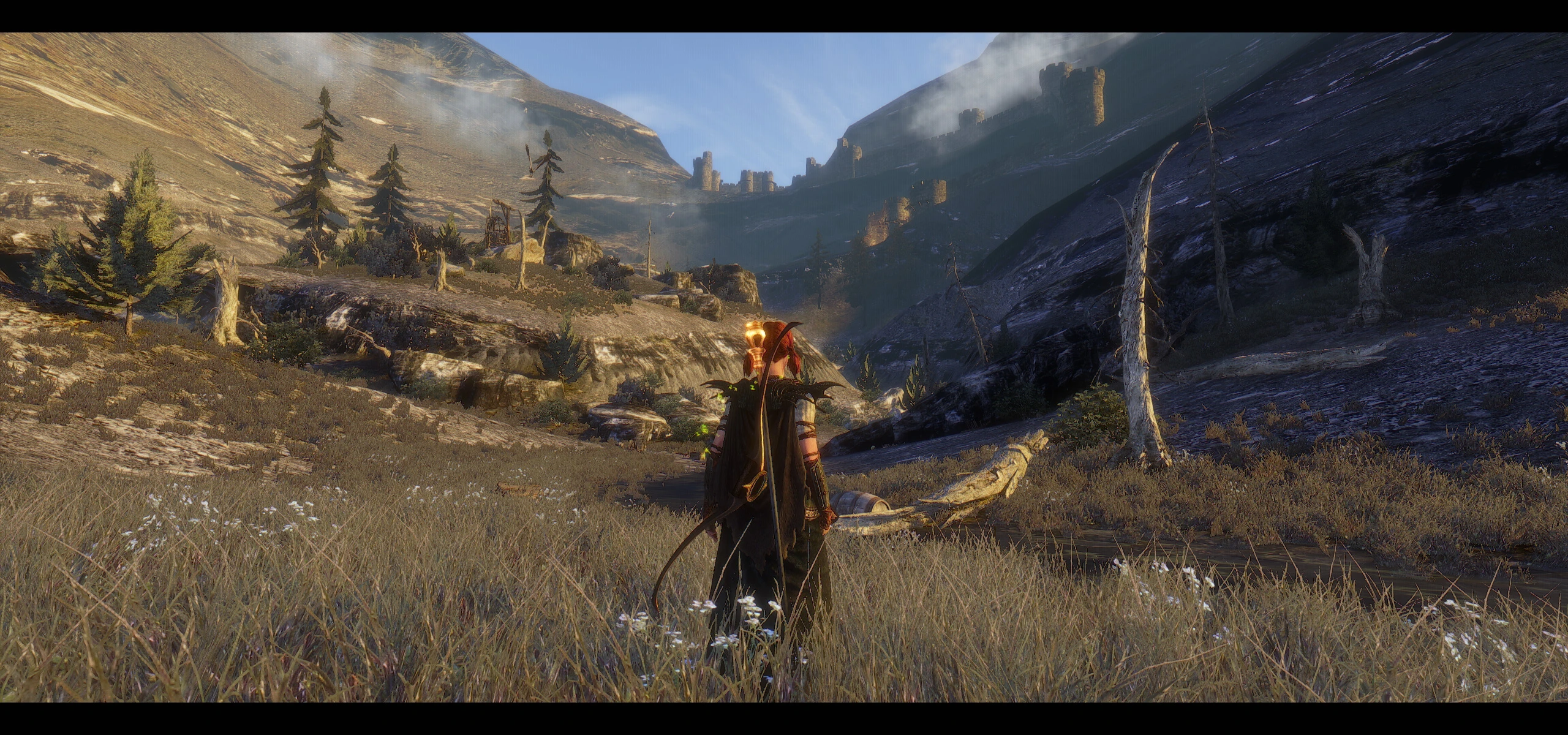
Rudy ENB for DDDA
⚪ Last updated 2024This mod may not work until the author updates it. Check for an update, or see the rollback guide.
⚠️ Install Order · 1 step
Install in this order, then this mod last — most mods fail to load without their framework and dependencies in place.
Preview
🔍 Analysis
- 👍 3.8% endorsement rate — high engagement, a strong quality signal
- 🏆 #3 of 77 Visuals and Graphics mods in this game by downloads
📋 About This Mod
If you want, maybe , to say something like : Thank you :) and help keeping enb alive, you can support ENBSeries
This and every other enb preset wouldn't be possible without ENBSeries and hard work of Boris Vorontsov.
2. 0 version for the ENB v0476. Use updated ENB binary (published March 31, 2024 or newer)!!!
Tweaked main weathers, lighting, AO, IL, new effects like: Normal Mapping Shadows, Particles, ENB Particle Lights, Subsurface Scattering, Volumetric Rays.
In this version custom Depth of Field effect is turned off by default ( a few frames more ). You can enable it in the GUI (Shift+Enter), in the effects section - just check "EnableDepthOfField".
You can also use the Game Depth Of Field shader maded by Boris. Check only "EnableGameDepthOfField" and turn DOF on in the game options menu.
- Some really great DDDA images by Guthwulf ( spoiler alert )
KxYxxDfM41s
sIP4iGzzVvQ
sA91vtlik4M
Installation:
- Make sure that the game video options are maxed and HDR is set to high - especially this parameter is essential for for my mod. Otherwise ENB will not work.
- I use Camera FOV plus 5. This parameter may affect ENB DOF, remember that the auto focus point is set to the center of the screen. You can change this in the GUI - enbeffectprepass.fx.
- DOF in the game options should be turned off if you want to use the DOF effect from my preset ( expect the loss of a few frames, no depth of field effect in the cutscenes and when the character targeting with the bows ).
- If you use ENB v. 0. 300 or later, you can use game depth of field shader maded by Boris. You need to enable DOF in the game options. In the ENB effects section in the GUI ( shift + enter ) turn on EnableGameDepthOfField and turn off EnableDepthOfField.
- AA - I play with FXAA, but it is also your choice.
- Download v. 0. 476 ENB , a black arrow at the bottom of the page. From this page you can also donate to the author of the ENB :) Appreciate his really hard and useful work.
- Unzip it. Inside you will find two folders : "WrapperVersion" an
Rudy ENB for DDDA is a visual preset for Dragon's Dogma: Dark Arisen that uses the latest ENB libraries to enhance graphics while maintaining good performance. With 3,042 endorsements and 79,633 downloads, it's a popular choice for players seeking a visual overhaul without heavy performance hits.
✨ Key Features
📊 Pros & Cons
✅ Pros
- Huge community trust with 3,042 endorsements
- Nearly 80k downloads show it's a go-to for many players
- Balances looks and performance, so you don't need a monster rig
⚠️ Cons
- Requires ENB libraries, so you'll need to grab those separately
- Last updated May 2024 – might not be tuned for the newest game patches
For Dragon's Dogma players who want a visual upgrade without sacrificing frame rate. If you're tired of the vanilla look and want a proven preset, this is a solid pick. Skip if you're not into ENB mods or prefer gameplay changes over graphics.
💡 Beginner Tips
- Make sure to download the latest ENB binaries from enbdev.com and drop them into your game folder first.
- If you're using a mod manager, you can still install this preset manually – just copy the files to your Dragon's Dogma directory.
- Check your in-game ENB settings (Shift+Enter) to tweak performance if you're not hitting your target FPS.
📊 Mod Details
- Game
- Dragonsdogma Mods
- Author
- Rudy102
- Version
- 2.0.b
- Downloads
- 79,633
- Endorsements
- 3,042
- Category
- Visuals and Graphics
- Created
- 1/24/2016
- Updated
- 5/13/2024
🔧 How to Install Dragon's Dogma: Dark Aris Mods
Download from Nexus Mods.
📖 Full step-by-step install guide for Dragon's Dogma: Dark Aris →
Visit the official mod page for specific installation instructions for this mod.
🎮 Need cheat codes or console commands? Check ur gaming wiki for Dragon's Dogma: Dark Aris commands, item IDs, and more.
Keep browsing — more Dragon's Dogma: Dark Aris mods await