Screenarcher ReShade Preset
⚪ Last updated 2015⚠️ Install Order · 1 step
Install in this order, then this mod last — most mods fail to load without their framework and dependencies in place.
Preview
🔍 Analysis
- 👍 5.2% endorsement rate — high engagement, a strong quality signal
- 🏆 #10 of 75 Visuals and Graphics mods in this game by downloads
📋 About This Mod
Thanks to Crosire for ReShade LuciferHawk for the ReShade Framework and GemFX Marty McFly Modding for Master Effects shaders CeeJay for SweetFX Ioxa for the High Pass Sharpening Shader
ReShade by Crosire is a post processing injector much like an ENB is, but it is available for a wide variety of API's (DX8-DX11. 2 and OpenGL) ReShade Website
DONATE TO THE RESHADE PROJECT!!
I encourage you to Download Notepad++ and make you own preset!
-------------------------------------------------------------------------------------------------------------------------------------------------------------------------------------------
Description
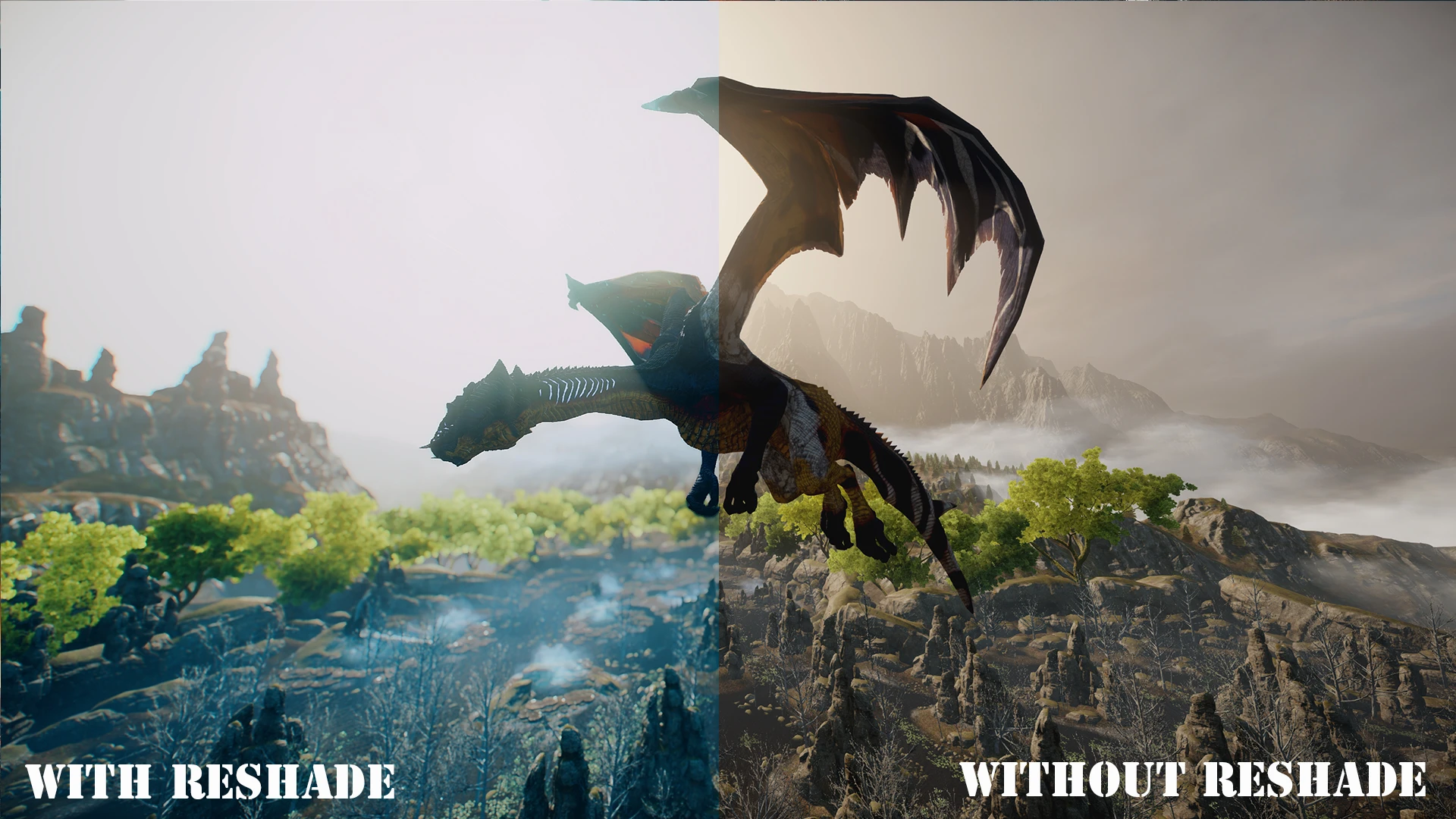
This adds cinematic effects to the game: Matso DOF, Lens Dirt, SMAA, Bloom, Sharpening, DPX, Vibrance, and Sun Flares
INSTALLATION
- []Unzip Screenarcher ReShade Preset to the folder with your Dragonageinqusition.exe ( mine is at \Origin\Dragon Age Inquisition )[/] []You will see "Compiling effects" if it works in the top of your screen on launch [/]
THIS DOES NOT WORK WITH MANTLE API
- ------------------------------------------------------------------------------------------------------------------------------------------------------------------------------------------
- Removal
The easiest way to remove is to delete the dxgi.dll
-------------------------------------------------------------------------------------------------------------------------------------------------------------------------------------------
Notes
To disable effects in game
I mapped the ScrLk key to toggle effects.
HBAO is Toggled with the HOME key
DOF is toggled with the END key
They are separate of the ScrLk key
THE DOF WILL BLUR THE HUD, THERE IS NO AUTO HUD DETECTION PRESENT IN RESHADE YET
To edit effects open the CFG files in notepad (Notepad++ is
Screenarcher ReShade Preset is a visual enhancement preset for ReShade, adding effects like Matso DOF, Lens Dirt, SMAA, Bloom, Sharpening, DPX, HBAO, High Pass Sharpening, Vibrance, and Sun Flares. It offers a no-DOF version for those who prefer sharper images. With 494 endorsements and 9,571 downloads, it's a popular choice for players seeking cinematic screenshots.
✨ Key Features
📊 Pros & Cons
✅ Pros
- Solid community backing with 494 endorsements and nearly 10k downloads
- Comes with a no-DOF version for those who hate depth of field blur
- Packs a ton of effects into one preset—DOF, SMAA, bloom, HBAO, and more
⚠️ Cons
- Last updated in 2015—might not play nice with newer ReShade versions or game updates
- Requires ReShade, which isn't included—you'll need to grab that separately
For screenshot enthusiasts and players who want cinematic visuals without fiddling with ENB. If you're into tweaking your game's look for pretty captures, this preset is a solid starting point. Skip if you want gameplay changes—this is purely cosmetic.
💡 Beginner Tips
- Make sure you have ReShade installed first, then drop the preset files into your game's ReShade folder.
- If you're using a mod manager, check if it supports ReShade presets—otherwise, manual placement is fine.
- Try the no-DOF version if you find the depth of field too strong during gameplay.
📊 Mod Details
- Game
- Dragon Age Mods
- Author
- Brandon Hortman
- Version
- 4.29.2015
- Downloads
- 9,571
- Endorsements
- 494
- Category
- Visuals and Graphics
- Created
- 3/3/2015
- Updated
- 4/29/2015
🔧 How to Install Dragon Age Mods
Download from Nexus.
📖 Full step-by-step install guide for Dragon Age →
Visit the official mod page for specific installation instructions for this mod.
🎮 Need cheat codes or console commands? Check ur gaming wiki for Dragon Age commands, item IDs, and more.
Keep browsing — more Dragon Age mods await