Erika's DAI ReShade Presets
⚪ Last updated 2020⚠️ Install Order · 1 step
Install in this order, then this mod last — most mods fail to load without their framework and dependencies in place.
Preview
🔍 Analysis
- 👍 2.9% endorsement rate — high engagement, a strong quality signal
- 🏆 #1 of 75 Visuals and Graphics mods in this game by downloads
📋 About This Mod
Erika's DAI ReShade Presets
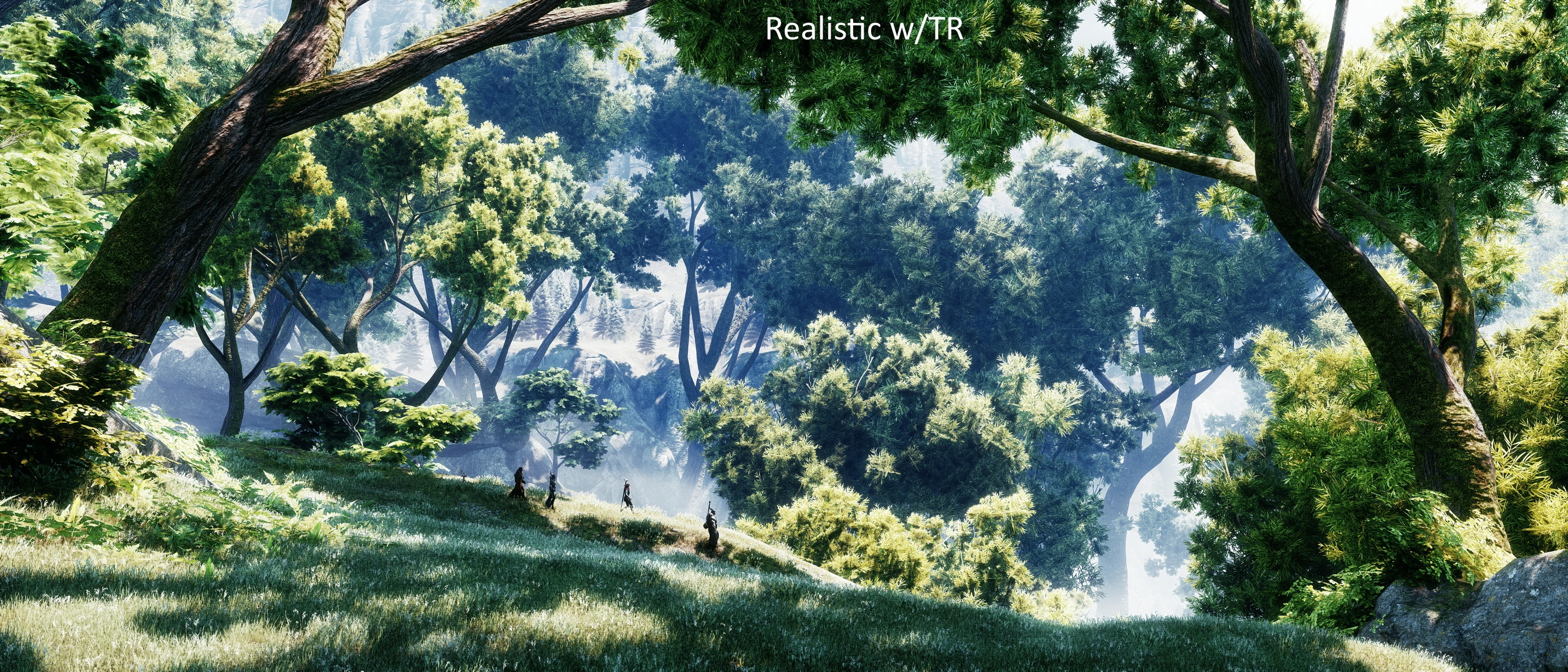
What began as a small project to upload a preset I made several years ago that fixes the white balance issues the game has, has now multiplied into a variety of looks for DAI. Have a look at the shots, and pick one that suits your purposes. Note that all shots have been altered a bit (not much) with Hattiwatti's Cinematic Tools.
Preset Descriptions:
Each preset now comes with a version for prod's tint remover shader, which will remove the overall tint from any game. It is a bit finicky, and I don't necessarily recommend it for gameplay, as sometimes it will act a bit odd. But it required altering the presets a bit for when it was on, which evolved into separate versions. Use whichever you prefer.
Realistic, Cinematic, Fantasy: These are all fairly similar, as you can see. Their main purpose was to correct the white balance of the game, and add some bloom and sharpening. Realistic is the most desaturated, Cinematic is the most saturated. Fantasy is in between, but is brighter. CInematic is the darkest, with the most skin detail. Fantasy and Realistic look very similar in places, and very different in others. See shots for comparison.
Filmic Teal-Orange: Somewhat self-explanatory. A teal-orange palette, fairly saturated, orange skin-tones with quite a bit of detail. With the tint remover the lighter skin tones are often quite pale, as it seems to remove pink tones from the skin.
Sylvan and Dutch School: Both of these are fairly reddish with purple shadows, and reddish skintones, but the Dutch is overall more reddish and has teal blues, whereas Sylvan's blues are heavily desaturated.
Threadbare: A teal-gold palette, dark shadows, teals are more towards green than in the Filmic Teal-Orange preset, yellow skin-tones.
Bleak: A very desaturated, very blue preset with very bright white highlights, desaturated skintones
New Bleak: This is very similar to Bleak, but less foggy. Uses a different LUT that was a free LUT from Lutify.me. It is part of a MultiLUT and I recommend trying some of the others, some look quite good with the Realistic, Fantasy, or Cinematic.
War Torn: B&W, super grainy, with chromatic aberration for photographic effect, has quite dark shadows, and now a chromatic aberration as part of bloom that adds some swathes of color to the image. See the shots for examples.
The images below are just examples. Full comparison shots in most areas are available in the mod images section. Note that in the labels, "TR" stands for "tint remover."
Installation:
Download ReShade from https://reshade.me/. Select your game
Erika's DAI ReShade Presets offers a variety of visual presets for Dragon Age: Inquisition, ranging from realistic color balance to artistic palettes. With over 4,400 endorsements and 155,000 downloads, it's a popular choice for players seeking to enhance the game's visuals. Last updated in 2020, it remains a well-loved cosmetic mod.
✨ Key Features
📊 Pros & Cons
✅ Pros
- Huge community trust (4,431 endorsements) — this is a proven preset pack.
- Massive download count (155k) means tons of players have tried it.
- Offers variety — you can switch between realistic and artistic looks.
⚠️ Cons
- Last updated in 2020 — might not be optimized for the latest ReShade versions.
- Requires ReShade to be installed separately — not included.
For Dragon Age: Inquisition players who want to refresh the game's visuals without overhauling textures. If you enjoy tweaking your game's look and want multiple options, this is for you. Skip if you prefer vanilla graphics or want gameplay changes.
💡 Beginner Tips
- Make sure you have ReShade installed and set up for Dragon Age: Inquisition before adding these presets.
- After installing, use the ReShade in-game overlay to cycle through presets and see which one fits your taste.
- If the presets look too dark or bright, adjust the in-game brightness settings to complement the preset.
📊 Mod Details
- Game
- Dragon Age Mods
- Author
- Erika Tschinkel
- Version
- 7.0
- Downloads
- 155,223
- Endorsements
- 4,431
- Category
- Visuals and Graphics
- Created
- 10/2/2015
- Updated
- 6/11/2020
🔧 How to Install Dragon Age Mods
Download from Nexus.
📖 Full step-by-step install guide for Dragon Age →
Visit the official mod page for specific installation instructions for this mod.
🎮 Need cheat codes or console commands? Check ur gaming wiki for Dragon Age commands, item IDs, and more.
Keep browsing — more Dragon Age mods await