DAI RESHADE
⚪ Last updated 2015Preview
🔍 Analysis
- 👍 5.4% endorsement rate — high engagement, a strong quality signal
- 🏆 #5 of 75 Visuals and Graphics mods in this game by downloads
📋 About This Mod
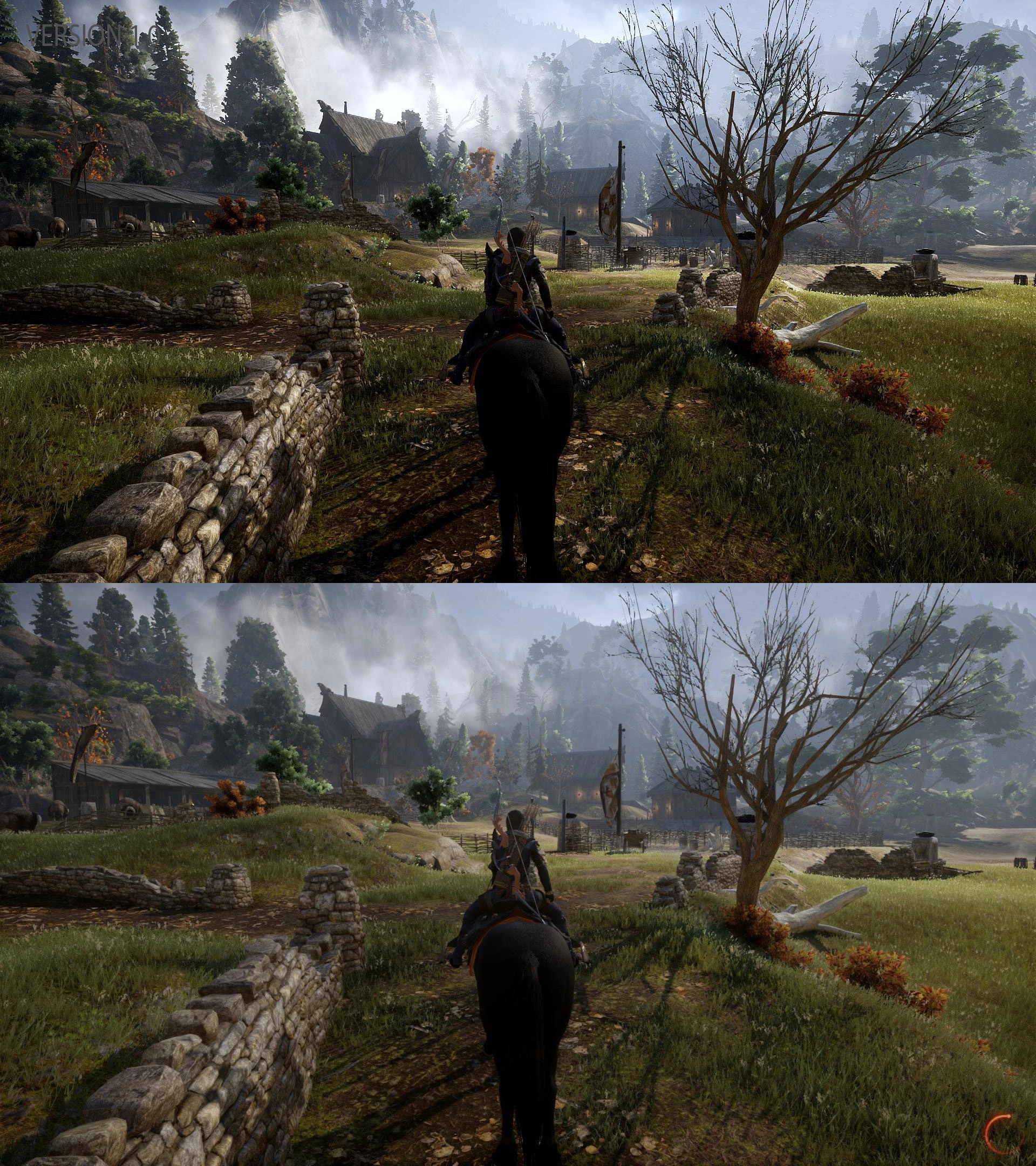
This ReShade preset attempts to eliminate the misty blurring that is present throughout the game. It also adds depth and brings out the colour of the world to produce a more sharper and clearer experience (see screenshots). I haven't used any performance hitting settings to produce this preset, so it shouldn't impact greatly on your game. In fact I haven't noticed any significant drop in FPS when using it.
INSTALLATION Extract the contents of the zip file to your "Dragon Age Inquisition" folder, where the "DragonAgeInquisition.exe" is located and then run the game. To uninstall simply delete the files added by this mod.
When you first run the game, you will be asked if you have read the notice which appears, read it and click 'YES' and the game will load and this message will not appear the next time.
Credit to Crosire for producing this brilliant advanced post-processing injector. If you like it, go to ReShade and donate to keep it being developed.
DAI RESHADE is a ReShade preset for Dragon Age: Inquisition, offering enhanced visuals through post-processing effects. With 1,828 endorsements and 33,675 downloads, it's a popular choice for players seeking a graphical overhaul. Last updated in 2015, it remains a stable option for the base game.
✨ Key Features
📊 Pros & Cons
✅ Pros
- Community favorite with 1,828 endorsements
- Over 33,000 downloads show it's been widely used
- Simple to install—just drop the preset into your ReShade folder
⚠️ Cons
- Last updated in 2015—may not be compatible with the latest game patches or ReShade versions
- No screenshots or detailed description provided, so you're flying blind on the look
- Requires ReShade to be installed separately, which adds setup steps
For Dragon Age: Inquisition players who want a quick visual upgrade without fiddling with ENB or manual tweaks. If you're after a specific aesthetic, you'll need to test it yourself since there's no preview. Skip if you prefer vanilla graphics or want a more modern preset with active updates.
💡 Beginner Tips
- Make sure you have ReShade installed and set up for Dragon Age: Inquisition before adding this preset.
- Back up your current ReShade settings so you can revert if you don't like the look.
- Check the mod's comments section on Nexus for user screenshots and compatibility notes.
📊 Mod Details
- Game
- Dragon Age Mods
- Author
- ramccoid
- Version
- 1.0
- Downloads
- 33,675
- Endorsements
- 1,828
- Category
- Visuals and Graphics
- Created
- 3/7/2015
- Updated
- 3/7/2015
🔧 How to Install Dragon Age Mods
Download from Nexus.
📖 Full step-by-step install guide for Dragon Age →
Visit the official mod page for specific installation instructions for this mod.
🎮 Need cheat codes or console commands? Check ur gaming wiki for Dragon Age commands, item IDs, and more.
Keep browsing — more Dragon Age mods await