upgrade weapon or armor
⚪ Last updated 2011Preview
🔍 Analysis
- 👍 4.3% endorsement rate — high engagement, a strong quality signal
- 🏆 #8 of 26 Utilities mods in this game by downloads
📋 About This Mod
Tutorial - how to make your weapon / armor to level up together with your level.
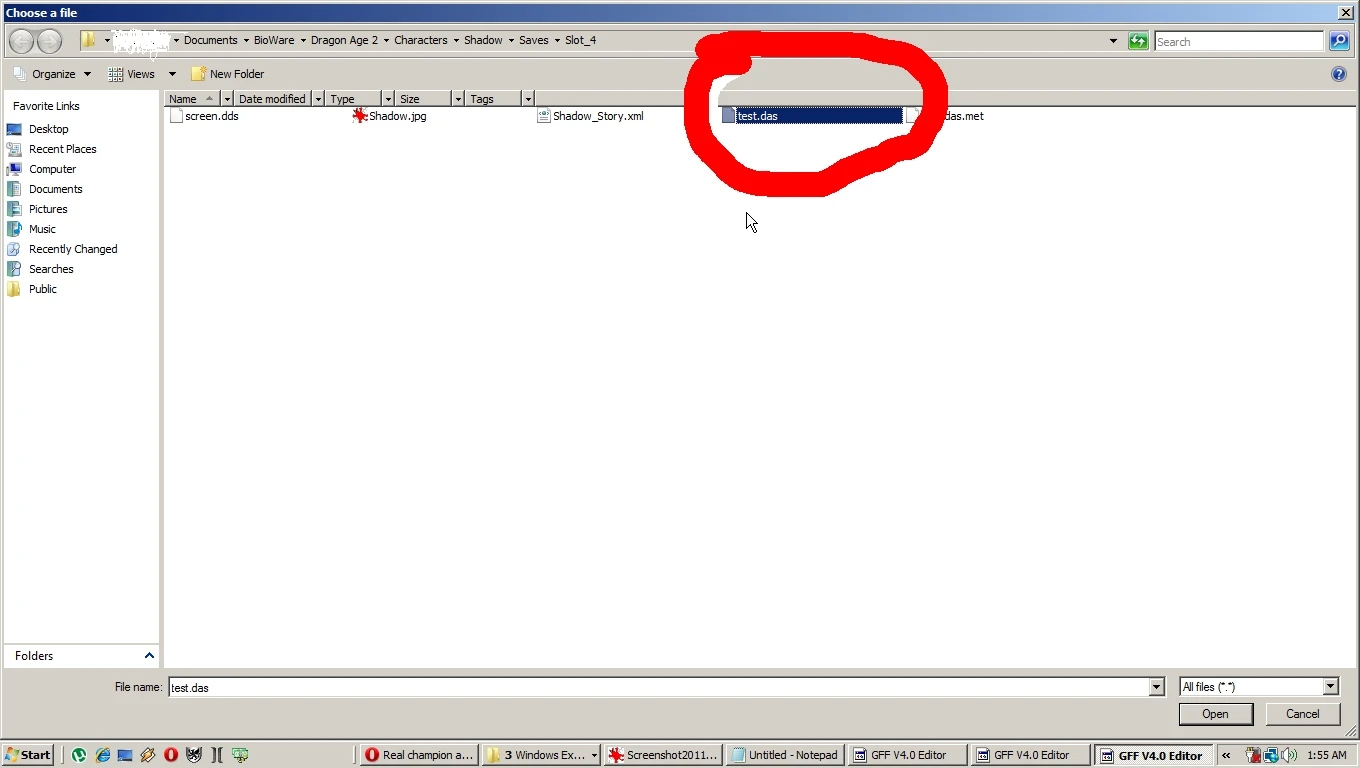
MAKE IT YOURSELF ! ============================================================= Update! Improved tutorial - pdf file, made possible by Kaosking (I envy his patience and organizing talents :P), containing also the work of b33tlejuice - the list of item properties, which you can see it here: http://dragonagenexus.com/downloads/file.php?id=2215 I give credits to Tiamatis for his contribution and to slothbites =========================================================== xD I could allways make a tons of items and place them on MY characters and upload the saves, but I just think is better when you do it on your character, and you don\'t need to restart or use my save with my name or whatever. :D =========================================================== How to make your weapon or armor to upgrade with your level. ============================================================= 1. Place it in your backpack 2. Save your game, exit. ============================================================ 3. Using GFF Editor, open your save. the file that you can edit has .das properties see pic tutorial 1 4. open down the menu from curent number \"0\", go to line \"SAVEGAME_PARTYLIST\" pic tutorial 2 5. open down menu from line \"SAVEGAME_BACKPACK pic tutorial 3 6. identify your item - our case \"Staff of Parthalan\". Object name in game is \"prm000im_parth_staff\". Click down this line. pic tutorial 4 7. Go to line \"ITEM_PROPERTIES\", open it down go to property code \"8000\". click it. You will see it in a window down left corner. (With menu \"Edit\") pic tutorial 5 7. 1. You can also add a new line and edit there 9115. Actually better if item has runes 8. Change the code to \"9115\" and click Save (from down left). After you pressed \"Save\" button you will see the change on the line under \"ITEM_PROPERTIES\" pic tutorial 6 and 7 9. Go to \"File\" -> \"Save as\" and select your savegame and overwrite it. pic tutorial 8 =========================================================== You will see when you open your game having your staff with the new property. And I uploaded another image with another staff (also changed item code \"8000\" to \"9115\" pic \"tutorial 9\" and \"other weapon\" ********************************************************* ============================================================= P. S. on this you can see how can modify only the appearance of an armor to look like the champion armor. So if you have a \"whatever\" helm you use and want to look like a one of the champion helms (rogue, mage or warrior), use this: http://dragonagenexus.com/downloads/file.php?id=2165 Check the description. *********************************************************** I - for example I wanted my archer to use a hood, not a helm, so I just modified the template appearance of that helm (no properties change). You can see also some pictures on the
📊 Mod Details
- Game
- Dragon Age 2 Mods
- Author
- toxic4u
- Version
- N/A
- Downloads
- 8,085
- Endorsements
- 345
- Category
- Utilities
- Created
- 3/15/2011
- Updated
- 3/18/2011
🔧 How to Install DA2 Mods
Use DA2 Mod Manager.
📖 Full step-by-step install guide for DA2 →
Visit the official mod page for specific installation instructions for this mod.
🎮 Need cheat codes or console commands? Check ur gaming wiki for DA2 commands, item IDs, and more.
Keep browsing — more DA2 mods await