Fake champion armors
⚪ Last updated 2011Preview
🔍 Analysis
- 👍 2.4% endorsement rate — high engagement, a strong quality signal
- 🏆 #69 of 218 Armour mods in this game by downloads
📋 About This Mod
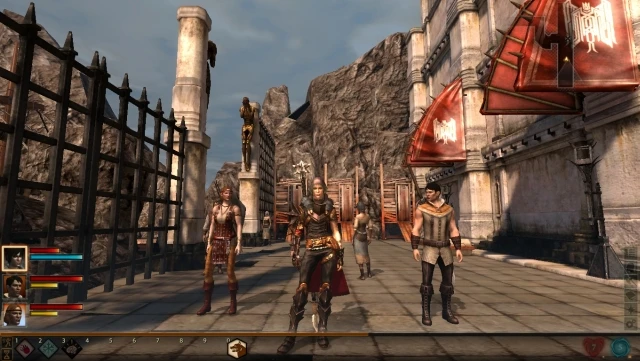
Champion armors for mage and warrior. (the lower stats from prologue, not the real armors)
Champion armor (lower stats) For mage and warrior only I can\'t get it for rogue yet, no idea why :(. I can have the daggers, but not the armor. ============================================================= LOWER STATS VERSION, not the actual armors. ============================================================= For real champion armors (all 3 classes): http://dragonagenexus.com/downloads/file.php?id=2170 ============================================================== You can equip them from start. This simple mod adds in your inventory the champion armor as soon you enter Kirkwall. ============================================================= Install: Place one of the extracted file (mage/warrior/rogue) in your \"Documents\\BioWare\\Dragon Age 2\\packages\\core\\override\" folder, related to what class you chose to play. You have to start a new game. ============================================================== P. S. note - tested with mage and warrior - works. ============================================================= Update - complete sets - armors + weapons (from fake blight - prologue, so do not curse me about their stats) ============================================================= Added new file - tutorial txt. You can see what I did, and feel free to try with rogue armor. ============================================================= If you really want a champion look armor on your rogue (not only), you can try this also, its pretty easy: Ideal if you don\'t want to start over and also don\'t want to start a new game, but you like the look of the armor. 1. have all your armor items in your backpack. save 2. open save file with gff4editor. 3. Look for \"SAVEGAME_PARTYLIST\", after that open down line \"SAVEGAME_BACKPACK\" 4. search for, let\'s say a helm: \"gen_im_arm_hlm_med_set_med\" (the helm from the last descent set) 5. open menu down, by clicking the \"+\" left to the current number 6. first line under you get \"TEMPLATERESREF\". Click it. You\'ll get on the down left window the name (editable) for the item, which will be (same as above): \"gen_im_arm_hlm_med_set_med\" 7. change it to \"fake_im_arm_hlm_med_champ\". Click the DOWN LEFT save first, then FILE -> SAVE AS -> overwrite your savegame. 8. play Again - ITEM KEEPS IT\'S STATS (hlm (helm), glv (gloves), boo (boots), cht (body armor) check tutorial file for further item codes infos ofc, advice, back-up your savegame first :P
📊 Mod Details
- Game
- Dragon Age 2 Mods
- Author
- toxic4u
- Version
- N/A
- Downloads
- 9,934
- Endorsements
- 234
- Category
- Armour
- Created
- 3/12/2011
- Updated
- 3/13/2011
🔧 How to Install DA2 Mods
Use DA2 Mod Manager.
📖 Full step-by-step install guide for DA2 →
Visit the official mod page for specific installation instructions for this mod.
🎮 Need cheat codes or console commands? Check ur gaming wiki for DA2 commands, item IDs, and more.
Keep browsing — more DA2 mods await