Pineappletree s Vibrant Colors for DA2
⚪ Last updated 2011Preview
🔍 Analysis
- 👍 4.8% endorsement rate — high engagement, a strong quality signal
- 🏆 #2 of 157 Face and Hair mods in this game by downloads
📋 About This Mod
Pineappletree's
Vibrant Colors
Description:
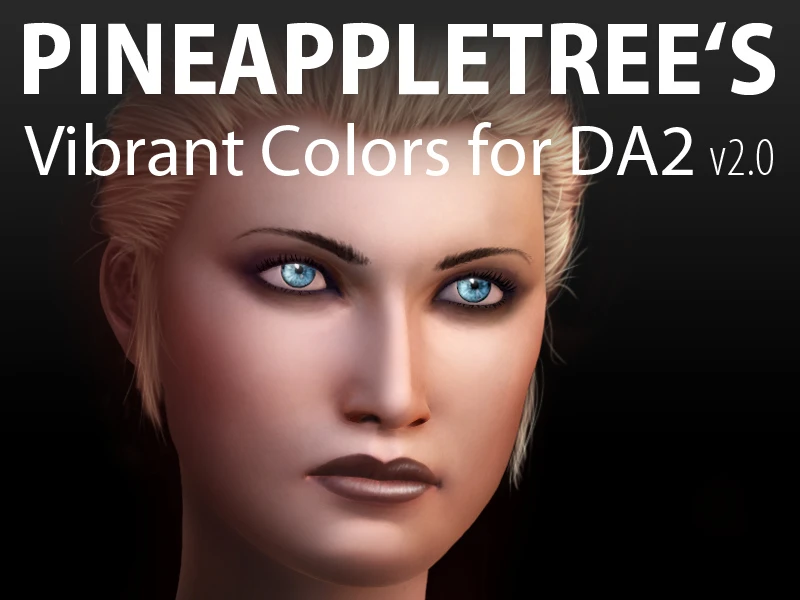
This is a collection of 46 new skin tones, 42 new eye colors and 48 new stubble & eyebrow colors for use in the DA2 character creator.
I recommend pairing this with my high resolution eye texture addon "Vibrant Eyes" which is deliberately designed to optimize the brightness and vibrancy of the eye colors included here. (And of course it works great with all other eye colors as well.)
Download: PTs Vibrant Eyes
Concerning hair colors:
I deliberately didn't include any for the time being!
The reason for this is that Bioware changed the way certain tints render in DA2, which makes a direct port of my old files impossible. (Unless you have a thing for glowing neon hair of course :D )
And - in short - I don't have the tools / information and / or time to get them working in DA2 at the moment.
However, I will continue to monitor the sitiuaton and hopefully we will see a return of the "Vibrant Hair Colors" soon.
Note, that I left all stubble / eyebrow colors that went with my DA:O hair tints in this addon, as they should render the same way they did before.
If you allready know this addon for DA:O, you might be interested that there are now 6 additional skin tones (5 very light and 1 very dark) and 12 additional eye colors in comparison to the old release and I updated the "Drow" skin tones to be a bit darker and more colorfull than before.
And last but not least:
If you would like a collection of new makeup styles to go with your freshly downloaded "Vibrant Colors" or if you are interested in a more stylized approach to eye textures, please take a look at Bidelle's Cosmetics II for DA2.
Installation:
Deinstall any older versions first!
Unzip and copy the folder "Pineappletree's Vibrant Colors 2_0" into your [...]\Dragon Age 2\packages\core\override\ folder.
Deinstallation:
Just delete the folder "Pineappletree's Vibrant Colors 2_0" from your [...]\Dragon Age 2\packages\core\override\ folder.
Known Issues:
This will most probably collide with any other mod that integrates new colors, morph presets, hairstyles etc. into the game.
This is because they come with their own version of the file "chargenmorphcfg.xml", which tells the game what options to show in the character creator.
To use multiple mods of this kind at the same time, you have to combine the data of their respective "chargenmorphcfg.xml" files, by either editing them manually or by using a program that does this auto
Pineappletree's Vibrant Colors for DA2 adds 46 new skin tones, 42 new eye colors, and 48 new stubble & eyebrow colors to the Dragon Age 2 character creator. It's a popular cosmetic mod with over 12,000 endorsements, perfect for players wanting more diverse character customization options.
✨ Key Features
📊 Pros & Cons
✅ Pros
- Huge variety boost: 136 new color options total for your Hawke.
- Massive community trust: 12,191 endorsements and 255k downloads show it's a staple.
- Simple install: just drop it in and fire up the character creator.
⚠️ Cons
- Last updated in 2011, so it may not be compatible with newer mods or patches.
- Only affects the character creator—no in-game changes to NPCs or lighting.
This is for DA2 players who want more diverse character appearances, especially those who love spending time in the character creator. It's also great for roleplayers who need specific looks for their Hawke. If you're tired of the limited vanilla options, this is a must-have.
💡 Beginner Tips
- Place the mod files in your Dragon Age 2 'packages/core/override' folder to ensure they load correctly.
- When creating a character, scroll through the new options slowly—some colors are subtle and easy to miss.
- If you use other character mods, install this one first to avoid conflicts.
📊 Mod Details
- Game
- Dragon Age 2 Mods
- Author
- Pineappletree
- Version
- 2.0
- Downloads
- 255,158
- Endorsements
- 12,191
- Category
- Face and Hair
- Created
- 3/27/2011
- Updated
- 3/27/2011
🔧 How to Install DA2 Mods
Use DA2 Mod Manager.
📖 Full step-by-step install guide for DA2 →
Visit the official mod page for specific installation instructions for this mod.
🎮 Need cheat codes or console commands? Check ur gaming wiki for DA2 commands, item IDs, and more.
Keep browsing — more DA2 mods await