WADDI - Expandable add item script with input window
⚪ Last updated 2013Preview
🔍 Analysis
- 👍 5.4% endorsement rate — high engagement, a strong quality signal
- 🏆 #3 of 26 Utilities mods in this game by downloads
📋 About This Mod
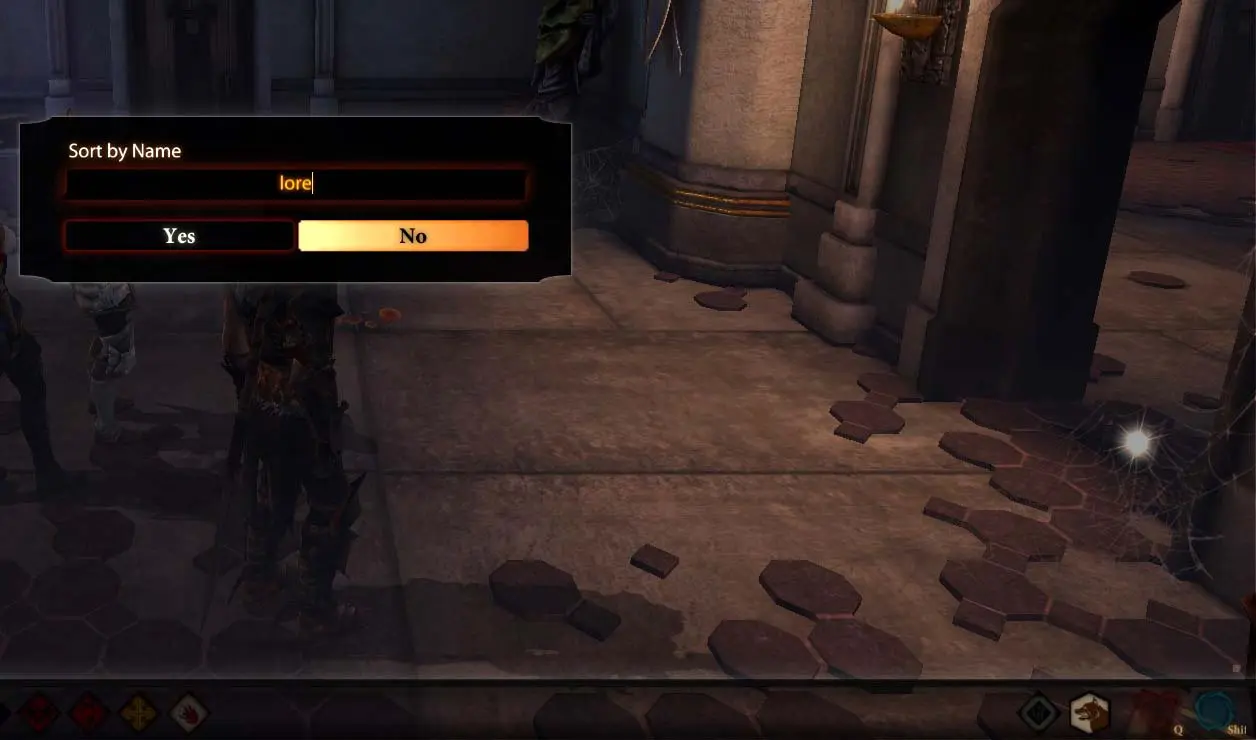
Add item script like VADDI that\'s easily expandable and provides an input window for error-free entry of search phrases.
UPDATE Version 1. 4b allows you to use apostrophes & dashes in the text field.
VADDI is one of the greatest mods for DA2, along with it\'s update, but it does have two drawbacks: 1) It can\'t be easily expanded to include new user-created items without causing conflicts. 2) Like all console commands, you can\'t see what you\'re typing. So I created W(indowed)ADDI, which calls up an input window so you can see what you\'re typing to search for. It\'s also easily expanded via standard 2DA methods. Instructions 1. Unzip into your /override folder. 2. To use, type \'runscript waddi\' into the console. 3. A window will pop up with the message \"Sort by Name\", an input field, and \"YES\" and \"NO\" buttons.
- [] Pressing the \"NO\" button with an empty input field will exit the script with no search performed. [] Typing into the field and pressing the \"YES\" button or the enter key will cause a NAME SEARCH of items. Just like VADDI, this is processing intensive and will cause a slowdown. [] Typing into the field and pressing the \"NO\" button will cause a RESOURCE SEARCH of items.
📊 Mod Details
- Game
- Dragon Age 2 Mods
- Author
- gastank
- Version
- 1.4b
- Downloads
- 36,904
- Endorsements
- 1,994
- Category
- Utilities
- Created
- 10/23/2013
- Updated
- 12/1/2013
🔧 How to Install DA2 Mods
Use DA2 Mod Manager.
📖 Full step-by-step install guide for DA2 →
Visit the official mod page for specific installation instructions for this mod.
🎮 Need cheat codes or console commands? Check ur gaming wiki for DA2 commands, item IDs, and more.
Keep browsing — more DA2 mods await