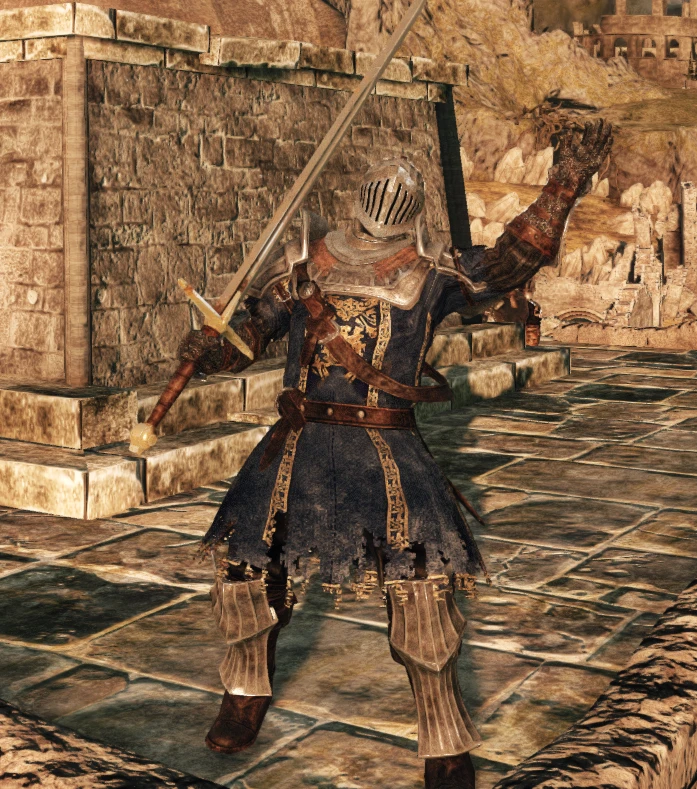
SOTFS Astora Imperious Knight
⚪ Last updated 2017Preview
🔍 Analysis
- 🏆 #146 of 208 Armour mods in this game by downloads
📋 About This Mod
Take a look at this TANK-KNIGHT from the good ol' land of Astora.
Since there aren't many heavy armors that make you look like an invincible heavy knight, i decided to take one of my favorite Armor Designs and make it happen. Ask me if you have any suggestion to tweak a bit more this armor, other helmet, gauntlets, etc...
INCLUDES: -Alva Helmet -Imperious Armor -Royal swordsman Gauntlets -Imperious Boots/Leggins
INSTALLATION: 1. Download iGP 11 and make sure you have acomplished to add this mod first. 2. Here's a quick tutorial, it's for DS3 but it's almost the same. 3. Download this file. 4. Put the content inside of your C:\Program Files (x86)\BANDAI NAMCO Entertainment\DARK SOULS II - Scholar of the First Sin\Game\tex_override folder or either folder you chose at iGP11. 5. Launch iGP 11 as admin, then choose the override mode(the icon surely will move itself to your hidden icons in your windows bar).
📊 Mod Details
- Game
- Darksouls2 Mods
- Author
- SSJetstream
- Version
- 1.0
- Downloads
- 226
- Endorsements
- 9
- Category
- Armour
- Created
- 1/7/2017
- Updated
- 1/7/2017
🔧 How to Install Dark Souls 2 Mods
Download from Nexus Mods.
📖 Full step-by-step install guide for Dark Souls 2 →
Visit the official mod page for specific installation instructions for this mod.
🎮 Need cheat codes or console commands? Check ur gaming wiki for Dark Souls 2 commands, item IDs, and more.
Keep browsing — more Dark Souls 2 mods await