DS2MouseLagFix
⚪ Last updated 2014Preview
🔍 Analysis
- 👍 3.4% endorsement rate — high engagement, a strong quality signal
- 🏆 #5 of 61 Miscellaneous mods in this game by downloads
📋 About This Mod
Dark Souls II - Mouse Lag Fix
by _DTG_
- -----------------------------------------------------------
- DS2MouseLagFix version 1. 1 (2014/05/31):
- -----------------------------------------------------------
- - Added Mouse XButton-1, XButton-2 support.
- - Now the mod Toggle ON/OFF key can be changed via the DS2MouseLagFix.ini file.
- - VAC notification message on the mod startup now can be disabled in the DS2MouseLagFix.ini file.
VAC (Valve Anti-cheat) Warning! There is no guarantee that DS2MouseLagFix is VAC (Valve Anti-Cheat) safe. I cannot assure you that you will not get VAC ban for using this mod, so use it at your own risk. I can only say that DS2MouseLagFix does not touch (modify) any piece of original code in the game. It just intercepts Mouse Inputs using a technique known as Window Subclassing. But, I'm afraid, that VAC is not smart enough to distinguish a cheating program from non-cheating one, and VAC might consider DS2MouseLagFix as a cheating tool by mistake.
- -------------------------------------------------
- What is DS2MouseLagFix?
- -------------------------------------------------
- As its name says it is a tool made for fixing Dark Souls II mouse problems:
- - When you click Mouse buttons your commands start with 0. 5 sec delay.
- - When you hold CTRL, SHIFT, ALT keys and click Mouse buttons you get unwanted commands.
- - When you want to do quick Single clicks they become Double clicks and produce unwanted actions.
- -------------------------------------------------
- How does DS2MouseLagFix work?
- -------------------------------------------------
- It intercepts Mouse Inputs (Left, Right, Middle, XButton-1, XButton-2) mouse buttons clicks, double clicks, also mouse wheel up, wheel down events and maps them to the keyboard (simulates Keyboard key press) according to the DS2MouseLagFix.ini (configuration) file.
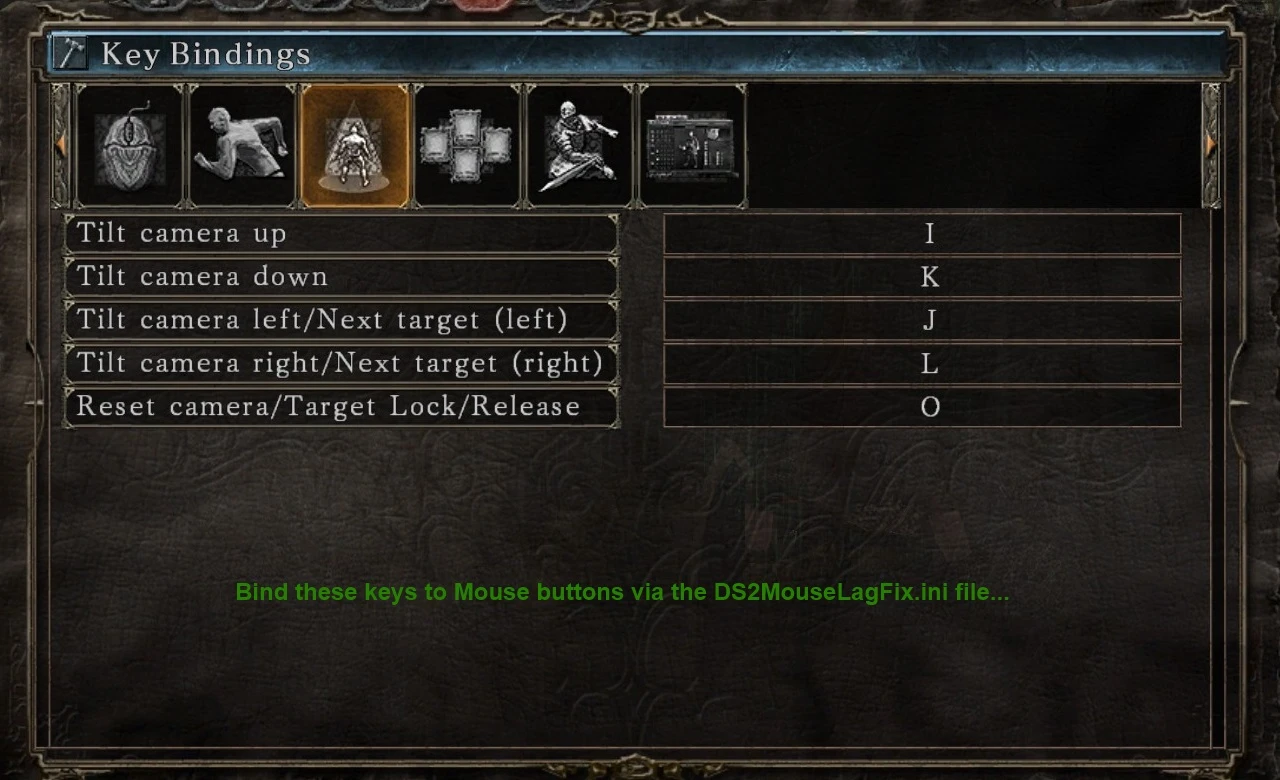
For example, I want to bind my Left Mouse click to Strong Right Hand attack. I can do this by following these steps:
- []In the game, go to the Key Bindings configuration screen. Find the Strong Attack (Right Hand) key binding. []Open the DS2MouseLagFix.ini file with Notepad and bind the same key to 'MouseLButton=' field.
- If DS2MouseLagFix is already loaded into the game, then you need to restart your game in order the 'DS2MouseLagFix.ini' changes take effect.
Also please note that there won't be sepa
DS2MouseLagFix is a utility mod for Dark Souls II that addresses mouse input issues, such as lag and responsiveness. With 412 endorsements and over 12,000 downloads, it's a well-received fix for players using mouse and keyboard. Last updated in 2014, it remains a relevant solution for the game's mouse problems.
✨ Key Features
📊 Pros & Cons
✅ Pros
- Community-approved fix (412 endorsements) for a common annoyance.
- High download count (12,103) shows it's widely used.
- Directly addresses a specific issue without extra bloat.
⚠️ Cons
- Last updated in 2014, so it may not be compatible with newer game patches or OS versions.
- No detailed instructions or compatibility notes, so you're on your own for setup.
- Potential conflicts with other input-related mods or overlays.
For Dark Souls II players who play with mouse and keyboard and are frustrated by input lag or erratic camera movement. This is a must-try if you're having mouse issues. Skip if you use a controller or don't experience mouse problems.
💡 Beginner Tips
- Make sure to disable any mouse acceleration in Windows settings for best results.
- If you're using a mod manager, place this mod after other input-related mods to avoid conflicts.
- Test in-game sensitivity settings after installing to fine-tune the feel.
📊 Mod Details
- Game
- Darksouls2 Mods
- Author
- _DTG_
- Version
- 1.1
- Downloads
- 12,103
- Endorsements
- 412
- Category
- Miscellaneous
- Created
- 5/21/2014
- Updated
- 5/31/2014
🔧 How to Install Dark Souls 2 Mods
Download from Nexus Mods.
📖 Full step-by-step install guide for Dark Souls 2 →
Visit the official mod page for specific installation instructions for this mod.
🎮 Need cheat codes or console commands? Check ur gaming wiki for Dark Souls 2 commands, item IDs, and more.
Keep browsing — more Dark Souls 2 mods await