Dark Souls 2 Deadzone Fix
⚪ Last updated 2014Preview
🔍 Analysis
- 👍 3.5% endorsement rate — high engagement, a strong quality signal
- 🏆 #2 of 61 Miscellaneous mods in this game by downloads
📋 About This Mod
UPDATE - IMPORTANT This fix does not work with Scholar of the First Sin! It uses and old 32-bit version of Durazno, which cannot work with the 64-bit game. Luckily, the latest release of Durazno by KrossX has both 32-bit and 64-bit versions - Durazno
Just extract the 64-bit version from the archive (files from the x64 folder) into the Dark Souls 2/Game folder and make sure to use the following settings: LinearADZ: Checked Deadzone: 20-30 (depends on user) AntiDeadzone: 36
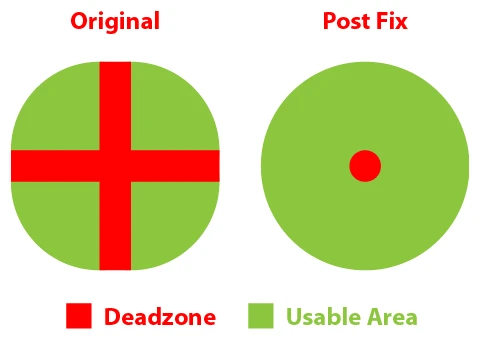
Description This fix modifies the Dark Souls II gamepad deadzone to make it work similarly to the one in the original Dark Souls. This fix does not fix the sudden camera speed up that happens when tilting the right stick halfway. It simply makes controlling your character and camera more responsive. No more snapping to the x and y axis.
This fix is essentially 100% Durazno XInput Wrapper with a small modification I made to the anti-deadzone calculation. The author of Durazno XInput Wrapper is KrossX and I'm uploading this fix with his permission. Please read the readme.txt file included in the archive for more information.
VAC At this moment there's no cofirmation that this fix will or won't trigger a VAC ban. All I can say is that you use this software at your own risk.
Installation Extract it into the Dark Souls 2/Game folder. You don't need to configure anything, it should just work. However, if you find the deadzone not to your liking, consult the readme file inside the archive to learn how to change it.
The future of this fix I've spoken to KrossX to see if there's any way this could be implemented into the official Durazno release. He responded and it seems that it was already on his todo list for some time. Which means, that the next release of Durazno will surely replace this fix entirely, which is great news.
Credits A special thank you to KrossX for creating Durazno XInput Wrapper, the lifeblood of this fix. I wouldn't have uploaded this here if it weren't for his permission. Thank you KrossX! Thanks also go to the creators of x360ce. I wouldn't have known that it's possible to fix broken deadzones if it weren't for x360ce's anti-deadzone setting.
If any of this information is false or in any other way unsatisfactory, don't hesitate to contact me.
This mod adjusts the gamepad deadzone in Dark Souls 2 to match the original Dark Souls, improving analog stick responsiveness. It does not address the sudden camera speed-up when tilting the right stick halfway. A simple fix for controller users, with 1,246 endorsements and 35,744 downloads.
✨ Key Features
📊 Pros & Cons
✅ Pros
- Community-approved with 1,246 endorsements and over 35k downloads.
- Directly addresses a common controller complaint for Dark Souls 2.
- Simple, focused fix that does exactly what it says.
⚠️ Cons
- Only affects deadzone; the camera speed-up issue remains unfixed.
- May not be compatible with other controller or camera mods.
- Last updated in 2014, so it might not work with later game patches.
For Dark Souls 2 players using a gamepad who find the default deadzone sluggish or unresponsive. If you're bothered by the camera speed-up on half-tilt, this mod won't help. Skip if you play with keyboard and mouse.
💡 Beginner Tips
- Place the file in your Dark Souls 2 game directory, usually where the .exe is located.
- If you use other input mods, test this one first to see if they conflict.
- Adjust in-game sensitivity settings after applying to fine-tune the feel.
📊 Mod Details
- Game
- Darksouls2 Mods
- Author
- MTaye
- Version
- 1.0
- Downloads
- 35,744
- Endorsements
- 1,246
- Category
- Miscellaneous
- Created
- 5/5/2014
- Updated
- 5/5/2014
🔧 How to Install Dark Souls 2 Mods
Download from Nexus Mods.
📖 Full step-by-step install guide for Dark Souls 2 →
Visit the official mod page for specific installation instructions for this mod.
🎮 Need cheat codes or console commands? Check ur gaming wiki for Dark Souls 2 commands, item IDs, and more.
Keep browsing — more Dark Souls 2 mods await