(YAR) Yet Another ReShade (uses Reshade 3.x)
⚪ Last updated 2018⚠️ Install Order · 1 step
Install in this order, then this mod last — most mods fail to load without their framework and dependencies in place.
Preview
🔍 Analysis
- 👍 3.9% endorsement rate — high engagement, a strong quality signal
- 🏆 #93 of 195 Visuals and Graphics mods in this game by downloads
📋 About This Mod
Description:
This ReShade uses version 3. 0. 5. and as a result comes with better performance, easily enable/disable/tweak effects with the overlay (shift+f2). It also doesn't clash with other overlays. I made this out of desperation because steam big picture mode wasn't working properly for my controller because of the overlay being overwritten with the older ReShade framework.
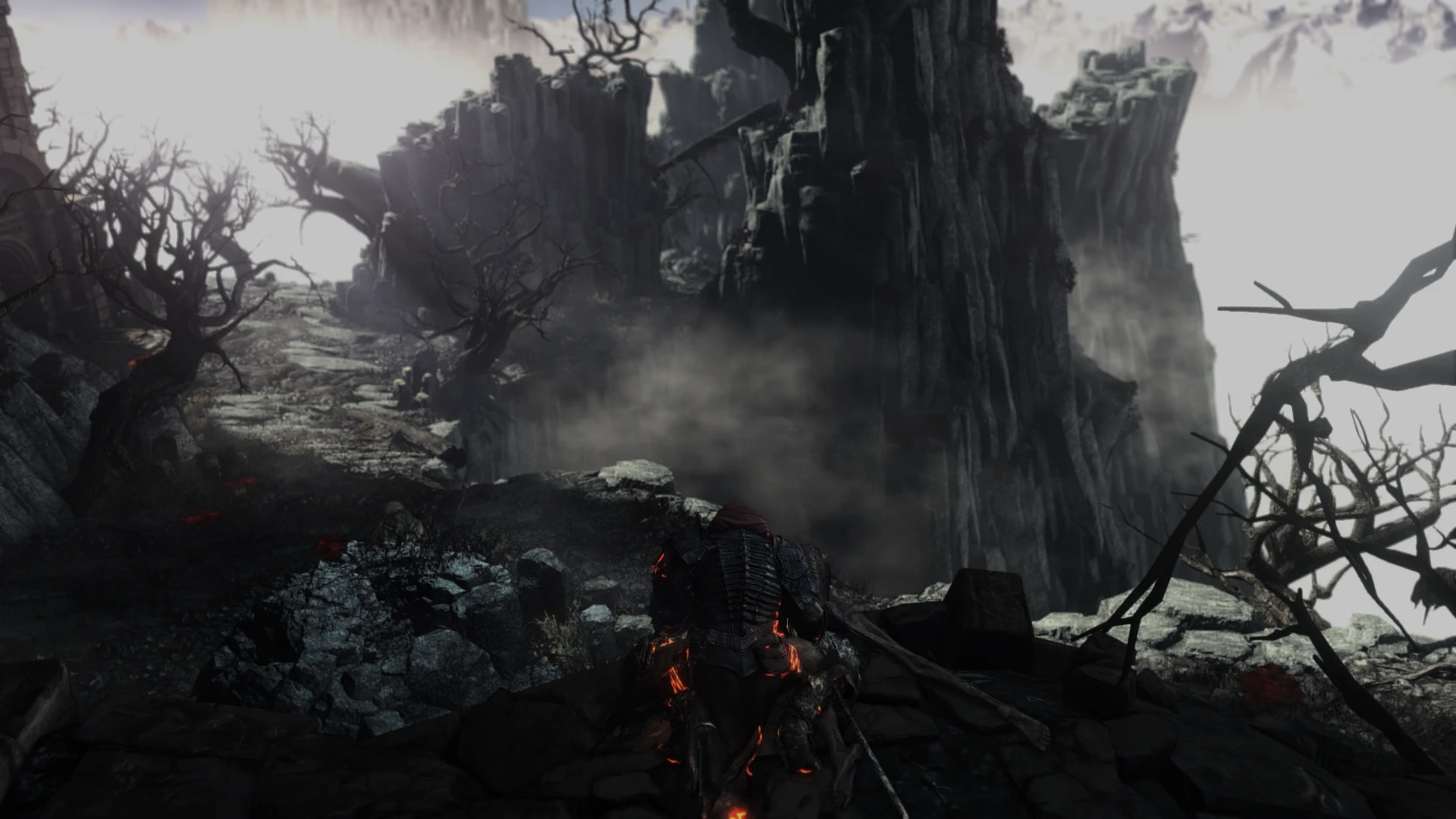
If you're worried the mod makes things too dark, screenshots were done with the brightness all the way down to 0. The mod still looks great with the brightness turned up a bit too, I just prefer it low.
SMAA was added to get rid of the aliasing that the game can't get rid of on it's own. The lighting is much better, and the colors aren't washed out and not being cartoony looking either. DoF added, as well as HDR and Ambient Lighting. Environments have a slightly darker, grittier, and bleak tone, while being very cinematic in presentation.
Effects Used:
AmbientLight
LumaSharpen
LightDoF_Far
Installation and Usage:
Place all files in the Dks3 installation folder (where the .exe is located). If you have a steam library in a different location than the default "C:\Program Files (x86)\Steam\steamapps\common\DARK SOULS III\Game" you may need to open dxgi.ini and modify the paths to the correct location. For everyone else with a default installation you don't need to do anything. Then launch the game normally. Enjoy! I recommend brightness at 0-2 depending on your monitor. I personally use 0.
If you are having performance issues press 'shift+F2' and disable 'AmbientLighting' as it's typically the most intensive shader used.
Delete all files included in the mod and that's it.
Update 1. 1:
Changed some effects around. Added/removed/tweaked effects. A little more performance demanding now but more drastic as well.
Update 2. 0:
Tons of tweaks to dramatically improve the image.
A ReShade 3.0.5 preset for improved lighting, designed to be performance-friendly and compatible with overlays like Steam Big Picture. It offers easier tweaking for users who want to adjust visuals. With 43 endorsements and 1,101 downloads, it's a niche but functional graphics enhancement.
✨ Key Features
📊 Pros & Cons
✅ Pros
- Performance-friendly: built on ReShade 3.x, so it's lighter than older presets
- Overlay-safe: won't conflict with Steam or other overlays, great for Big Picture
- Easy to tweak: the new framework makes adjusting settings simpler
⚠️ Cons
- Only 43 endorsements, so it's not widely tested
- Last updated in 2018, may not work with newer games or ReShade versions
- Compatibility risk: requires ReShade 3.0.5 specifically, which might be outdated
For gamers who want a lightweight ReShade preset that works with Steam Big Picture and overlays. Also for those who prefer tweaking visuals without heavy performance hits. Not for those seeking a feature-rich, actively maintained preset.
💡 Beginner Tips
- Make sure you have ReShade 3.0.5 installed, as this preset is built for that version.
- If you're using Steam Big Picture, this preset is designed to work without overlay conflicts.
- Start with the default settings and tweak from there—it's meant to be easy to adjust.
📊 Mod Details
- Game
- Dark Souls 3 Mods
- Author
- Nano-Ocelot
- Version
- 2.0
- Downloads
- 1,101
- Endorsements
- 43
- Category
- Visuals and Graphics
- Created
- 12/6/2016
- Updated
- 7/19/2018
🔧 How to Install Dark Souls 3 Mods
Download from Nexus.
📖 Full step-by-step install guide for Dark Souls 3 →
Visit the official mod page for specific installation instructions for this mod.
🎮 Need cheat codes or console commands? Check ur gaming wiki for Dark Souls 3 commands, item IDs, and more.
Keep browsing — more Dark Souls 3 mods await