DS3 Mod Engine
⚪ Last updated 2019⚠️ Install Order · 1 step
Install in this order, then this mod last — most mods fail to load without their framework and dependencies in place.
Preview
🔍 Analysis
- 👍 3.4% endorsement rate — high engagement, a strong quality signal
- 🏆 #1 of 69 Utilities mods in this game by downloads
📋 About This Mod
If you are playing a mod that modifies DLC specific stuff such as Cinders 1. 60 or later, you must update Mod Engine to 0. 1. 13.
Mod Engine 0. 1. 13 was just released! This update includes all the improvements and bug fixes in the latest Sekiro Mod Engine including:
AOB scans for all function hooks, which greatly improves general compatibility
Rewritten override resolution logic which can fix issues with finding game files
* Support chain loading other dinput8 dll based mods such as Boss Rush
This also fixes an issue that causes DLC files not to load
Users experiencing issues or desiring to chain load dlls should try updating to this version.
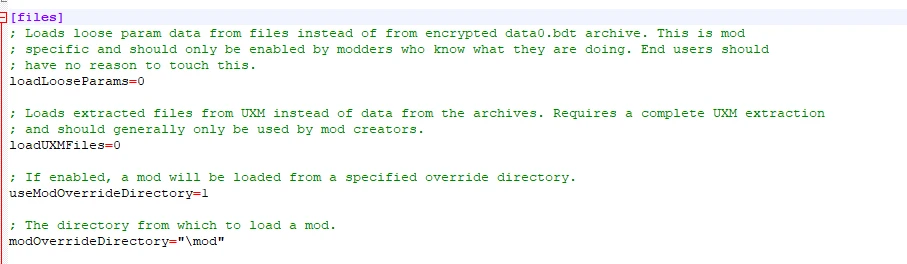
Mod Engine is a an injection DLL library that makes modding game files super easy and safe. Gone are the days of having to use UXM and extract gigabytes worth of game files to play a mod, or accidentally go online and get banned when you just want to mess around in the game. Mod Engine supports any mod that relies on file edits including Cinders, Enemy Onslaught, and Archives of Doom. Playing DS3 mods is as simple as creating a folder, dropping in modded files, and modifying an ini file to point to the mod directory.
DISCLAIMER: Mod Engine is designed to be compatible with the latest official Steam version of Dark Souls III. Older versions and cracked versions are not supported and may not work.
Installation:
1. Copy dinput8.dll and modengine.ini to your DARK SOULS III\Game directory (usually located at C:\Program Files (x86)\steam\steamapps\common\DARK SOULS III\Game for default installations)
2. Extract or copy the files for the mod you are installing to a unique new directory in DARK SOULS III\Game directory. For example, if installing Cinders, you should create a directory called cinders in DARK SOULS III\Game and copy all the cinders files (data0.bdt, msg, map, event, etc) into that directory.
3. Open up modengine.ini and modify the modOverrideDirectory parameter to the folder you installed the mod into (a '\' character is required currently). For example for cinders you would change the line to say
modOverrideDirectory="\cinders"
4. Launch the game. You will see the game attempt to connect to the internet and eventually fail. After it fails, you should go into the settings and set the game to start in offline mode.
5. Enjoy your mod. If you want to play a different mod, change the modOverrideDirectory setting to point to a different folder with a different mod. To uninstall, delete or rename dinput8.dll.
DS3 Mod Engine is a utility that simplifies mod installation for Dark Souls 3, allowing players to use mods without unpacking game archives and with protection from online bans. It has 24,498 endorsements and 715,164 downloads, last updated in December 2019.
✨ Key Features
📊 Pros & Cons
✅ Pros
- Massive community trust – 24,498 endorsements and over 700k downloads.
- Saves you from the headache of manually unpacking game archives.
- Lets you mod without fear of getting banned online – a huge plus for PvP players.
⚠️ Cons
- Last updated in 2019 – may not be compatible with the latest game patches or DLC.
- As a utility, it doesn't add content itself – you'll still need to find mods to use with it.
For Dark Souls 3 players who want to dive into modding without the technical hassle or the risk of online bans. Essential for anyone planning to use gameplay or cosmetic mods. Skip if you're on console or prefer vanilla play.
💡 Beginner Tips
- Make sure to launch the game through the Mod Engine executable, not the normal launcher, to ensure mods load correctly.
- If you're playing online, double-check that the mod engine's anti-ban features are active – it's your safety net.
- Since the mod is from 2019, check the mod's forum or comments for any community patches if you're on the latest game version.
📊 Mod Details
- Game
- Dark Souls 3 Mods
- Author
- Katalash
- Version
- 0.1.13
- Downloads
- 715,164
- Endorsements
- 24,498
- Category
- Utilities
- Created
- 3/18/2019
- Updated
- 12/11/2019
🔧 How to Install Dark Souls 3 Mods
Download from Nexus.
📖 Full step-by-step install guide for Dark Souls 3 →
Visit the official mod page for specific installation instructions for this mod.
🎮 Need cheat codes or console commands? Check ur gaming wiki for Dark Souls 3 commands, item IDs, and more.
Keep browsing — more Dark Souls 3 mods await