Incandescent ReShade 2.0 - 2020 Re-Release
⚪ Last updated 2024⚠️ Install Order · 2 steps
Install in this order, then this mod last — most mods fail to load without their framework and dependencies in place.
Preview
🔍 Analysis
- 👍 3.1% endorsement rate — high engagement, a strong quality signal
- 🏆 #2 of 195 Visuals and Graphics mods in this game by downloads
📋 About This Mod
Incandescent ReShade 2. 0 Update
In anticipation of my planned ReShade for Sekiro, I decided to first come back and update this popular Dark Souls III mod to the new ReShade standard. This new version is more user-friendly, and easier to tweak in-game on the fly, without the need for minimising, refreshing, saving, backing up files, and all the other fun steps I went through to get the original mod to a state I was happy with.
With the advances in hardware over the years since original release I've decided to leave out the lite version from the update, though it is still available in its legacy format.
Description
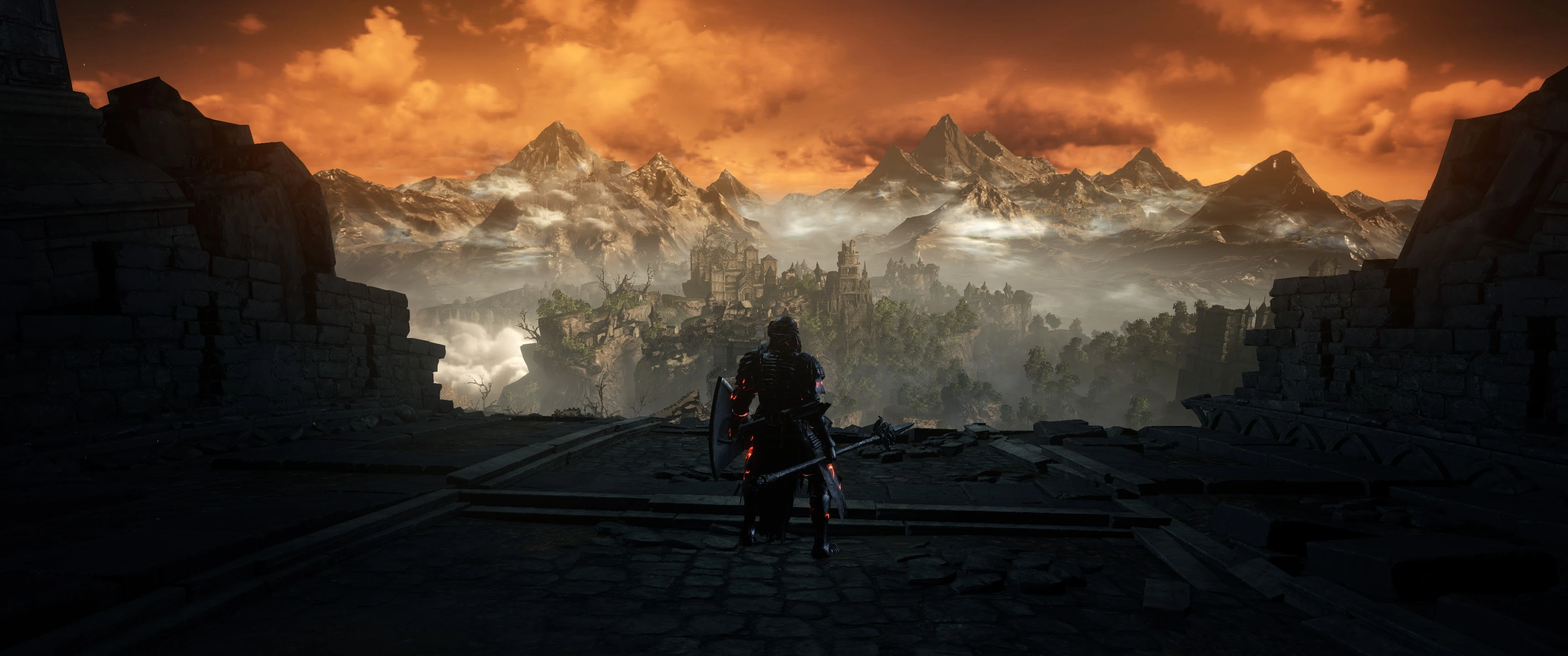
Want a ReShade that doesn't kill your fps? I agree that DS3 is a good looking game, but there was just something that always looked a little off about it. This ReShade will remove the grey, washed out colours of the vanilla game, without over saturating or adding unnecessary effects so it still feels the same, giving you the full intended definitive Dark Souls experience.
Tombs, nights, and shadows will be darker. Torches, candles, the sky and reflections will emit more light, enhancing the over-all atmosphere.
Darks should be darker, lights should illuminate more, and fires should feel warmer. See screenshots for comparison, but please note that the screenshots and videos aren't entirely representative of the changes you'll experience in game, especially after undergoing compression.
HTHMods, and NorthWind kindly made a couple of video comparisons for your enjoyment:
wEn6DsGSp5U NiyUQoLqDa8
v2. 0 Installation
Installing ReShade
1. Download the ReShade installer from https://reshade.me
2. Run the installer, and select "Click here to select a game and manage its ReShade installation".
3. Wait for the list of .exe's to populate, or find the DarkSoulsIII.exe manually using the "Browse" button to the bottom right.
4. Click on "Direct3D 10/11/12".
5. From the list which pops up select only "SweetFX by CeeJay.dk", and "Legacy standard effects" (to be safe or simply if you'd like to play around with them yourself, you can enable all effects throughout the installation).
6. Ensure all effects are ticked in the following windows by pressing "Check all", and click "OK". Do this multiple times for each window that pops up.
Incandescent ReShade 2.0 is a lite ReShade preset for Dark Souls 3 that preserves the original atmosphere while minimizing performance impact. With nearly 4,000 endorsements and over 127,000 downloads, it's a popular choice for players seeking enhanced visuals without heavy FPS loss.
✨ Key Features
📊 Pros & Cons
✅ Pros
- Huge community trust: 3,978 endorsements and 127k downloads show this preset is battle-tested
- Performance-friendly by design—perfect for players who want better visuals without tanking FPS
- Preserves the original DS3 mood, so you won't get a completely different look
⚠️ Cons
- Last updated in March 2024—may not be optimized for the latest ReShade versions or game patches
- As a ReShade preset, it requires ReShade to be installed separately, which might be a hurdle for newcomers
For Dark Souls 3 players who want a subtle visual upgrade that keeps the game's original feel and doesn't wreck performance. Skip if you're looking for dramatic graphical overhauls or if you prefer vanilla visuals.
💡 Beginner Tips
- Make sure you have ReShade installed and set up for Dark Souls 3 before adding this preset.
- After installing, tweak the preset's settings in-game using the ReShade overlay to match your monitor's brightness and contrast.
- If you experience crashes, check that your ReShade version is compatible with the game's latest patch.
📊 Mod Details
- Game
- Dark Souls 3 Mods
- Author
- Obanon
- Version
- 2.2
- Downloads
- 127,041
- Endorsements
- 3,978
- Category
- Visuals and Graphics
- Created
- 4/27/2016
- Updated
- 3/13/2024
🔧 How to Install Dark Souls 3 Mods
Download from Nexus.
📖 Full step-by-step install guide for Dark Souls 3 →
Visit the official mod page for specific installation instructions for this mod.
🎮 Need cheat codes or console commands? Check ur gaming wiki for Dark Souls 3 commands, item IDs, and more.
Keep browsing — more Dark Souls 3 mods await