SoulsOutfitManager
⚪ Last updated 2022⚠️ Install Order · 1 step
Install in this order, then this mod last — most mods fail to load without their framework and dependencies in place.
Preview
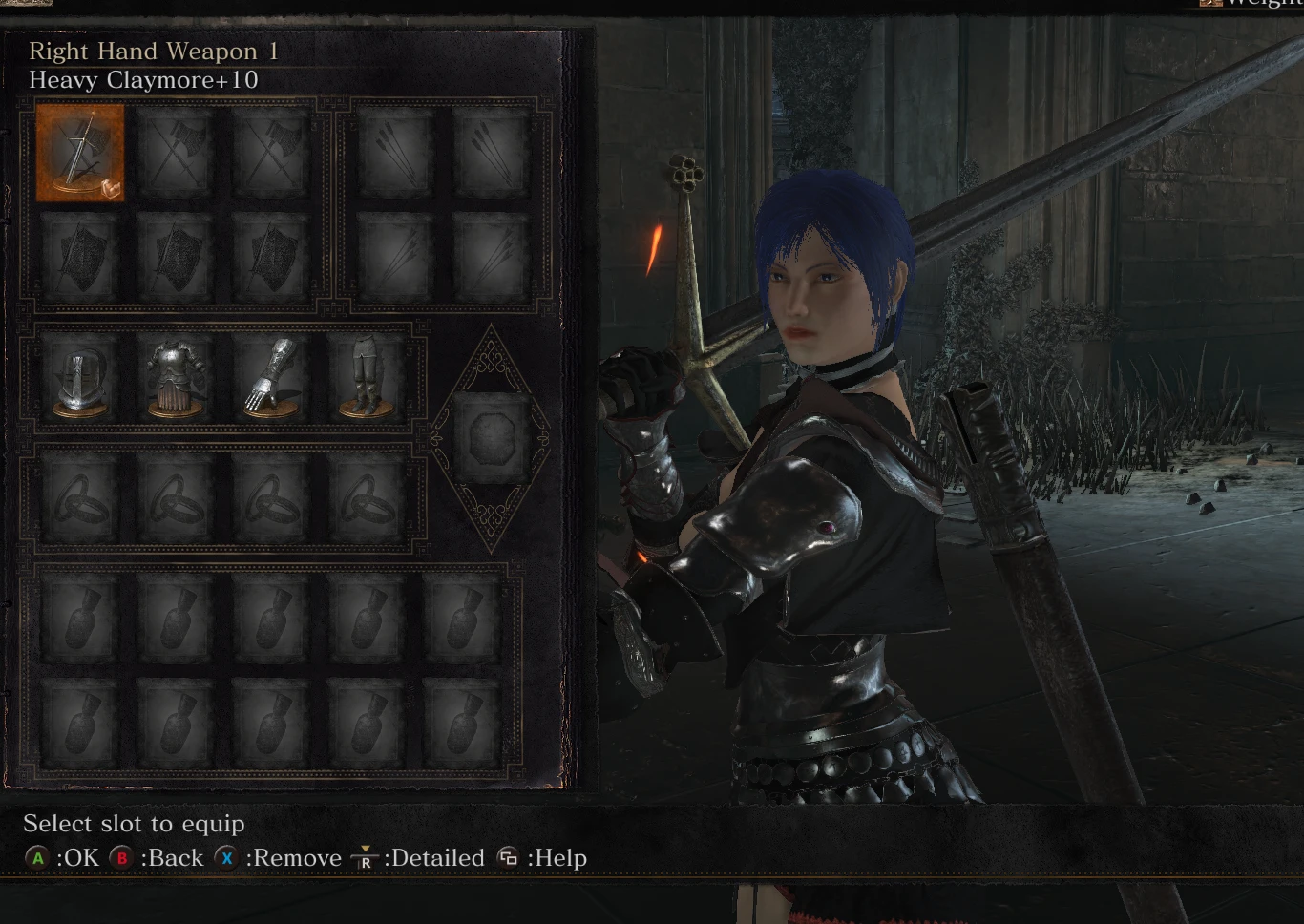
🔍 Analysis
- 👍 5.6% endorsement rate — high engagement, a strong quality signal
- 🏆 #8 of 153 Models and Textures mods in this game by downloads
📋 About This Mod
SoulsOutfitManager
A tool to make life easier when it comes to replacing armor and weapon models in Dark Souls III. It also includes
-
[]Restoration feature to undo any replacements you've made
[
]Search feature for mods you have prepared, unmodded parts in your game, and the parts you have replaced currently in your game[]Delete feature which can remove the model of a part entirely until you restore it
[]Model Mask Editor, which automatically patches the model masks of armor pieces(Eg. gauntlets hiding your wrists) in your game as you edit them. You'll need to make sure to save the presets you create to use them after restarting the program.
How to install?
Getting Started
1: Currently, the mod only supports UXM which I recommend as it does not ban online with cosmetic armor model replacement mods.
After downloading UXM, unpack the game and patch it to read from the raw unpacked game files.
2: Download SoulsOufitManager under files, extract the zip and run the exe. Do not remove the exe from the folder it was extracted into, however you can move the folder containing it anywhere you like.
3: Use the browse button to show the program where your game folder containing DarkSoulsIII.exe is located.
Replacing a part file
1: Place any DS3 part mods(Files ending with ".dcx") you wish to install in the mods folder next to SoulsOutfitManager.exe and click refresh.
2: Highlight the file under "Your Prepared Mods" you want to replace another file with, search in "Parts in your Game" and double click the file you wish to
3: Press "Ok" on the confirmation window.
4: Reequip the armor piece or weapon ingame.
Replacing a part file with nothing
1: Highlight the file you want to replace with nothing under "Parts in your Game", then click "Delete" on your keyboard.
2: Press "Ok" on the confirmation window
Restoring a replaced or deleted part file
1: Select the file in the "Installed Modded Parts" window and click "Backspace" on your keyboard.
2: Press "Ok" on the confirmation window
Editing model Masks
Incase an armor replacement hides a certain body part or does not when it should, you can use the edit model masks pane to
edit the model masks of currently replaced parts.
1: Select the part you wish to edit the model masks under "Installed Modded Parts"
2: Check on or off model masks under "Edit Model Masks".
3: Open DS3 or if you have DS3 already open, reequip the armor you edited the masks of.
4(Optional): Click "Save Model Mask Change
SoulsOutfitManager is a utility for Dark Souls 3 that simplifies installing and removing model replacement mods, and allows customizing model masks. With 542 endorsements and 9,652 downloads, it's a community-trusted tool for mod management. Last updated in September 2022, it remains a relevant resource for modders.
✨ Key Features
📊 Pros & Cons
✅ Pros
- Solid community trust with 542 endorsements and nearly 10k downloads.
- Solves a real pain point: installing and removing model mods without headaches.
- Model mask customization gives you fine control over which parts get replaced.
⚠️ Cons
- Last updated in September 2022 — might not support the latest game patches or mods.
- Utility tool, not a content mod — if you want new armor or weapons, this isn't it.
For Dark Souls 3 modders who regularly swap model replacements and want a cleaner way to manage them. If you're tired of manually overwriting files or want to tweak which parts of a model get replaced, this is your tool. Skip if you're just looking for new armor sets — this is a manager, not content.
💡 Beginner Tips
- Check if your game version is compatible with the mod manager, as it hasn't been updated since 2022.
- Use a mod manager like Mod Organizer 2 to keep your game directory clean, even when using this tool.
- Read the mod's forum posts or comments for any user-reported issues with specific mods or game versions.
📊 Mod Details
- Game
- Dark Souls 3 Mods
- Author
- Amir
- Version
- 0.2.1
- Downloads
- 9,652
- Endorsements
- 542
- Category
- Models and Textures
- Created
- 7/14/2021
- Updated
- 9/28/2022
🔧 How to Install Dark Souls 3 Mods
Download from Nexus.
📖 Full step-by-step install guide for Dark Souls 3 →
Visit the official mod page for specific installation instructions for this mod.
🎮 Need cheat codes or console commands? Check ur gaming wiki for Dark Souls 3 commands, item IDs, and more.
Keep browsing — more Dark Souls 3 mods await